<?xml version="1.0" encoding="ISO-8859-1"?>
<rdf:RDF xmlns:rdf="http://www.w3.org/1999/02/22-rdf-syntax-ns#" xmlns:ref="http://purl.org/rss/1.0/modules/reference/" xmlns:dc="http://purl.org/dc/elements/1.1/" xmlns="http://purl.org/rss/1.0/">
	<channel rdf:about="http://avelinoherrera.es:443/blog/rss.rdf">
		<title>blog de avelino herrera morales</title>
		<link>http://avelinoherrera.es:443/blog/index.php</link>
		<description><![CDATA[]]></description>
		<items>
			<rdf:Seq>
				<rdf:li resource="http://avelinoherrera.es:443/blog/index.php?entry=entry260307-105525" />
				<rdf:li resource="http://avelinoherrera.es:443/blog/index.php?entry=entry250809-100925" />
				<rdf:li resource="http://avelinoherrera.es:443/blog/index.php?entry=entry250615-211109" />
				<rdf:li resource="http://avelinoherrera.es:443/blog/index.php?entry=entry241103-224521" />
				<rdf:li resource="http://avelinoherrera.es:443/blog/index.php?entry=entry240519-122453" />
				<rdf:li resource="http://avelinoherrera.es:443/blog/index.php?entry=entry240519-112658" />
				<rdf:li resource="http://avelinoherrera.es:443/blog/index.php?entry=entry240519-084333" />
				<rdf:li resource="http://avelinoherrera.es:443/blog/index.php?entry=entry240517-171022" />
				<rdf:li resource="http://avelinoherrera.es:443/blog/index.php?entry=entry240424-175753" />
				<rdf:li resource="http://avelinoherrera.es:443/blog/index.php?entry=entry231209-010823" />
			</rdf:Seq>
		</items>
	</channel>
	<item rdf:about="http://avelinoherrera.es:443/blog/index.php?entry=entry260307-105525">
		<title>Programación de la NES: desarrollo de un juego sencillo</title>
		<link>http://avelinoherrera.es:443/blog/index.php?entry=entry260307-105525</link>
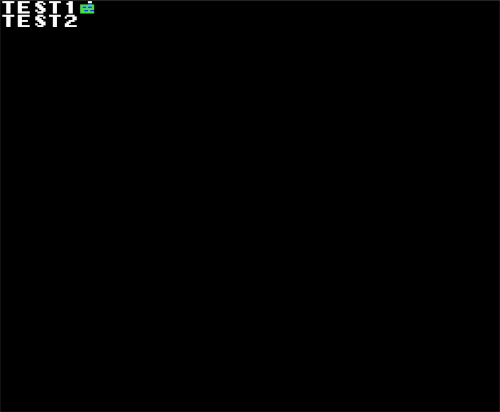
		<description><![CDATA[La consola Nintendo Entertainment System (NES) fue una consola lanzada por Nintendo en 1983 y fue su primera consola de sobremesa basada en cartuchos de juegos. Está equipada con el procesador de 8 bits MOS6502 (mismo procesador que la Atari 2600, que el Apple II y que otros ordenadores de principios de los 80). A lo largo de esta entrada intentaré explicar de forma sencilla cómo programarla en C desarrollando un sencillo juego de buscaminas usando el compilador SDCC.<br /><br />La NES dispone de una CPU y una PPU (Picture Processing Unit) con memorias separadas. La CPU accede a:<br /><br /><b>-</b> 2 Kb de memoria RAM interna de la consola.<br /><br /><b>-</b> Registros específicos para acceder a la PPU, la APU (audio) y E/S.<br /><br /><b>-</b> Cartucho (ROM y, opcionalmente, RAM).<br /><br />La PPU accede a:<br /><br /><b>-</b> 2 Kb de memoria de vídeo.<br /><br /><b>-</b> Memoria de paletas.<br /><br /><b>-</b> Memoria de sprites.<br /><br /><b>-</b> Otra parte del cartucho donde puede haber almacenadas baldosas, por ejemplo o RAM adicional para la PPU, aunque suele ser ROM (denominada CHR-ROM).<br /><br />Como se puede ver, los cartucho NES traen, por lo general mínimo dos chips ROM: uno con el programa para la CPU (el código del juego) y un chip con las baldosas para ser mapeado directamente en la memoria de vídeo de la PPU. Esta es la configuración más sencilla y en la que nos centraremos nosotros.<br /><br /><b>Mapa de memoria</b><br /><br />La NES permite una cantidad enorme de mapeados de memoria en los cartuchos tanto para la CPU como para la PPU. Documentar los diferentes mapeos en esta entrada sería excesivo así que me centraré en el mapeador &quot;NROM&quot; (<a href="https://www.nesdev.org/wiki/NROM" >https://www.nesdev.org/wiki/NROM</a>) por ser el más sencillo:<br /><br /><b>-</b> 16 ó 32 Kb de memoria de programa PRG-ROM.<br /><br /><b>-</b> 8 Kb de memoria de caracteres (o baldosas) CHR-ROM.<br /><br />Este mapper no requiere hacer bank-switching: toda la memoria de programa PRG-ROM se mapea directamente a partir de la dirección de memoria 0x8000 de la CPU (hasta los 32 Kb) y toda la memoria de caracteres o baldosas CHR-ROM se mapea directamente en los primeros 8 Kb de la memoria de vídeo (accesible por la PPU como &quot;pattern table 0&quot; y &quot;pattern table 1&quot;).<br /><br />El mapa de memoria accesible por la CPU es el siguiente (bus de direcciones de 16 bits):<br /><br />
<style type="text/css">
table.nes {
    border: 1px solid black;
    border-collapse: collapse;
}
table.nes tr td {
    border: 1px solid black;
    padding-left: 1em;
    padding-right: 1em;
}
</style>
<table class="nes">
<tr><td>Desde</td><td>Hasta</td><td>Tamaño</td><td>Descripción</td></tr>
<tr><td>0x0000</td><td>0x07FF</td><td>0x0800</td><td>RAM interna NES (2 Kb)</td></tr>
<tr><td>0x2000</td><td>0x2007</td><td>0x0008</td><td>Registros PPU</td></tr>
<tr><td>0x4000</td><td>0x4017</td><td>0x0018</td><td>Registros APU (audio) y E/S</td></tr>
<tr><td>0x4020</td><td>0xFFFF</td><td>0xBFE0</td><td>Cartucho<br/>0x6000 - 0x7FFF para RAM en el cartucho<br/>0x8000 - 0xFFFF para ROM de programa</td></tr>
</table><br /><br />Poner RAM en el cartucho es opcional y sólo lo hacen algunos juegos que permiten guardar partidas usando una RAM no volátil, por ejemplo.<br /><br />El mapa de memoria accesible por la PPU es el siguiente (bus de direcciones de 14 bits):<br /><br />
<table class="nes">
<tr><td>Desde</td><td>Hasta</td><td>Tamaño</td><td>Descripción</td></tr>
<tr><td>0x0000</td><td>0x0FFF</td><td>0x1000</td><td>Pattern table 0 (4 Kb) en el cartucho</td></tr>
<tr><td>0x1000</td><td>0x1FFF</td><td>0x1000</td><td>Pattern table 1 (4 Kb) en el cartucho</td></tr>
<tr><td>0x2000</td><td>0x23BF</td><td>0x03C0</td><td>Name table 0 (32 x 30 bytes, uno por baldosa)</td></tr>
<tr><td>0x23C0</td><td>0x23FF</td><td>0x0040</td><td>Attribute table 0 (paletas name table 0)</td></tr>
<tr><td>0x2400</td><td>0x27BF</td><td>0x03C0</td><td>Name table 1 (32 x 30 bytes, uno por baldosa)</td></tr>
<tr><td>0x27C0</td><td>0x27FF</td><td>0x0040</td><td>Attribute table 1 (paletas name table 1)</td></tr>
<tr><td>0x2800</td><td>0x2BBF</td><td>0x03C0</td><td>Name table 2 (32 x 30 bytes, uno por baldosa)</td></tr>
<tr><td>0x2BC0</td><td>0x2BFF</td><td>0x0040</td><td>Attribute table 2 (paletas name table 2)</td></tr>
<tr><td>0x2C00</td><td>0x2FBF</td><td>0x03C0</td><td>Name table 3 (32 x 30 bytes, uno por baldosa)</td></tr>
<tr><td>0x2FC0</td><td>0x2FFF</td><td>0x0040</td><td>Attribute table 3 (paletas name table 3)</td></tr>
<tr><td>0x3F00</td><td>0x3F1F</td><td>0x0020</td><td>Paletas internas de la PPU</td></tr>
</table><br /><br />Los 8 Kb (4 + 4) correspondientes a las &quot;pattern tables&quot; (o baldosas en sí) se mapean en el cartucho (ya sea como ROM o como RAM). En nuestro caso, con el mapeador NROM, se mapean como una ROM (llamada CHR-ROM) de 8 Kb que almacena las dos &quot;pattern tables&quot; seguidas una después de la otra.<br />El resto de la memoria de vídeo son:<br /><br /><b>-</b> 4 Kb correspondientes a las 4 &quot;name tables&quot;. Realmente la PPU sólo dispone de 2 Kb y en un registro de la misma se establece cómo de hace el mirroring y se disponen para el caso de que se quiera hacer efectos de scroll, por ejemplo. No será nuestro caso.<br /><br /><b>-</b> 32 bytes correspondientes a las paletas de color internas de la PPU.<br /><br /><b>-</b> 256 bytes correspondientes a los sprites (64 sprites, 4 bytes por sprite) que no aparecen en la tabla anterior puesto que no se encuentran direccionados en una zona concreta de la VRAM sino en unos registros aparte de la PPU.<br /><br />Con este mapper &quot;NROM&quot; podemos hacer juegos que no requieran alterar las &quot;pattern tables&quot; (las baldosas) ya que dichas baldosas estarán en una ROM del cartucho (CHR-ROM) de 8 Kb. En la práctica esta limitación no es importante pues rara vez necesitaremos modificar las baldosas a nivel de pixel y muchos juegos comerciales de NES utilizan este mapeo. En caso de que necesitemos que toda o parte de la memoria de caracteres (baldosas) sea RAM, tendríamos que utilizar otro tipo de mapper que no sea NROM.<br /><br /><b>Fichero .nes</b><br /><br />Como lo que queremos al final es poder jugar a los juegos que hagamos para la NES, necesitamos que el proceso de compilación genere un fichero &quot;.nes&quot; que pueda ser ejecutado en un emulador o incluso cargado en un cartucho flash de una NES real. Para el mapeador &quot;NROM&quot; si lo que queremos es una ROM de programa (PRG-ROM) de 32 Kb más una memoria ROM de baldosas (CHR-ROM) de 8 Kb (para almacenar las &quot;pattern tables&quot; 0 y 1) el fichero tendrá que tener el siguiente formato interno:<br /><br />
<table class="nes">
<tr><td>Desde</td><td>Hasta</td><td>Tamaño</td><td>Contenido</td></tr>
<tr><td>0x0000</td><td>0x000F</td><td>0x0010</td><td>4e 45 53 1a 02 01 00 00 00 00 03 00 00 00 00 00</td></tr>
<tr><td>0x0010</td><td>0x800F</td><td>0x8000</td><td>PRG-ROM o ROM del programa (32 Kb)</td></tr>
<tr><td>0x8010</td><td>0xA00F</td><td>0x2000</td><td>CHR-ROM o ROM de caracteres (baldosas) (8 Kb)</td></tr>
<tr><td colspan="2" style="text-align: right;">Total</td><td>0xA010</td><td></td></tr>
</table><br /><br />La cabecera y la disposición de los datos vienen explicados con más detalle en <a href="https://www.nesdev.org/wiki/INES" >https://www.nesdev.org/wiki/INES</a> y no me pararé a explicar lo que significa cada byte. Por ahora baste saber que con esa cabecera tenemos un fichero &quot;.nes&quot; con mapeador NROM, 32 Kb de memoria de programa y 8 Kb de memoria de baldosas (CHR-ROM). Al final el tamaño del fichero &quot;.nes&quot; generado en nuestro caso será siempre de 0xA010 bytes (40976 bytes).<br /><br /><b>Secuencia de arranque</b><br /><br />La NES asume el siguiente contenido en estas posiciones de la memoria accesible por la CPU:<br /><br />
<table class="nes">
<tr><td>Desde</td><td>Hasta</td><td>Tamaño</td><td>Descripción</td></tr>
<tr><td>0xFFFA</td><td>0xFFFB</td><td>2</td><td>Puntero a rutina de servicio de NMI (interrupción no enmascarable)</td></tr>
<tr><td>0xFFFC</td><td>0xFFFD</td><td>2</td><td>Puntero a código de arranque</td></tr>
<tr><td>0xFFFE</td><td>0xFFFF</td><td>2</td><td>Puntero a rutina de servicio de IRQ (interrupción enmascarable)</td></tr>
</table><br /><br />Como nosotros usaremos el mapper NROM, podemos hacer una ROM de 32 Kb que se alojará a partir de la dirección 0x8000 y en los últimos 6 bytes de esa ROM podremos esos tres punteros indicados en la tabla.<br /><br />A continuación puede verse el detalle del fichero &quot;crt0nes.s&quot; utilizado:<br /><br /><pre>    .module crt0nes<br />    .globl _main     ; programmer must define these functions in C<br />    .globl _irq_isr<br />    .globl _nmi_isr<br />    .area _HEAD (ABS)<br /><br />    .org 0x8000<br /><br />    jmp init<br /><br />    jmp _irq_isr<br /><br />    jmp _nmi_isr<br /><br />init:<br />    sei         ; ignore IRQs<br />    cld         ; disable decimal mode<br />    ldx #0x40<br />    stx 0x4017  ; disable APU frame IRQ<br />    ldx #0xff<br />    txs         ; set stack pointer to $01ff<br />    inx         ; now X = 0<br />    stx 0x2000  ; disable NMI<br />    stx 0x2001  ; disable rendering<br />    stx 0x4010  ; disable DMC IRQs<br /><br />    ; The vblank flag is in an unknown state after reset,<br />    ; so it is cleared here to make sure that @vblankwait1<br />    ; does not exit immediately.<br />    bit 0x2002<br /><br />    ; First of two waits for vertical blank to make sure that the<br />    ; PPU has stabilized<br />vblankwait1:<br />    bit 0x2002<br />    bpl vblankwait1<br /><br />    ; We now have about 30,000 cycles to burn before the PPU stabilizes.<br />    ; One thing we can do with this time is put RAM in a known state.<br />    ; Here we fill it with $00, which matches what (say) a C compiler<br />    ; expects for BSS. Since we haven&#039;t modified the X register since<br />    ; the earlier code above, it&#039;s still set to 0, so we can just<br />    ; transfer it to the Accumulator and save a byte<br />    txa<br />clrmem:<br />    sta 0x00,x<br />    sta 0x100,x<br />    sta 0x200,x<br />    sta 0x300,x<br />    sta 0x400,x<br />    sta 0x500,x<br />    sta 0x600,x<br />    sta 0x700,x<br />    inx<br />    bne clrmem<br /><br />vblankwait2:<br />    bit 0x2002<br />    bpl vblankwait2<br /><br />    ; init global variables<br />    jsr gsinit<br />    ; main function<br />    jsr _main<br />inf_loop:<br />    jmp inf_loop<br /><br />    ; ordering of segments for the linker.<br />    .area   _HOME<br />    .area   _CODE<br />    .area   CODE<br />    .area   _INITIALIZER<br />    .area   _GSINIT<br />gsinit::<br />    .area   _GSFINAL<br />    rts<br /><br />    .area RODATA<br /><br />    .area _TAIL (ABS)<br /><br />    .org 0xFFFA<br />    .dw #0x8006<br /><br />    .org 0xFFFC<br />    .dw #0x8000<br /><br />    .org 0xFFFE<br />    .dw #0x8003<br /></pre><br />Como se puede comprobar en las posiciones de memoria finales se incluyen esos tres punteros descritos. El programador está obligado a definir en C las funciones:<br /><br /><b>-</b> &quot;irq_isr&quot;: para atender la interrupción enmascarable (relacionada con el audio).<br /><br /><b>-</b> &quot;nmi_isr&quot;: para atender la interrupción no enmascarable (asociada al vblank de la PPU).<br /><br /><b>-</b> &quot;main&quot;: para escribir el código de arranque del juego.<br /><br />De la siguiente manera:<br /><br /><!-- HTML generated using hilite.me --><div style="background: #ffffff; overflow:auto;width:auto;border:solid gray;border-width:.1em .1em .1em .1em;padding:.2em .6em;"><pre style="margin: 0; line-height: 125%;"><span></span><span style="color: #339; font-weight: bold">void</span><span style="color: #BBB"> </span><span style="color: #06B; font-weight: bold">irq_isr</span>(<span style="color: #339; font-weight: bold">void</span>)<span style="color: #BBB"> </span>__interrupt<span style="color: #BBB"> </span>{
<span style="color: #BBB">    </span><span style="color: #888">// atender interrupción de audio</span>
}

<span style="color: #339; font-weight: bold">void</span><span style="color: #BBB"> </span><span style="color: #06B; font-weight: bold">nmi_isr</span>(<span style="color: #339; font-weight: bold">void</span>)<span style="color: #BBB"> </span>__interrupt<span style="color: #BBB"> </span>{
<span style="color: #BBB">    </span><span style="color: #888">// atender interrupción de retrazo vertical (vblank)</span>
}

<span style="color: #339; font-weight: bold">void</span><span style="color: #BBB"> </span><span style="color: #06B; font-weight: bold">main</span>(<span style="color: #339; font-weight: bold">void</span>)<span style="color: #BBB"> </span>{
<span style="color: #BBB">    </span><span style="color: #888">// código principal del juego</span>
}
</pre></div><br /><br /><b>Interrupciones</b><br /><br />La CPU de la NES tiene 2 fuentes de interrupción:<br /><br /><b>-NMI (interrupción no enmascarable)</b>: no puede deshabilitarse y se dispara en cada retrazo vertical de la pantalla (60 veces por segundo, después de cada frame, en sistemas de televisión NTSC y 50 veces por segundo en sistemas de televisión PAL). La genera la PPU y, aunque no puede deshabilitarse desde la CPU, sí puede configurarse la PPU para que la genere o no. Lo normal es usarla y basar el timing de nuestro juego en esta interrupción.<br /><br /><b>- IRQ (interrupción enmascarable)</b>: puede deshabilitarse y habilitarse desde la CPU y normalmente está asociada a la APU, aunque algunos mappers y periféricos también la utilizar. En nuestro caso, como no la usaremos, definimos la función &quot;irq_isr&quot; vacía.<br /><br /><b>Compilar el compilador</b><br /><br />Para programar en C el 6502 hay varios compiladores y proyectos pero yo siempre he tenido &quot;debilidad&quot; por el SDCC, por ser un compilador muy completo, con licencia GPL y con buen soporte por parte de la comunidad. Compilar el compilador SDCC es muy sencillo, basta descargarlo de <a href="https://sdcc.sourceforge.net/" >https://sdcc.sourceforge.net/</a>, decomprimirlo y realizar los siguientes pasos:<br /><br /><pre>$ cd /ruta/fuente/sdcc<br />$ ./configure --prefix=/ruta/destino/sdcc --disable-pic14-port --disable-pic16-port<br />$ make<br />$ make install</pre><br />Ahora ya tendremos instalado el SDCC en la carpeta &quot;/ruta/destino/sdcc&quot;.<br /><br /><b>Ejemplo sencillo</b><br /><br />Como ejemplo sencillo tenemos que partir de una CHR-ROM que hagamos nosotros o que esté ya hecha y podamos usar. La web <a href="https://jimmarshall35.github.io/TileEditor/index.html" >https://jimmarshall35.github.io/TileEditor/index.html</a> permite cargar ROM de NES y extraerles y editarles la CHR-ROM. En mi caso he extraido la CHR-ROM del juego homebrew &quot;<a href="https://pineight.com/mw/page/Thwaite.xhtml" >Thwaite</a>&quot; que tiene licencia GPL. La CHR-ROM de este juego tiene la ventaja de que las baldosas 32 a la 127 mapean los caracteres imprimibles del alfabeto ASCII.<br /><br /><!-- HTML generated using hilite.me --><div style="background: #ffffff; overflow:auto;width:auto;border:solid gray;border-width:.1em .1em .1em .1em;padding:.2em .6em;"><pre style="margin: 0; line-height: 125%;"><span></span><span style="color: #579">#define  PPUCTRL    *((volatile uint8_t *) 0x2000)</span>
<span style="color: #579">#define  PPUMASK    *((volatile uint8_t *) 0x2001)</span>
<span style="color: #579">#define  PPUSTATUS  *((volatile uint8_t *) 0x2002)</span>
<span style="color: #579">#define  OAMADDR    *((volatile uint8_t *) 0x2003)</span>
<span style="color: #579">#define  OAMDATA    *((volatile uint8_t *) 0x2004)</span>
<span style="color: #579">#define  PPUSCROLL  *((volatile uint8_t *) 0x2005)</span>
<span style="color: #579">#define  PPUADDR    *((volatile uint8_t *) 0x2006)</span>
<span style="color: #579">#define  PPUDATA    *((volatile uint8_t *) 0x2007)</span>

<span style="color: #339; font-weight: bold">void</span><span style="color: #BBB"> </span><span style="color: #06B; font-weight: bold">irq_isr</span>(<span style="color: #339; font-weight: bold">void</span>)<span style="color: #BBB"> </span>__interrupt<span style="color: #BBB"> </span>{
}

<span style="color: #080; font-weight: bold">volatile</span><span style="color: #BBB"> </span><span style="color: #339; font-weight: bold">uint16_t</span><span style="color: #BBB"> </span>v;

<span style="color: #339; font-weight: bold">void</span><span style="color: #BBB"> </span><span style="color: #06B; font-weight: bold">nmi_isr</span>(<span style="color: #339; font-weight: bold">void</span>)<span style="color: #BBB"> </span>__interrupt<span style="color: #BBB"> </span>{
<span style="color: #BBB">    </span>PPUSTATUS;
<span style="color: #BBB">    </span>PPUADDR<span style="color: #BBB"> </span><span style="color: #333">=</span><span style="color: #BBB"> </span><span style="color: #058; font-weight: bold">0x20</span>;
<span style="color: #BBB">    </span>PPUADDR<span style="color: #BBB"> </span><span style="color: #333">=</span><span style="color: #BBB"> </span><span style="color: #058; font-weight: bold">0x05</span>;
<span style="color: #BBB">    </span>PPUDATA<span style="color: #BBB"> </span><span style="color: #333">=</span><span style="color: #BBB"> </span>(v<span style="color: #BBB"> </span><span style="color: #333">>></span><span style="color: #BBB"> </span><span style="color: #00D; font-weight: bold">3</span>)<span style="color: #BBB"> </span><span style="color: #333">&</span><span style="color: #BBB"> </span><span style="color: #058; font-weight: bold">0x00FF</span>;<span style="color: #BBB">   </span><span style="color: #888">// change some tile each 2^3 = 8 frames</span>
<span style="color: #BBB">    </span>PPUCTRL<span style="color: #BBB"> </span><span style="color: #333">=</span><span style="color: #BBB"> </span><span style="color: #058; font-weight: bold">0x80</span>;<span style="color: #BBB">   </span><span style="color: #888">// base nametable = 0x2000, VRAM increment = 1, sprite pattern table = 0, background pattern table = 0, sprite size = 8x8, enable VBlank NMI</span>
<span style="color: #BBB">    </span>PPUSTATUS;
<span style="color: #BBB">    </span>PPUSCROLL<span style="color: #BBB"> </span><span style="color: #333">=</span><span style="color: #BBB"> </span><span style="color: #058; font-weight: bold">0x00</span>;
<span style="color: #BBB">    </span>v<span style="color: #333">++</span>;
}

<span style="color: #080; font-weight: bold">const</span><span style="color: #BBB"> </span><span style="color: #339; font-weight: bold">char</span><span style="color: #BBB"> </span>STR_1[]<span style="color: #BBB"> </span><span style="color: #333">=</span><span style="color: #BBB"> </span><span style="background-color: #FFF0F0">"TEST1"</span>;
<span style="color: #080; font-weight: bold">const</span><span style="color: #BBB"> </span><span style="color: #339; font-weight: bold">char</span><span style="color: #BBB"> </span>STR_2[]<span style="color: #BBB"> </span><span style="color: #333">=</span><span style="color: #BBB"> </span><span style="background-color: #FFF0F0">"TEST2"</span>;

<span style="color: #339; font-weight: bold">void</span><span style="color: #BBB"> </span><span style="color: #06B; font-weight: bold">show_str</span>(<span style="color: #080; font-weight: bold">const</span><span style="color: #BBB"> </span><span style="color: #339; font-weight: bold">char</span><span style="color: #BBB"> </span><span style="color: #333">*</span>p)<span style="color: #BBB"> </span>{
<span style="color: #BBB">    </span><span style="color: #080; font-weight: bold">while</span><span style="color: #BBB"> </span>(<span style="color: #333">*</span>p<span style="color: #BBB"> </span><span style="color: #333">!=</span><span style="color: #BBB"> </span><span style="color: #00D; font-weight: bold">0</span>)<span style="color: #BBB"> </span>{
<span style="color: #BBB">        </span>PPUDATA<span style="color: #BBB"> </span><span style="color: #333">=</span><span style="color: #BBB"> </span><span style="color: #333">*</span>p;
<span style="color: #BBB">        </span>p<span style="color: #333">++</span>;
<span style="color: #BBB">    </span>}
}

<span style="color: #339; font-weight: bold">void</span><span style="color: #BBB"> </span><span style="color: #06B; font-weight: bold">main</span>(<span style="color: #339; font-weight: bold">void</span>)<span style="color: #BBB"> </span>{
<span style="color: #BBB">    </span>v<span style="color: #BBB"> </span><span style="color: #333">=</span><span style="color: #BBB"> </span><span style="color: #00D; font-weight: bold">0</span>;
<span style="color: #BBB">    </span><span style="color: #888">// disable rendering</span>
<span style="color: #BBB">    </span>PPUCTRL<span style="color: #BBB"> </span><span style="color: #333">=</span><span style="color: #BBB"> </span><span style="color: #058; font-weight: bold">0x00</span>;
<span style="color: #BBB">    </span>PPUMASK<span style="color: #BBB"> </span><span style="color: #333">=</span><span style="color: #BBB"> </span><span style="color: #058; font-weight: bold">0x00</span>;
<span style="color: #BBB">    </span><span style="color: #888">// put STR_1 and STR_2 string in nametable (at 1st and 2nd line respectively)</span>
<span style="color: #BBB">    </span>PPUSTATUS;
<span style="color: #BBB">    </span>PPUADDR<span style="color: #BBB"> </span><span style="color: #333">=</span><span style="color: #BBB"> </span><span style="color: #058; font-weight: bold">0x20</span>;<span style="color: #BBB">     </span><span style="color: #888">// STR_1 at 1st line of nametable 0x2000</span>
<span style="color: #BBB">    </span>PPUADDR<span style="color: #BBB"> </span><span style="color: #333">=</span><span style="color: #BBB"> </span><span style="color: #058; font-weight: bold">0x00</span>;
<span style="color: #BBB">    </span>show_str(STR_1);
<span style="color: #BBB">    </span>PPUSTATUS;
<span style="color: #BBB">    </span>PPUADDR<span style="color: #BBB"> </span><span style="color: #333">=</span><span style="color: #BBB"> </span><span style="color: #058; font-weight: bold">0x20</span>;<span style="color: #BBB">     </span><span style="color: #888">// STR_2 at 2nd line of nametable 0x2000</span>
<span style="color: #BBB">    </span>PPUADDR<span style="color: #BBB"> </span><span style="color: #333">=</span><span style="color: #BBB"> </span><span style="color: #058; font-weight: bold">0x20</span>;
<span style="color: #BBB">    </span>show_str(STR_2);
<span style="color: #BBB">    </span><span style="color: #888">// init palette</span>
<span style="color: #BBB">    </span>PPUSTATUS;
<span style="color: #BBB">    </span>PPUADDR<span style="color: #BBB"> </span><span style="color: #333">=</span><span style="color: #BBB"> </span><span style="color: #058; font-weight: bold">0x3F</span>;
<span style="color: #BBB">    </span>PPUADDR<span style="color: #BBB"> </span><span style="color: #333">=</span><span style="color: #BBB"> </span><span style="color: #058; font-weight: bold">0x00</span>;
<span style="color: #BBB">    </span>PPUDATA<span style="color: #BBB"> </span><span style="color: #333">=</span><span style="color: #BBB"> </span><span style="color: #058; font-weight: bold">0x0F</span>;<span style="color: #BBB">   </span><span style="color: #888">// palette 0, color 0, black</span>
<span style="color: #BBB">    </span>PPUDATA<span style="color: #BBB"> </span><span style="color: #333">=</span><span style="color: #BBB"> </span><span style="color: #058; font-weight: bold">0x12</span>;<span style="color: #BBB">   </span><span style="color: #888">// palette 0, color 1, blue</span>
<span style="color: #BBB">    </span>PPUDATA<span style="color: #BBB"> </span><span style="color: #333">=</span><span style="color: #BBB"> </span><span style="color: #058; font-weight: bold">0x2A</span>;<span style="color: #BBB">   </span><span style="color: #888">// palette 0, color 2, green</span>
<span style="color: #BBB">    </span>PPUDATA<span style="color: #BBB"> </span><span style="color: #333">=</span><span style="color: #BBB"> </span><span style="color: #058; font-weight: bold">0x30</span>;<span style="color: #BBB">   </span><span style="color: #888">// palette 0, color 3, white</span>
<span style="color: #BBB">    </span><span style="color: #888">// enable rendering</span>
<span style="color: #BBB">    </span>PPUMASK<span style="color: #BBB"> </span><span style="color: #333">=</span><span style="color: #BBB"> </span><span style="color: #058; font-weight: bold">0x0A</span>;<span style="color: #BBB">   </span><span style="color: #888">// color, show background in leftmost 8 pixels, enable background rendering</span>
<span style="color: #BBB">    </span>PPUCTRL<span style="color: #BBB"> </span><span style="color: #333">=</span><span style="color: #BBB"> </span><span style="color: #058; font-weight: bold">0x80</span>;<span style="color: #BBB">   </span><span style="color: #888">// base nametable = 0x2000 (bits 1 and 0 = 0), VRAM increment = 1, sprite pattern table = 0, background pattern table = 0, sprite size = 8x8, enable VBlank NMI</span>
<span style="color: #BBB">    </span>PPUSTATUS;
<span style="color: #BBB">    </span>PPUSCROLL<span style="color: #BBB"> </span><span style="color: #333">=</span><span style="color: #BBB"> </span><span style="color: #058; font-weight: bold">0x00</span>;<span style="color: #BBB">   </span><span style="color: #888">// update "t" internal register so top-left at beginning of nametable</span>
<span style="color: #BBB">    </span>PPUSCROLL<span style="color: #BBB"> </span><span style="color: #333">=</span><span style="color: #BBB"> </span><span style="color: #058; font-weight: bold">0x00</span>;
<span style="color: #BBB">    </span><span style="color: #888">// infinite loop (wait vblank NMI)</span>
<span style="color: #BBB">    </span><span style="color: #080; font-weight: bold">while</span><span style="color: #BBB"> </span>(<span style="color: #00D; font-weight: bold">1</span>)
<span style="color: #BBB">        </span>;
}
</pre></div><br />El programa imprime dos cadenas de texto al principio de la &quot;name table&quot; 0, habilita la interrupción NMI (la que se dispara en cada retrazo vertical (VBlank)) para hacer que una baldosa cambie varias veces por segundo.<br /><br />Para generar la ROM haremos lo siguiente:<br /><br /><pre># ensamblamos el crt0<br />$ sdas6500 -o crt0nes.rel crt0nes.s<br /><br /># compilamos el main.c<br />$ sdcc -mmos6502 --stack-auto -c -o main.rel main.c<br /><br /># enlazamos todo y generamos el ejecutable main.ihx (formato intel hex)<br />$ sdcc -mmos6502 --stack-auto --no-std-crt0 -o main.ihx crt0nes.rel main.rel<br /><br /># generamos el PRG-ROM a partir del intel hex (main.ihx)<br />$ objcopy -I ihex -O binary main.ihx main.prg-rom<br /><br /># generamos la ROM en formato &quot;.nes&quot; (como si fuese un cartucho)<br />$ cat main.header main.prg-rom main.chr-rom &gt; main.nes</pre><br />Ya podemos ejecutar la ROM &quot;main.nes&quot; con un emulador o pasarlo a un cartucho flash y ejecutarlo en una consola real.<br /><br /><img src="images/programacion_nes_emulador_0.png" width="500" height="412" border="0" alt="" /><br /><br />El fichero &quot;main.header&quot; es un fichero de 16 bytes que contiene la cabecera del fichero &quot;.nes&quot; mientras que el fichero &quot;main.chr-rom&quot; es un fichero de 8 Kb que contiene las baldosas extraidas del juego &quot;Thwaite&quot;. Ambos ficheros están en el &quot;nes.tar.gz&quot; de la sección <a href="/soft" >soft</a>.<br /><br /><b>RAM y pila</b><br /><br />La pila en la gran mayoría de procesadores de 8 y más bits puede ser alojada en cualquier sitio de la RAM teniendo el puntero de pila la misma cantidad de bits que el bus de direcciones. Ese no es el caso del 6502.<br /><br />En el 6502 el puntero de pila (registro S) es un registro de 8 bits por lo que la pila del sistema sólo puede almacenar 256 bytes y, además, dicha pila está localizada siempre entre 0x0100 y 0x01FF. En el arranque se recomienda inicializar S a 0xFF ya que la pila crece hacia direcciones de memoria inferiores cuando se hace PUSH (instrucciones &quot;PHA&quot; y &quot;PHP&quot;) y viceversa, decrece hacia direcciones de memoria superiores cuando se hace POP (instrucciones &quot;PLA&quot; y &quot;PLP&quot;).<br /><br />Con respecto al resto de la RAM, hay que tener en cuenta que los accesos a la &quot;página 0&quot; (o &quot;Zero Page&quot;, ZP) de la memoria (direcciones 0x0000 a 0x00FF) son más rápidos en ciclos de reloj que los accesos al resto de la memoria. Por tanto, lo lógico es intentar que la mayor cantidad posible de variables que se usen con frecuencia se alojen en la página 0 (ZP) entre 0x0000 y 0x00FF. El compilador se encarga de esas cosas aunque el SDCC no es muy &quot;inteligente&quot; y al final las coloca por orden de declaración en el código.<br /><br />Éstas son algunas de las consideraciones que hay que tener en cuenta a la hora de programar:<br /><br /><b>-</b> La cantidad de bytes que necesitemos para variables globales determinarán si pueden ser alojadas todas en la página 0 o no. Cuando se excedan los 256 bytes de variables globales se empezarán a alojar después de la pila a partir de 0x0200 (que es una zona de memoria RAM más lenta que la página 0).<br /><br /><b>-</b> El SDCC en el caso del 6502 trata de optimizar el uso de la pila y este tipo de optimización suele ser incompatible con algunos mecanismos avanzados del lenguaje como punteros a funciones o recursividad. Para estos casos existe la opción &quot;--stack-auto&quot; que hace que la pila sea usada de forma &quot;habitual&quot; como se haría con cualquier otro procesador: permitiendo punteros a funciones y recursividad, con la penalización de que la pila crecerá muy rápido y la profundidad de llamadas anidadas que podamos hacer será limitada.<br /><br /><b>-</b> Se debe tener en cuenta que las variables locales se alojan en pila por lo que hay que ser cuidadosos a la hora de declararlas y evitar meter objetos o estructuras muy grandes en ellas.<br /><br /><b>-</b> Las constantes (&quot;const&quot;) se alojan en la memoria de programa (PRG-ROM), por lo que no ocupan RAM (ni pila).<br /><br /><b>Consideraciones especiales con respecto a la VRAM de la PPU</b><br /><br />La PPU de la NES es extremadamente sencilla y adolece de un &quot;problema&quot; de diseño que hace que el registro interno utilizado para direccionar la VRAM sea el mismo tanto para acceder desde la CPU como para renderizar.<br /><br />La CPU se comunica con la PPU escribiendo y leyendo en una serie de registros mapeados en la RAM de la CPU (<a href="https://www.nesdev.org/wiki/PPU_registers" >https://www.nesdev.org/wiki/PPU_registers</a>) por lo que cada vez que la CPU necesite acceder a la VRAM debe escribir en el registro PPUADDR la dirección en la VRAM a la que quiere acceder y a continuación escribir o leer en el registro PPUDATA el byte. Estos accesos a la VRAM por parte de la CPU &quot;ensucian&quot; un registro interno que utiliza la PPU para el renderizado, por lo que, antes de que se empiece a renderizar el siguiente frame, se deben actualizar los registros PPUCTRL y PPUSCROLL (aunque sea para poner un 0 si no hay scroll). De esta forma nos aseguramos que cuando empieza a dibujarse la pantalla se hace desde la coordenada que realmente queremos.<br /><br />Por ejemplo, si, durante el retrazo vertical queremos escribir en una posición de la VRAM haremos:<br /><br /><!-- HTML generated using hilite.me --><div style="background: #ffffff; overflow:auto;width:auto;border:solid gray;border-width:.1em .1em .1em .1em;padding:.2em .6em;"><pre style="margin: 0; line-height: 125%;"><span></span>PPUSTATUS;<span style="color: #BBB">     </span><span style="color: #888">// se fuerza el reset del flip-flop que determina qué parte de la dirección se carga primero</span>
PPUADDR<span style="color: #BBB"> </span><span style="color: #333">=</span><span style="color: #BBB"> </span>byte<span style="color: #BBB"> </span>alto<span style="color: #BBB"> </span>de<span style="color: #BBB"> </span>la<span style="color: #BBB"> </span>direccion<span style="color: #BBB"> </span>VRAM
PPUADDR<span style="color: #BBB"> </span><span style="color: #333">=</span><span style="color: #BBB"> </span>byte<span style="color: #BBB"> </span>bajo<span style="color: #BBB"> </span>de<span style="color: #BBB"> </span>la<span style="color: #BBB"> </span>direccion<span style="color: #BBB"> </span>VRAM
PPUDATA<span style="color: #BBB"> </span><span style="color: #333">=</span><span style="color: #BBB"> </span>primer<span style="color: #BBB"> </span>byte
PPUDATA<span style="color: #BBB"> </span><span style="color: #333">=</span><span style="color: #BBB"> </span>segundo<span style="color: #BBB"> </span>byte

<span style="color: #888">// antes de terminar &#8220;limpiamos&#8221; el registro interno que hemos &#8220;ensuciado&#8221;</span>
PPUCTRL<span style="color: #BBB"> </span><span style="color: #333">=</span><span style="color: #BBB"> </span><span style="color: #058; font-weight: bold">0x80</span>;<span style="color: #BBB">   </span><span style="color: #888">// nametable = 0x2000, VRAM increment = 1, sprite pattern table = 0, background pattern table = 0, sprite size = 8x8, enable VBlank NMI</span>
PPUSTATUS;
PPUSCROLL<span style="color: #BBB"> </span><span style="color: #333">=</span><span style="color: #BBB"> </span><span style="color: #058; font-weight: bold">0x00</span>;<span style="color: #BBB">   </span><span style="color: #888">// sin scroll</span>
PPUSCROLL<span style="color: #BBB"> </span><span style="color: #333">=</span><span style="color: #BBB"> </span><span style="color: #058; font-weight: bold">0x00</span>;
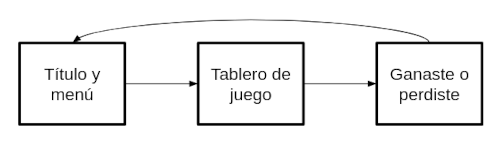
</pre></div><br /><br /><b>Sprites</b><br /><br />la PPU de la NES permite trabajar con hasta 64 sprites simultáneamente. Los sprites pueden ser de 8x8 o de 8x16 (en nuestro caso opté por sprites de 8x8 por ser más sencillos de manejar). Cada sprite está definido por 4 bytes (la memoria de sprites de la PPU es de 256 bytes):<br /><br /><b>- byte 0</b>: coordenada Y: byte sin signo. No se admiten valores negativos.<br /><br /><b>- byte 1</b>: índice de baldosa a usar<br /><br /><b>- byte 2</b>: atributos: paleta a utilizar, si está delante o detrás del fondo, si hay que invertir la baldosa horizontalmente y/o verticalmente. Útil para cuando tengamos sprites con algún tipo de simetría y ahorrarnos baldosas.<br /><br /><b>- byte 3</b>: coordenada X: sin signo. No se admiten valores negativos.<br /><br />Como en muchas otras consolas, el color 0 es el color transparente, por tanto cada sprite de 8x8 sólo tiene 3 colores más el fondo. Para poder &quot;esconder&quot; suavemente un sprite por el lado izquierdo de la pantalla hay un truco que se usa mucho que es decirle a la PPU que no renderice los 8 pixels de la izquierda de la pantalla para el fondo y/o para los sprites (mediante el registro PPUCTRL que tienes dos bits para esto). &quot;Esconder&quot; sprites por el lado superior (coordenada Y negativa) no era necesario pues en la práctica ni las primeras 8 líneas de arriba ni las últimas 8 líneas de abajo llegaban a ser visibles en la mayoría de las pantallas (ni PAL ni NTSC).<br /><br />A la hora de manipular y modificar los sprites hay dos formas de hacerlo:<br /><br /><b>-</b> Accediendo a los registros OAMADDR y OAMDATA para poner la dirección y el dato respectivamente.<br /><br /><b>-</b> Accediendo mediante DMA (la mejor forma y más eficiente): Se decide una zona de la RAM de la CPU (dentro de los 2 Kb) donde se podrá una copia de los 256 bytes de configuración de los sprites. Esa zona de 256 bytes debe estar alineada con una página de la RAM, es decir, tiene q ser unadirección de memoria de la forma 0xXX00 y, tras escribir en los 256 bytes de esa zona (entre 0xXX00 y 0xXXFF), escribimos en el registro OAMADDR un 0 y en el registro OAMDMA el byte alto de la dirección (OAMDMA = 0xXX).<br /><br />Por ejemplo, usando el mecanismo de DMA, si decidimos configurar los sprites en la dirección 0x0700 (al final de la RAM), la coordenada Y del sprite 0 estará en 0x0700, el índice de la baldosa del sprite 0 en 0x0701 y así con el resto de sprites hasta la posición 0x07FF que será la coordenada X del sprite 63. De esta forma basta con hacer:<br /><br /><pre>OAMADDR = 0;<br />OAMDMA = 0x07;</pre><br />Para que el controlador DMA de la PPU se encargue de mandar todos esos valores más rápido de lo que lo haría la CPU (la cantidad de bytes que se manda es siempre 256 y siempre desde la memoria de la CPU a la memoria de sprites del la PPU, no en sentido contrario).<br /><br />Este mecanismo es el más rápido y elegante para mover y manipular sprites de forma rápida. Es el que se utiliza en el ejemplo de juego que se describe a continuación.<br /><br /><b>Desarrollo de un pequeño juego</b><br /><br />Se plantea el desarrollo de un Buscaminas (Minesweeper) sencillo. El guión del juego sería el siguiente:<br /><br /><img src="images/programacion_nes_guion_juego.png" width="500" height="144" border="0" alt="" /><br />En el que cada nodo será una pantalla del juego. La forma en que se implementará la dinámica y los estados del juego será a través de una estructura de datos que simulará orientación a objetos mediante estructuras con punteros a funciones. Definimos la estructura &quot;screen_t&quot;:<br /><br /><!-- HTML generated using hilite.me --><div style="background: #ffffff; overflow:auto;width:auto;border:solid gray;border-width:.1em .1em .1em .1em;padding:.2em .6em;"><pre style="margin: 0; line-height: 125%;"><span></span><span style="color: #080; font-weight: bold">struct</span><span style="color: #BBB"> </span><span style="color: #B06; font-weight: bold">screen_t</span><span style="color: #BBB"> </span>{
<span style="color: #BBB">    </span><span style="color: #339; font-weight: bold">void</span><span style="color: #BBB"> </span>(<span style="color: #333">*</span>on_load)(<span style="color: #080; font-weight: bold">struct</span><span style="color: #BBB"> </span><span style="color: #B06; font-weight: bold">inter_screen_data_t</span><span style="color: #BBB"> </span><span style="color: #333">*</span>);
<span style="color: #BBB">    </span><span style="color: #080; font-weight: bold">const</span><span style="color: #BBB"> </span><span style="color: #080; font-weight: bold">struct</span><span style="color: #BBB"> </span><span style="color: #B06; font-weight: bold">screen_t</span><span style="color: #BBB"> </span><span style="color: #333">*</span>(<span style="color: #333">*</span>on_vblank)(<span style="color: #339; font-weight: bold">uint8_t</span>,<span style="color: #BBB"> </span><span style="color: #080; font-weight: bold">struct</span><span style="color: #BBB"> </span><span style="color: #B06; font-weight: bold">inter_screen_data_t</span><span style="color: #BBB"> </span><span style="color: #333">*</span>);
<span style="color: #BBB">    </span><span style="color: #339; font-weight: bold">void</span><span style="color: #BBB"> </span>(<span style="color: #333">*</span>on_unload)(<span style="color: #080; font-weight: bold">struct</span><span style="color: #BBB"> </span><span style="color: #B06; font-weight: bold">inter_screen_data_t</span><span style="color: #BBB"> </span><span style="color: #333">*</span>);
};
</pre></div><br />Dicha estructura define tres punteros a funciones:<br /><br /><b>- void on_load(struct inter_screen_data_t *)</b>: Se invoca justo cuando entramos en una pantalla (nodo del guión) y se encarga de configurarla (definir paletas, baldosas, sprites, variables globales, etc). Debe dejar la pantalla ya preparada y activada. Recibe como parámetro un puntero a una estructura que se usa para pasar valores entre pantallas (nodos del guión).<br /><br /><b>- const struct screen_t *on_vblank(uint8_t, struct inter_screen_data_t *)</b>:  Se invoca después de cada retrazo vertical. Recibe por parámetros, además de la estructura &quot;inter_screen_data_t&quot; un byte indicando el estado del controlador (botones A, B, start, select y cruceta, en forma de bits a 0 o a 1). La función devuelve un puntero a una estructura &quot;screen_t&quot; o NULL. En caso de devolver una estructura &quot;screen_t&quot; que no sea la misma que la actual, significa que el juego debe cambiar de pantalla.<br /><br /><b>- void on_unload(struct inter_screen_data_t *)</b>: Se invoca en caso de que &quot;on_vblank&quot; devuelva un puntero a una &quot;screen_t&quot; que no sea la propia y justo antes de invocar el &quot;on_load&quot; de la siguiente pantalla.<br /><br />Nótese que, al utilizar el mecanismo de punteros a funciones, estamos obligados a utilizar la opción &quot;--stack-auto&quot; del compilador, que produce una penalización en la cantidad de datos que se meten en la pila.<br /><br />El esqueleto principal del juego quedaría como sigue:<br /><br /><!-- HTML generated using hilite.me --><div style="background: #ffffff; overflow:auto;width:auto;border:solid gray;border-width:.1em .1em .1em .1em;padding:.2em .6em;"><pre style="margin: 0; line-height: 125%;"><span></span><span style="color: #080; font-weight: bold">volatile</span><span style="color: #BBB"> </span><span style="color: #080; font-weight: bold">struct</span><span style="color: #BBB"> </span><span style="color: #B06; font-weight: bold">inter_screen_data_t</span><span style="color: #BBB"> </span>isd;

<span style="color: #339; font-weight: bold">void</span><span style="color: #BBB"> </span><span style="color: #06B; font-weight: bold">irq_isr</span>(<span style="color: #339; font-weight: bold">void</span>)<span style="color: #BBB"> </span>__interrupt<span style="color: #BBB"> </span>{
}

<span style="color: #080; font-weight: bold">volatile</span><span style="color: #BBB"> </span><span style="color: #339; font-weight: bold">uint8_t</span><span style="color: #BBB"> </span>vblank;

<span style="color: #339; font-weight: bold">void</span><span style="color: #BBB"> </span><span style="color: #06B; font-weight: bold">nmi_isr</span>(<span style="color: #339; font-weight: bold">void</span>)<span style="color: #BBB"> </span>__interrupt<span style="color: #BBB"> </span>{
<span style="color: #BBB">    </span>vblank<span style="color: #BBB"> </span><span style="color: #333">=</span><span style="color: #BBB"> </span><span style="color: #00D; font-weight: bold">1</span>;
}

<span style="color: #080; font-weight: bold">const</span><span style="color: #BBB"> </span><span style="color: #080; font-weight: bold">struct</span><span style="color: #BBB"> </span><span style="color: #B06; font-weight: bold">screen_t</span><span style="color: #BBB"> </span>screens[]<span style="color: #BBB"> </span><span style="color: #333">=</span><span style="color: #BBB"> </span>{
<span style="color: #BBB">    </span>{
<span style="color: #BBB">        </span>title_screen_on_load,
<span style="color: #BBB">        </span>title_screen_on_vblank,
<span style="color: #BBB">        </span>title_screen_on_unload
<span style="color: #BBB">    </span>},
<span style="color: #BBB">    </span>{
<span style="color: #BBB">        </span>board_screen_on_load,
<span style="color: #BBB">        </span>board_screen_on_vblank,
<span style="color: #BBB">        </span>board_screen_on_unload
<span style="color: #BBB">    </span>},
<span style="color: #BBB">    </span>{
<span style="color: #BBB">        </span>end_screen_on_load,
<span style="color: #BBB">        </span>end_screen_on_vblank,
<span style="color: #BBB">        </span>end_screen_on_unload
<span style="color: #BBB">    </span>}
};

<span style="color: #339; font-weight: bold">void</span><span style="color: #BBB"> </span><span style="color: #06B; font-weight: bold">main</span>(<span style="color: #339; font-weight: bold">void</span>)<span style="color: #BBB"> </span>{
<span style="color: #BBB">    </span>vblank<span style="color: #BBB"> </span><span style="color: #333">=</span><span style="color: #BBB"> </span><span style="color: #00D; font-weight: bold">0</span>;
<span style="color: #BBB">    </span><span style="color: #080; font-weight: bold">const</span><span style="color: #BBB"> </span><span style="color: #080; font-weight: bold">struct</span><span style="color: #BBB"> </span><span style="color: #B06; font-weight: bold">screen_t</span><span style="color: #BBB"> </span><span style="color: #333">*</span>current_screen<span style="color: #BBB"> </span><span style="color: #333">=</span><span style="color: #BBB"> </span>screens;
<span style="color: #BBB">    </span>current_screen<span style="color: #333">-></span>on_load(<span style="color: #333">&</span>isd);
<span style="color: #BBB">    </span><span style="color: #339; font-weight: bold">uint8_t</span><span style="color: #BBB"> </span>controller_mask<span style="color: #BBB"> </span><span style="color: #333">=</span><span style="color: #BBB"> </span>controller_read();
<span style="color: #BBB">    </span><span style="color: #888">// infinite loop (wait vblank NMI)</span>
<span style="color: #BBB">    </span><span style="color: #080; font-weight: bold">while</span><span style="color: #BBB"> </span>(<span style="color: #00D; font-weight: bold">1</span>)<span style="color: #BBB"> </span>{
<span style="color: #BBB">        </span><span style="color: #080; font-weight: bold">if</span><span style="color: #BBB"> </span>(vblank)<span style="color: #BBB"> </span>{
<span style="color: #BBB">            </span>vblank<span style="color: #BBB"> </span><span style="color: #333">=</span><span style="color: #BBB"> </span><span style="color: #00D; font-weight: bold">0</span>;
<span style="color: #BBB">            </span><span style="color: #080; font-weight: bold">const</span><span style="color: #BBB"> </span><span style="color: #080; font-weight: bold">struct</span><span style="color: #BBB"> </span><span style="color: #B06; font-weight: bold">screen_t</span><span style="color: #BBB"> </span><span style="color: #333">*</span>next_screen<span style="color: #BBB"> </span><span style="color: #333">=</span><span style="color: #BBB"> </span>current_screen<span style="color: #333">-></span>on_vblank(controller_mask,<span style="color: #BBB"> </span><span style="color: #333">&</span>isd);
<span style="color: #BBB">            </span><span style="color: #080; font-weight: bold">if</span><span style="color: #BBB"> </span>((next_screen<span style="color: #BBB"> </span><span style="color: #333">!=</span><span style="color: #BBB"> </span><span style="color: #007020">NULL</span>)<span style="color: #BBB"> </span><span style="color: #333">&&</span><span style="color: #BBB"> </span>(next_screen<span style="color: #BBB"> </span><span style="color: #333">!=</span><span style="color: #BBB"> </span>current_screen))<span style="color: #BBB"> </span>{
<span style="color: #BBB">                </span>current_screen<span style="color: #BBB"> </span><span style="color: #333">=</span><span style="color: #BBB"> </span>next_screen;
<span style="color: #BBB">                </span>current_screen<span style="color: #333">-></span>on_load(<span style="color: #333">&</span>isd);
<span style="color: #BBB">            </span>}
<span style="color: #BBB">            </span>controller_mask<span style="color: #BBB"> </span><span style="color: #333">=</span><span style="color: #BBB"> </span>controller_read();
<span style="color: #BBB">        </span>}
<span style="color: #BBB">    </span>}
}
</pre></div><br />Para cada nodo del guión del juego definimos un &quot;.h&quot; y un &quot;.c&quot; que definirá como mínimo esas tres funciones para ese nodo. Por ejemplo, para la pantalla de título tenemos el fichero &quot;title_screen.h&quot;:<br /><br /><!-- HTML generated using hilite.me --><div style="background: #ffffff; overflow:auto;width:auto;border:solid gray;border-width:.1em .1em .1em .1em;padding:.2em .6em;"><pre style="margin: 0; line-height: 125%;"><span></span><span style="color: #339; font-weight: bold">void</span><span style="color: #BBB"> </span><span style="color: #06B; font-weight: bold">title_screen_on_load</span>(<span style="color: #080; font-weight: bold">struct</span><span style="color: #BBB"> </span><span style="color: #B06; font-weight: bold">inter_screen_data_t</span><span style="color: #BBB"> </span><span style="color: #333">*</span>d);
<span style="color: #080; font-weight: bold">const</span><span style="color: #BBB"> </span><span style="color: #080; font-weight: bold">struct</span><span style="color: #BBB"> </span><span style="color: #B06; font-weight: bold">screen_t</span><span style="color: #BBB"> </span><span style="color: #333">*</span>title_screen_on_vblank(<span style="color: #339; font-weight: bold">uint8_t</span><span style="color: #BBB"> </span>controller_mask,<span style="color: #BBB"> </span><span style="color: #080; font-weight: bold">struct</span><span style="color: #BBB"> </span><span style="color: #B06; font-weight: bold">inter_screen_data_t</span><span style="color: #BBB"> </span><span style="color: #333">*</span>d);
<span style="color: #339; font-weight: bold">void</span><span style="color: #BBB"> </span><span style="color: #06B; font-weight: bold">title_screen_on_unload</span>(<span style="color: #080; font-weight: bold">struct</span><span style="color: #BBB"> </span><span style="color: #B06; font-weight: bold">inter_screen_data_t</span><span style="color: #BBB"> </span><span style="color: #333">*</span>d);
</pre></div><br />Y el fichero &quot;title_screen.c&quot;:<br /><br /><!-- HTML generated using hilite.me --><div style="background: #ffffff; overflow:auto;width:auto;border:solid gray;border-width:.1em .1em .1em .1em;padding:.2em .6em;"><pre style="margin: 0; line-height: 125%;"><span></span><span style="color: #339; font-weight: bold">void</span><span style="color: #BBB"> </span><span style="color: #06B; font-weight: bold">title_screen_on_load</span>(<span style="color: #080; font-weight: bold">struct</span><span style="color: #BBB"> </span><span style="color: #B06; font-weight: bold">inter_screen_data_t</span><span style="color: #BBB"> </span><span style="color: #333">*</span>d)<span style="color: #BBB"> </span>{
<span style="color: #BBB">    </span><span style="color: #888">// deshabilitar renderizado</span>
<span style="color: #BBB">    </span><span style="color: #888">// inicializar esta pantalla</span>
<span style="color: #BBB">    </span><span style="color: #888">// configurar PPU (baldosas, paletas, sprites, etc.) para esta pantallaines);</span>
<span style="color: #BBB">    </span><span style="color: #888">// habilitar renderizado</span>
}

<span style="color: #080; font-weight: bold">const</span><span style="color: #BBB"> </span><span style="color: #080; font-weight: bold">struct</span><span style="color: #BBB"> </span><span style="color: #B06; font-weight: bold">screen_t</span><span style="color: #BBB"> </span><span style="color: #333">*</span>title_screen_on_vblank(<span style="color: #339; font-weight: bold">uint8_t</span><span style="color: #BBB"> </span>controller_mask,<span style="color: #BBB"> </span><span style="color: #080; font-weight: bold">struct</span><span style="color: #BBB"> </span><span style="color: #B06; font-weight: bold">inter_screen_data_t</span><span style="color: #BBB"> </span><span style="color: #333">*</span>d)<span style="color: #BBB"> </span>{
<span style="color: #BBB">    </span><span style="color: #888">// rutina porincipal de vblank</span>
<span style="color: #BBB">    </span><span style="color: #888">// devolver NULL para permanecer en esta pantalla</span>
<span style="color: #BBB">    </span><span style="color: #888">// devolver puntero a otra screen si se quiere cambiar de pantalla</span>
}

<span style="color: #339; font-weight: bold">void</span><span style="color: #BBB"> </span>title_screen_on_unload(<span style="color: #080; font-weight: bold">struct</span><span style="color: #BBB"> </span><span style="color: #B06; font-weight: bold">inter_screen_data_t</span><span style="color: #BBB"> </span><span style="color: #333">*</span>d)<span style="color: #BBB"> </span>{
<span style="color: #BBB">    </span><span style="color: #888">// código a ejecutar antes de irse de esta pantalla (puede estar vacío)</span>
}
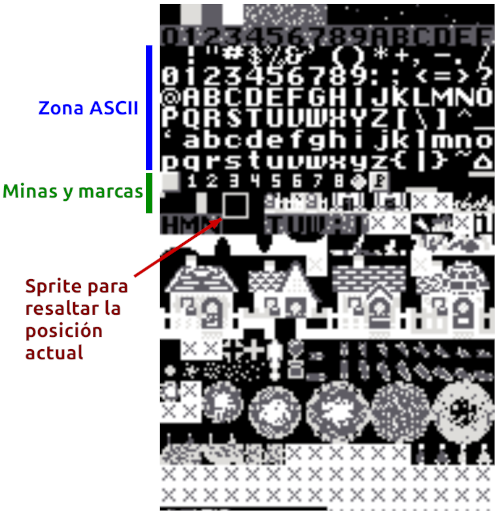
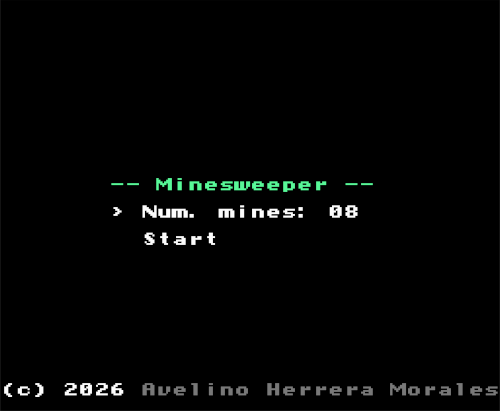
</pre></div><br />En &quot;main.c&quot; incluimos los &quot;.h&quot; de todas las pantallas y definimos el array &quot;screens&quot; como constante que guarda los punteros a todas las funciones definidas.<br /><br />La ventaja de esta aproximación es que en cada &quot;.c&quot; nos podemos centrar en el problema de pintar, leer las entradas y gestionar esa pantalla en concreto, sin preocuparnos por las demás y añadir nodos o cambiar el comportamiento de algunos apenas requerirá cambiar &quot;main.c&quot;.<br /><br />La paleta de colores no se cambia en este juego: se define una sola vez y se escribe en la PPU en &quot;main.c&quot; antes de empezar el bucle principal del juego. A continuación se comentan algunas cosas de interés:<br /><br /><b>CHR-ROM</b><br /><br />La CHR-ROM utilizada es la del juego <a href="https://pineight.com/mw/page/Thwaite.xhtml" >Thwaite</a> con licencia GPL a la que se le han realizado algunos retoques para incluir baldosas para el tablero de minas y para los sprites encargados de resaltar la posición en la que nos encontramos en cada momento.<br /><br /><img src="images/programacion_nes_chr-rom.png" width="500" height="514" border="0" alt="" /><br />Nótese que como cada baldosa son 8x8 pixels, si queremos que el sprite haga de &quot;marco exterior&quot; de la baldosa donde se encuentra en cada momento, debe medir 10x10 pixels, por lo que necesitamos 4 sprites (ocupar 16x16 pixels) para generar un sprite de 10x10.<br /><br /><b>Pantalla de título</b><br /><br />Para indicar la cantidad de minas con las que queremos inicializar el tablero lo lógico es usar un byte para almacenar el valor. Sin embargo a la hora de mostrar un byte por pantalla en formato decimal (para 2 cifras) hay que hacer una división entre 10, siendo las decenas el cociente y el resto de la división las unidades. Algo que parece trivial para un procesador actual, pero que para el 6502 es todo un mundo. Lo que hace el SDCC es implementar un algoritmo de división por software que funciona bien pero consume muchos ciclos de reloj.<br /><br />Teniendo en cuenta que con respecto a la cantidad de minas sólo se iban a realizar operaciones de incremento, decremento y visualizar, y que la cantidad máxima de minas sería 99, se optó por almacenar dicho valor en formato BCD: por ejemplo el valor 45 en decimal es 0x2D en hexadecimal y 0x45 en BCD. Haciéndolo de esta forma la visualización es muy rápida:<br /><br /><pre>decenas = (valor &gt;&gt; 4) + &#039;0&#039;<br />unidades = (valor &amp; 0x0F) + &#039;0&#039;</pre><br />Y, aunque los incrementos y decrementos son algo más complejos, compensa no tener que hacer una división entera para visualizar el valor cada vez que cambia.<br /><br /><!-- HTML generated using hilite.me --><div style="background: #ffffff; overflow:auto;width:auto;border:solid gray;border-width:.1em .1em .1em .1em;padding:.2em .6em;"><pre style="margin: 0; line-height: 125%;"><span></span><span style="color: #579">#define  BCD_INC(bcd_v)  ((((bcd_v) & 0x0F) == 0x09) ? (((bcd_v) + 0x10) & 0xF0) : ((bcd_v) + 1))</span>
<span style="color: #579">#define  BCD_DEC(bcd_v)  ((((bcd_v) & 0x0F) == 0x00) ? ((((bcd_v) - 0x10) & 0xF0) | 0x09) : ((bcd_v) - 1))</span>
</pre></div><br /><br /><b>Pantalla de tablero</b><br /><br />El tablero es de 16 x 16 = 256 baldosas y está centrado en la pantalla. Al tener esa cantidad de posiciones, el offset en el tablero puede ser definido con un solo byte (0x00 a 0xFF) y, además, el nibble menos significativo de ese byte es la coordenada X mientras que el nibble más significativo es la coordenada Y:<br /><br /><!-- HTML generated using hilite.me --><div style="background: #ffffff; overflow:auto;width:auto;border:solid gray;border-width:.1em .1em .1em .1em;padding:.2em .6em;"><pre style="margin: 0; line-height: 125%;"><span></span><span style="color: #888">// obtener offset a partir de coordenadas</span>
<span style="color: #339; font-weight: bold">uint8_t</span><span style="color: #BBB"> </span>offset<span style="color: #BBB"> </span><span style="color: #333">=</span><span style="color: #BBB"> </span>(y<span style="color: #BBB"> </span><span style="color: #333"><<</span><span style="color: #BBB"> </span><span style="color: #00D; font-weight: bold">4</span>)<span style="color: #BBB"> </span><span style="color: #333">|</span><span style="color: #BBB"> </span>x;
<span style="color: #339; font-weight: bold">uint8_t</span><span style="color: #BBB"> </span>valor<span style="color: #BBB"> </span><span style="color: #333">=</span><span style="color: #BBB"> </span>tablero[offset];

<span style="color: #888">// obtener coordenadas a partir de offset</span>
<span style="color: #339; font-weight: bold">uint8_t</span><span style="color: #BBB"> </span>x<span style="color: #BBB"> </span><span style="color: #333">=</span><span style="color: #BBB"> </span>offset<span style="color: #BBB"> </span><span style="color: #333">&</span><span style="color: #BBB"> </span><span style="color: #058; font-weight: bold">0x0F</span>;
<span style="color: #339; font-weight: bold">uint8_t</span><span style="color: #BBB"> </span>y<span style="color: #BBB"> </span><span style="color: #333">=</span><span style="color: #BBB"> </span>offset<span style="color: #BBB"> </span><span style="color: #333">>></span><span style="color: #BBB"> </span><span style="color: #00D; font-weight: bold">4</span>;
</pre></div><br />Cada posición del tablero es un byte con los siguientes valores:<br /><br /><b>- 0x0F</b>: para indicar que en esa posición hay una mina<br /><br /><b>- 0x01 a 0x08</b>: para indicar que alrededor hay 1 a 8 minas. Al descubrirse esta baldosa aparece el número correspondiente.<br /><br /><b>0x00</b>: para indicar que alrededor hay 0 minas. Igual que el anterior caso con la diferencia de que en este caso se muestra un hueco negro (no se muestra un &quot;0&quot;).<br /><br />Y las siguientes máscaras:<br /><br /><b>- 0x80</b>: es una máscara que indica si esa posición está &quot;pisada&quot; o &quot;descubierta&quot;. Por ejemplo una posición con el valor 0x84 es una posición descubierta que tiene alrededor 4 minas (y por tanto visualiza el número 4). El valor 0x8F nunca se va a dar pues en cuanto se pisa una mina termina en juego con &quot;game over&quot;. Para pisar una posición presionamos el botón A del mando de la NES.<br /><br /><b>- 0x40</b>: es una máscara que indica si en esa posición hemos puesto una banderita para ayudarnos a localizar las posiciones donde sospechamos que hay minas. Las posiciones donde haya una bandera no puede ser pisadas (&quot;descubiertas&quot;). Para colocar o quitar una bandera presionamos el botón B del mando de la NES.<br /><br />En caso de que se pise una posición con bomba y sin banderita se terminará el juego con &quot;game over&quot; mientras que si se descubren todas las posiciones que no tengan minas y quedan cubiertas sólo las posiciones que tienen minas (tengan banderita o no), se terminará el juego con un &quot;you win!&quot;.<br /><br />La pantalla de &quot;game over&quot; o &quot;you win!&quot; permanece unos segundos antes de regresar a la pantalla de título de nuevo. A continuación puede verse el juego cargado en un emulador:<br /><br /><img src="images/programacion_nes_emulador_1.png" width="500" height="411" border="0" alt="" /><br /><br /><img src="images/programacion_nes_emulador_2.png" width="500" height="411" border="0" alt="" /><br /><br />El marco azul que se va moviendo son 4 sprites dispuestos en cuadrado (2x2 sprites, 16x16 pixels) asociados a las baldosas 0x93, 0x94, 0xA3 y 0xA4. Esas baldosas juntas crean la imagen de un marco de 10x10 pixels con el centro de 8x8 pixels transparente y son los 4 sprites que se van moviendo de forma solidaria al pulsar los botones de la cruceta.<br /><br />A continuación puede verse de forma resumida cómo se definen los sprites y cómo se mueven utilizando la técnica de transferencia DMA:<br /><br /><!-- HTML generated using hilite.me --><div style="background: #ffffff; overflow:auto;width:auto;border:solid gray;border-width:.1em .1em .1em .1em;padding:.2em .6em;"><pre style="margin: 0; line-height: 125%;"><span></span><span style="color: #080; font-weight: bold">struct</span><span style="color: #BBB"> </span><span style="color: #B06; font-weight: bold">sprite_t</span><span style="color: #BBB"> </span>{
<span style="color: #BBB">    </span><span style="color: #339; font-weight: bold">uint8_t</span><span style="color: #BBB"> </span>y;
<span style="color: #BBB">    </span><span style="color: #339; font-weight: bold">uint8_t</span><span style="color: #BBB"> </span>tile;
<span style="color: #BBB">    </span><span style="color: #339; font-weight: bold">uint8_t</span><span style="color: #BBB"> </span>attr;
<span style="color: #BBB">    </span><span style="color: #339; font-weight: bold">uint8_t</span><span style="color: #BBB"> </span>x;
};


<span style="color: #888">// sprites al final de la RAM</span>
<span style="color: #579">#define  SPRITES   ((struct sprite_t *) 0x0700)</span>


<span style="color: #888">// En el on_load situamos los 4 sprites</span>
<span style="color: #888">// en la esquina superior izquierda del tablero</span>
<span style="color: #BBB">    </span>SPRITES[<span style="color: #00D; font-weight: bold">0</span>].x<span style="color: #BBB"> </span><span style="color: #333">=</span><span style="color: #BBB"> </span><span style="color: #00D; font-weight: bold">63</span>;<span style="color: #BBB">                 </span><span style="color: #888">// top left sprite</span>
<span style="color: #BBB">    </span>SPRITES[<span style="color: #00D; font-weight: bold">0</span>].y<span style="color: #BBB"> </span><span style="color: #333">=</span><span style="color: #BBB"> </span><span style="color: #00D; font-weight: bold">54</span>;
<span style="color: #BBB">    </span>SPRITES[<span style="color: #00D; font-weight: bold">0</span>].tile<span style="color: #BBB"> </span><span style="color: #333">=</span><span style="color: #BBB"> </span><span style="color: #058; font-weight: bold">0x93</span>;
<span style="color: #BBB">    </span>SPRITES[<span style="color: #00D; font-weight: bold">0</span>].attr<span style="color: #BBB"> </span><span style="color: #333">=</span><span style="color: #BBB"> </span><span style="color: #058; font-weight: bold">0x00</span>;
<span style="color: #BBB">    </span>SPRITES[<span style="color: #00D; font-weight: bold">1</span>].x<span style="color: #BBB"> </span><span style="color: #333">=</span><span style="color: #BBB"> </span><span style="color: #00D; font-weight: bold">71</span>;<span style="color: #BBB">                 </span><span style="color: #888">// top right sprite</span>
<span style="color: #BBB">    </span>SPRITES[<span style="color: #00D; font-weight: bold">1</span>].y<span style="color: #BBB"> </span><span style="color: #333">=</span><span style="color: #BBB"> </span><span style="color: #00D; font-weight: bold">54</span>;
<span style="color: #BBB">    </span>SPRITES[<span style="color: #00D; font-weight: bold">1</span>].tile<span style="color: #BBB"> </span><span style="color: #333">=</span><span style="color: #BBB"> </span><span style="color: #058; font-weight: bold">0x94</span>;
<span style="color: #BBB">    </span>SPRITES[<span style="color: #00D; font-weight: bold">1</span>].attr<span style="color: #BBB"> </span><span style="color: #333">=</span><span style="color: #BBB"> </span><span style="color: #058; font-weight: bold">0x00</span>;
<span style="color: #BBB">    </span>SPRITES[<span style="color: #00D; font-weight: bold">2</span>].x<span style="color: #BBB"> </span><span style="color: #333">=</span><span style="color: #BBB"> </span><span style="color: #00D; font-weight: bold">63</span>;<span style="color: #BBB">                 </span><span style="color: #888">// bottom left sprite</span>
<span style="color: #BBB">    </span>SPRITES[<span style="color: #00D; font-weight: bold">2</span>].y<span style="color: #BBB"> </span><span style="color: #333">=</span><span style="color: #BBB"> </span><span style="color: #00D; font-weight: bold">62</span>;
<span style="color: #BBB">    </span>SPRITES[<span style="color: #00D; font-weight: bold">2</span>].tile<span style="color: #BBB"> </span><span style="color: #333">=</span><span style="color: #BBB"> </span><span style="color: #058; font-weight: bold">0xA3</span>;
<span style="color: #BBB">    </span>SPRITES[<span style="color: #00D; font-weight: bold">2</span>].attr<span style="color: #BBB"> </span><span style="color: #333">=</span><span style="color: #BBB"> </span><span style="color: #058; font-weight: bold">0x00</span>;
<span style="color: #BBB">    </span>SPRITES[<span style="color: #00D; font-weight: bold">3</span>].x<span style="color: #BBB"> </span><span style="color: #333">=</span><span style="color: #BBB"> </span><span style="color: #00D; font-weight: bold">71</span>;<span style="color: #BBB">                 </span><span style="color: #888">// bottom right sprite</span>
<span style="color: #BBB">    </span>SPRITES[<span style="color: #00D; font-weight: bold">3</span>].y<span style="color: #BBB"> </span><span style="color: #333">=</span><span style="color: #BBB"> </span><span style="color: #00D; font-weight: bold">62</span>;
<span style="color: #BBB">    </span>SPRITES[<span style="color: #00D; font-weight: bold">3</span>].tile<span style="color: #BBB"> </span><span style="color: #333">=</span><span style="color: #BBB"> </span><span style="color: #058; font-weight: bold">0xA4</span>;
<span style="color: #BBB">    </span>SPRITES[<span style="color: #00D; font-weight: bold">3</span>].attr<span style="color: #BBB"> </span><span style="color: #333">=</span><span style="color: #BBB"> </span><span style="color: #058; font-weight: bold">0x00</span>;
<span style="color: #BBB">    </span>OAMADDR<span style="color: #BBB"> </span><span style="color: #333">=</span><span style="color: #BBB"> </span><span style="color: #00D; font-weight: bold">0</span>;<span style="color: #BBB">          </span><span style="color: #888">// transferencia DMA</span>
<span style="color: #BBB">    </span>OAMDMA<span style="color: #BBB"> </span><span style="color: #333">=</span><span style="color: #BBB"> </span><span style="color: #058; font-weight: bold">0x07</span>;


<span style="color: #888">// Para moverlos una posición del tablero</span>
<span style="color: #888">// a la derecha en on_vblank bastaría con hacer</span>
<span style="color: #BBB">    </span>SPRITES[<span style="color: #00D; font-weight: bold">0</span>].x<span style="color: #BBB"> </span><span style="color: #333">+=</span><span style="color: #BBB"> </span><span style="color: #00D; font-weight: bold">8</span>;
<span style="color: #BBB">    </span>SPRITES[<span style="color: #00D; font-weight: bold">1</span>].x<span style="color: #BBB"> </span><span style="color: #333">+=</span><span style="color: #BBB"> </span><span style="color: #00D; font-weight: bold">8</span>;
<span style="color: #BBB">    </span>SPRITES[<span style="color: #00D; font-weight: bold">2</span>].x<span style="color: #BBB"> </span><span style="color: #333">+=</span><span style="color: #BBB"> </span><span style="color: #00D; font-weight: bold">8</span>;
<span style="color: #BBB">    </span>SPRITES[<span style="color: #00D; font-weight: bold">3</span>].x<span style="color: #BBB"> </span><span style="color: #333">+=</span><span style="color: #BBB"> </span><span style="color: #00D; font-weight: bold">8</span>;
<span style="color: #BBB">    </span>OAMADDR<span style="color: #BBB"> </span><span style="color: #333">=</span><span style="color: #BBB"> </span><span style="color: #00D; font-weight: bold">0</span>;
<span style="color: #BBB">    </span>OAMDMA<span style="color: #BBB"> </span><span style="color: #333">=</span><span style="color: #BBB"> </span><span style="color: #058; font-weight: bold">0x07</span>;<span style="color: #BBB">     </span><span style="color: #888">// transferencia DMA</span>
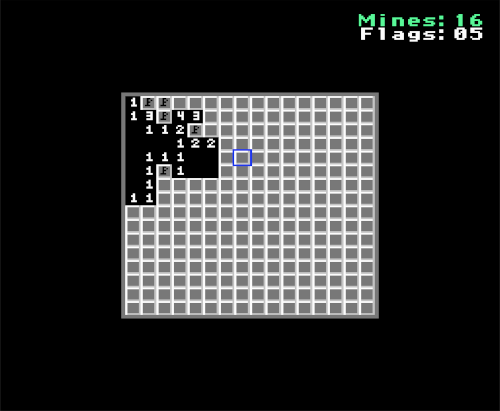
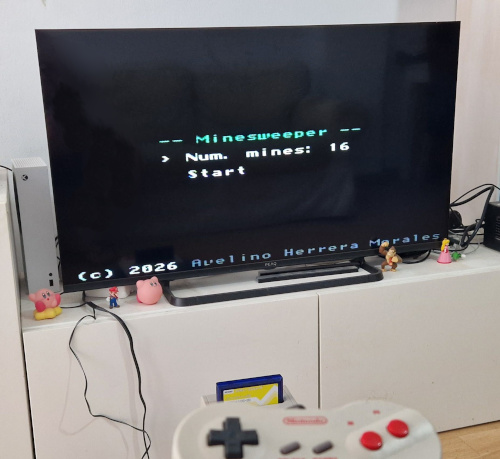
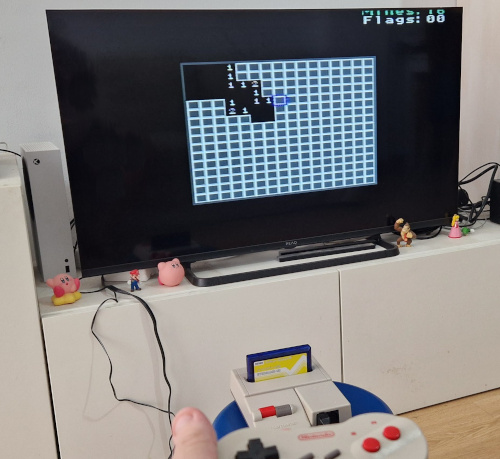
</pre></div><br /><br />Así es cómo se ve el juego en una NES real:<br /><br /><img src="images/programacion_nes_foto_1.jpg" width="500" height="459" border="0" alt="" /><br /><br /><img src="images/programacion_nes_foto_2.jpg" width="500" height="459" border="0" alt="" /><br /><br />Todo el código está disponible en la sección <a href="/soft" >soft</a>.]]></description>
	</item>
	<item rdf:about="http://avelinoherrera.es:443/blog/index.php?entry=entry250809-100925">
		<title>Programación de la Sega Mega Drive</title>
		<link>http://avelinoherrera.es:443/blog/index.php?entry=entry250809-100925</link>
		<description><![CDATA[Tras estudiar, en la <a href="index.php?entry=entry250615-211109" >anterior entrega</a>, el desarrollo en la consola Sega Master System, le toca el turno ahora a la Sega Mega Drive. La consola de cuarta generación de Sega salió entre 1988 y 1990 y fue la primera consola de 16 bits de Sega, compitiendo con la SNES de Nintendo. La Mega Drive (conocida en EEUU como Sega Genesis) incluye un procesador Motorola 68000 (bus de 16 bits y registros de 32 bits) y un coprocesador Z80 dedicado para el sonido. El VDP es mucho más potente que su predecesora, la Master System (más colores, scroll vertical y horizontal, varios planos, mayor cantidad de sprites, etc.), e incluye, además del PSG, un chip de sonido con síntesis FM y un canal de sonido muestreado.<br /><br /><b>Breve repaso a la arquitectura de la Sega Mega Drive</b><br /><br />La Sega Mega Drive tiene, como procesador principal, un 68000 de Motorola (la consola disponen también de un procesador Z80 auxiliar destinado al procesamiento de sonido que se verá más adelante). El 68000 dispone de un bus de direcciones de 24 bits, que le permite direccionar un total de 16 Mbytes de memoria distribuidos de la siguiente manera.<br /><br /><i>Mapa de memoria</i><br /><br />
<style type="text/css">
table.megadrive {
    border: 1px solid black;
    border-collapse: collapse;
}
table.megadrive tr td {
    border: 1px solid black;
    padding-left: 1em;
    padding-right: 1em;
}
</style>
<table class="megadrive">
<tr><td>Inicio</td><td>Fin</td><td>Descripción</td></tr>
<tr><td>0x000000</td><td>0x3FFFFF</td><td>ROM y RAM del cartucho (4 Mbytes)</td></tr>
<tr><td>0x400000</td><td>0x9FFFFF</td><td>Espacio reservado para Mega-CD y 32X</td></tr>
<tr><td>0xA00000</td><td>0xA0FFFF</td><td>RAM: Espacio de memoria del Z80 (YM2612 y PSG)</td></tr>
<tr><td>0xA10000</td><td>0xBFFFFF</td><td>E/S y reservado</td></tr>
<tr><td>0xC00000</td><td>0xC0000F</td><td>VDP</td></tr>
<tr><td>0xFF0000</td><td>0xFFFFFF</td><td>RAM de trabajo del 68000 (64 Kbytes)</td></tr>
</table><br /><br />Esta tabla es una simplificación para facilitar la comprensión del tema. Una versión más exhaustiva del mapa de memoria puede encontrarse <a href="https://segaretro.org/Sega_Mega_Drive/Memory_map" >aquí</a>.<br /><br />El espacio de memoria que está entre 0xA00000 y 0xA0FFFF (desde el punto de vista del 68000) se corresponde con todo el espacio de memoria del procesador Z80 (0x0000 a 0xFFFF). Es una memoria RAM compartida entre ambos procesadores pero no accesible de forma simultánea por ambos. Cuando veamos la parte de la interacción entre el 68000 y el coprocesador Z80 se explicará este tema con más detalle.<br /><br /><i>Interrupciones</i><br /><br />El 68000 dispone de múltiples fuentes de interrupción, pero en el caso de la Sega Mega Drive, la cantidad de fuentes de interrupción se limita a 3:<br /><br /><b>-</b> Interrupción externa: provocada por accesorios externos (pistola óptica, por ejemplo).<br /><br /><b>-</b> Interrupción de H Blank: generada cuando se pinta una línea concreta de la pantalla (configurable en los registros del VDP).<br /><br /><b>-</b> Interrupción de V Blank: generada en cada retrazo vertical (después de que se pinte cada frame de pantalla).<br /><br /><i>Mapa de memoria del cartucho</i><br /><br />Los 4 Mbytes de la ROM y la RAM del cartucho se disfribuyen de la siguiente manera:<br /><br /><table class="megadrive">
<tr><td>Inicio</td><td>Tamaño</td><td>Descripción</td></tr>
<tr><td>0x000000</td><td>4 bytes</td><td>Puntero de pila (A7) en el arranque</td></tr>
<tr><td>0x000004</td><td>4 bytes</td><td>Vector de reset (donde empieza la ejecución)</td></tr>
<tr><td>0x000068</td><td>4 bytes</td><td>Puntero a rutina de interrupción externa</td></tr>
<tr><td>0x000070</td><td>4 bytes</td><td>Puntero a rutina de interrupción H Blank</td></tr>
<tr><td>0x000078</td><td>4 bytes</td><td>Puntero a rutina de interrupción V Blank</td></tr>
<tr><td>0x000100</td><td>256 bytes</td><td>Cabecera del cartucho (nombre, checksum, etc.)</td></tr>
<tr><td>0x000200</td><td>2 Mbytes - 512 bytes</td><td>Resto del código del cartucho</td></tr>
<tr><td>0x200000</td><td>64 Kbytes</td><td>SRAM del cartucho (opcional, para guardar partidas)</td></tr>
<tr><td>0x210000</td><td>2 MBytes - 64 KBytes</td><td>Continúa la ROM del cartucho</td></tr>
</table><br /><br />La localización y el tamaño de la RAM del cartucho es arbitraria y puede alojarse en cualquier parte entre 0x000000 y 0x3FFFFF. Es en la cabecera del cartucho (0x000100) donde se indica dónde se encuentra, en caso de haberla, la SRAM del cartucho para almacenar las partidas guardadas.<br /><br />En la cabecera (los 256 bytes alojados en 0x000100) se indica el nombre del juego, fabricante, distribuidor, las zonas compatibles (Japón, EE.UU., Europa, etc.), mandos compatibles, checksum, etc.<br /><br /><b>Compilar la toolchain para Motorola 68000</b><br /><br />La toolchain estándar de GNU (binutils + gcc) junto con la newlib pueden ser compilados para el target &quot;m68k-none-elf&quot; siguiendo los pasos estándar:<br /><br /><i>binutils</i><br /><br /><pre>mkdir -p /opt/baremetalm68k/src<br />cd /opt/baremetalm68k/src<br />wget https://ftp.gnu.org/gnu/binutils/binutils-2.44.tar.xz<br />tar xf binutils-2.44.tar.xz<br />mkdir -p /opt/baremetalm68k/build/binutils-2.44<br />cd /opt/baremetalm68k/build/binutils-2.44<br />../../src/binutils-2.44/configure --prefix=/opt/baremetalm68k --target=m68k-none-elf --disable-nls<br />make<br />make install</pre><br /><br /><i>gcc (fase 1)</i><br /><br /><pre>cd /opt/baremetalm68k/src<br />wget https://ftp.gnu.org/gnu/gcc/gcc-15.1.0/gcc-15.1.0.tar.xz<br />wget https://ftp.gnu.org/gnu/gmp/gmp-6.3.0.tar.xz<br />wget https://ftp.gnu.org/gnu/mpc/mpc-1.3.1.tar.gz<br />wget https://ftp.gnu.org/gnu/mpfr/mpfr-4.2.2.tar.xz<br />tar xf gcc-15.1.0.tar.xz<br />tar xf gmp-6.3.0.tar.xz<br />tar xf mpc-1.3.1.tar.gz<br />tar xf mpfr-4.2.2.tar.xz<br />mv gmp-6.3.0 gcc-15.1.0/gmp<br />mv mpc-1.3.1 gcc-15.1.0/mpc<br />mv mpfr-4.2.2 gcc-15.1.0/mpfr<br />mkdir -p /opt/baremetalm68k/build/gcc-15.1.0-stage-1<br />cd /opt/baremetalm68k/build/gcc-15.1.0-stage-1<br />export PATH=/opt/baremetalm68k/bin:${PATH}<br />../../src/gcc-15.1.0/configure --prefix=/opt/baremetalm68k --target=m68k-none-elf --enable-languages=c --without-headers --disable-nls --disable-threads --disable-shared --disable-libssp --with-newlib<br />make all-gcc all-target-libgcc<br />make install-gcc install-target-libgcc</pre><br /><br /><i>newlib</i><br /><br /><pre>cd /opt/baremetalm68k/src<br />git clone https://sourceware.org/git/newlib-cygwin.git<br />mkdir -p /opt/baremetalm68k/build/newlib<br />cd /opt/baremetalm68k/build/newlib<br />../../src/newlib-cygwin/configure --prefix=/opt/baremetalm68k --target=m68k-none-elf<br />make<br />make install</pre><br /><br />En la última versión de newlib utilizada en el momento de realizar este proyecto se produjeron algunos errores de compilación derivados de la falta de definición de varias de las primitivas (&quot;stat&quot;, &quot;open&quot;, etc.). Como no haremos uso de dichas características de la newlib, me limité a crear &quot;stubs&quot; (funciones vacías) para dichas primitivas, con lo que se consigue compilar la newlib y, a su vez, poder compilar también la STL para C++. De todas formas en los proyectos realizados no se hace uso de la STL.<br /><br /><i>gcc (fase 2)</i><br /><br /><pre>mkdir -p /opt/baremetalm68k/build/gcc-15.1.0-stage-2<br />cd /opt/baremetalm68k/build/gcc-15.1.0-stage-2<br />../../src/gcc-15.1.0/configure --prefix=/opt/baremetalm68k --target=m68k-none-elf --enable-languages=c,c++ --disable-nls --disable-threads --disable-shared --disable-libssp --with-newlib --with-headers=../../src/newlib-cygwin/newlib/libc/include<br />make<br />make install</pre><br /><br />Ahora ya tenemos en /opt/baremetalm68k/bin el GCC para el target 68000.<br /><br /><b>Generación de código y linker script</b><br /><br />Teniendo el cuenta el mapa de memoria de la Mega Drive, puede hacerse un linker script que incluya las secciones de interrupciones (externa, H Blank y V Blank), así como la cabecera que permite identificar la ROM como una ROM de Sega Mega Drive.<br /><br />
<div style="white-space: pre; font-family: monospace;">
SECTIONS {
    . = 0x000000 ;
    .vectors : {
        LONG(0x01000000);    /* stack pointer at end or work RAM */
        LONG(0x00000200);    /* reset vector at 0x200 */
    }
    . = 0x000068 ;
    .level2_autovector : {
        LONG(EXT_ISR_ADDRESS);
    }
    . = 0x000070 ;
    .level4_autovector : {
        LONG(H_BLANK_ISR_ADDRESS);
    }
    . = 0x000078 ;
    .level6_autovector : {
        LONG(V_BLANK_ISR_ADDRESS);
    }
    . = 0x000100 ;
    .header : {
        KEEP(header.o (.header))
    }
    . = 0x000200 ;
    .text : {                   /* all the code here */
        _linker_code = . ;
        KEEP(startup.o (.startup))
        KEEP(*(.text))
        KEEP(*(.text.*))
        KEEP(*(.gnu.linkonce.t*))
        KEEP(*(.gnu.linkonce.r*))
        KEEP(*(.rodata*))
        KEEP(*(.got*))
    }
    . = ALIGN(4);
    EXT_ISR_ADDRESS = . ;
    .ext_isr : {
        KEEP(*(.ext_isr))
    }
    . = ALIGN(4);
    H_BLANK_ISR_ADDRESS = . ;
    .h_blank_isr : {
        KEEP(*(.h_blank_isr))
    }
    . = ALIGN(4);
    V_BLANK_ISR_ADDRESS = . ;
    .v_blank_isr : {
        KEEP(*(.v_blank_isr))
    }
    . = ALIGN(4);
    .preinit_array : {
        __preinit_array_start = . ;
        KEEP(*(.preinit_array))
        __preinit_array_end = . ;
    }
    . = ALIGN(4);
    .init_array : {
        __init_array_start = . ;
        KEEP(*(.init_array))
        __init_array_end = . ;
    }
    . = ALIGN(4);
    .fini_array : {
        __fini_array_start = . ;
        KEEP(*(.fini_array))
        __fini_array_end = . ;
    }
    . = ALIGN(4);
    .ctors : {
        __CTOR_LIST__ = . ;
        LONG((__CTOR_END__ - __CTOR_LIST__) / 2 - 2)
        KEEP(*(.ctors))
        LONG(0)
        __CTOR_END__ = . ;
    }
    . = ALIGN(4);
    .dtors : {
        __DTOR_LIST__ = . ;
        LONG((__DTOR_END__ - __DTOR_LIST__) / 2 - 2)
        KEEP(*(.dtors))
        LONG(0)
        __DTOR_END__ = . ;
    }
    . = 0x1F8000 ;        /* sound loop right before save ram */
    .sound_loop : {
        KEEP(*(.sound_loop))
    }

    _flash_sdata = . ;
    . = 0xFF0000 ;         /* work RAM starting at 0xFF0000 */
    _ram_sdata = . ;
    .data : AT (LOADADDR(.dtors) + SIZEOF(.dtors)) {
        _linker_data = . ;
        *(.data)
        *(.data.*)
        *(.sdata)
        *(.sdata.*)
        *(.gnu.linkonce.d*)
    }
    _ram_edata = . ;
    _ram_sbssdata = . ;
    .bss : AT (LOADADDR(.data) + SIZEOF(.data)) {
        _linker_bss = . ;
        *(.bss)
        *(.bss.*)
        *(.sbss)
        *(.sbss.*)
        *(.gnu.linkonce.b.*)
        *(.COMMON)
    }
    _ram_ebssdata = . ;
    _linker_end = . ;
    end = . ;
}</div><br /><br />Como se puede ver, toda la ROM se aloja en los primeros 4Mb del cartucho y la RAM en los 64Kb de Work RAM. El puntero de pila se inicializa al final de la Work RAM y el puntero de reset apunta a justo después de la cabecera del cartucho.<br /><br />Nótese que el puntero de pila se inicializa a 0x010000. La pila en el 68000 (y en la mayoría de las arquitecturas) crece hacia direcciones bajas de memoria, además, la operación de PUSH realiza un pre-decremento del puntero de pila, mientras que la operación POP realiza un post-incremento del puntero de pila. De esta forma la &quot;pila vacía&quot; la implementamos haciendo que el puntero de pila SP (A7) apunte a 0x010000, una dirección inexistente pero que, cuando se pre-decremente (PUSH) sí apuntará una dirección de memoria válida. De esta manera aprovechamos el 100% de la memoria RAM de trabajo que no es muy extensa (sólo tenemos 64 KBytes para las variables globales y para la pila del sistema).<br /><br /><b>Prueba de concepto</b><br /><br />Como primera prueba generaremos la ROM de un cartucho que simplemente inicializará el VPD y la VRAM para poner una imagen estática en pantalla. El VDP de la Mega Drive dispone de varios planos destinados a hacer scroll y efectos (plano B, plano A, Plano Window y los sprites). Cada plano, a su vez tiene un bit de prioridad que permite jugar con las superposiciones de pixels y los efectos.<br /><br />No me pararé a destallar de forma pormenorizada los detalles de VDP en este sentido, remito al lector a la <a href="https://md.railgun.works/index.php?title=VDP" >wiki de Railgun</a> para más información.<br /><br />El VDP de la Mega Drive, al igual que casitodos los VDPs de la época (tanto de consolas como de ordenadores como el MSX, el Spectrum, etc.) está basado en el concepto de baldosas o &quot;tiles&quot;: en una zona de la VRAM se definen las baldosas como agrupaciones de 8x8 pixels (en el caso de la megadrive, cada baldosa ocupa 32 bytes, ya que cada pixel son 4 bits, 16 colores, cada fila de pixels en la baldosa son 4 bytes), mientras que en otra zona de la VRAM se definen los planos, siendo cada plano un conjunto de MxN índices de baldosa (en terminología VDP se suelen llamas las &quot;name tables&quot;). No existe el concepto de &quot;frame buffer&quot; y todo debe ser dibujado a base de baldosas.<br /><br /><img src="images/megadrive_prueba_2_baldosas.png" width="500" height="690" border="0" alt="" /><br /><br />(Imagen extraida de un tileset gratuito publicado por al autor <a href="https://v3x3d.itch.io/deep-night" >Vexed en itch.io</a>)<br /><br /><!-- HTML generated using hilite.me --><div style="background: #ffffff; overflow:auto;width:auto;border:solid gray;border-width:.1em .1em .1em .1em;padding:.2em .6em;"><pre style="margin: 0; line-height: 125%;">
<span style="color: #080; font-weight: bold">using</span><span style="color: #BBB"> </span><span style="color: #080; font-weight: bold">namespace</span><span style="color: #BBB"> </span><span style="color: #0E84B5; font-weight: bold">std</span>;

<span style="color: #339; font-weight: bold">void</span><span style="color: #BBB"> </span>ext_isr()<span style="color: #BBB">  </span>__attribute__((interrupt,<span style="color: #BBB"> </span>section(<span style="background-color: #FFF0F0">".ext_isr"</span>)));

<span style="color: #339; font-weight: bold">void</span><span style="color: #BBB"> </span><span style="color: #06B; font-weight: bold">ext_isr</span>()<span style="color: #BBB"> </span>{
<span style="color: #BBB">    </span><span style="color: #888">//</span>
}

<span style="color: #339; font-weight: bold">void</span><span style="color: #BBB"> </span>h_blank_isr()<span style="color: #BBB">  </span>__attribute__((interrupt,<span style="color: #BBB"> </span>section(<span style="background-color: #FFF0F0">".h_blank_isr"</span>)));

<span style="color: #339; font-weight: bold">void</span><span style="color: #BBB"> </span><span style="color: #06B; font-weight: bold">h_blank_isr</span>()<span style="color: #BBB"> </span>{
<span style="color: #BBB">    </span><span style="color: #888">//</span>
}

<span style="color: #339; font-weight: bold">void</span><span style="color: #BBB"> </span>v_blank_isr()<span style="color: #BBB">  </span>__attribute__((interrupt,<span style="color: #BBB"> </span>section(<span style="background-color: #FFF0F0">".v_blank_isr"</span>)));

<span style="color: #339; font-weight: bold">void</span><span style="color: #BBB"> </span><span style="color: #06B; font-weight: bold">v_blank_isr</span>()<span style="color: #BBB"> </span>{
<span style="color: #BBB">    </span><span style="color: #888">//</span>
}

<span style="color: #579">#define  W_VDP_DATA        *((uint16_t *) 0xC00000)</span>
<span style="color: #579">#define  W_VDP_CTRL        *((uint16_t *) 0xC00004)</span>
<span style="color: #579">#define  W_VDP_HV_COUNTER  *((uint16_t *) 0xC00008)</span>
<span style="color: #579">#define  L_VDP_DATA        *((uint32_t *) 0xC00000)</span>
<span style="color: #579">#define  L_VDP_CTRL        *((uint32_t *) 0xC00004)</span>

<span style="color: #579">#define  VDPREG_MODE1      0x8000  </span><span style="color: #888">// Mode register #1</span>
<span style="color: #579">#define  VDPREG_MODE2      0x8100  </span><span style="color: #888">// Mode register #2</span>
<span style="color: #579">#define  VDPREG_PLANEA     0x8200  </span><span style="color: #888">// Plane A table address</span>
<span style="color: #579">#define  VDPREG_WINDOW     0x8300  </span><span style="color: #888">// Window table address</span>
<span style="color: #579">#define  VDPREG_PLANEB     0x8400  </span><span style="color: #888">// Plane B table address</span>
<span style="color: #579">#define  VDPREG_SPRITE     0x8500  </span><span style="color: #888">// Sprite table address</span>
<span style="color: #579">#define  VDPREG_BGCOL      0x8700  </span><span style="color: #888">// Background color</span>
<span style="color: #579">#define  VDPREG_HRATE      0x8A00  </span><span style="color: #888">// HBlank interrupt rate</span>
<span style="color: #579">#define  VDPREG_MODE3      0x8B00  </span><span style="color: #888">// Mode register #3</span>
<span style="color: #579">#define  VDPREG_MODE4      0x8C00  </span><span style="color: #888">// Mode register #4</span>
<span style="color: #579">#define  VDPREG_HSCROLL    0x8D00  </span><span style="color: #888">// HScroll table address</span>
<span style="color: #579">#define  VDPREG_INCR       0x8F00  </span><span style="color: #888">// Autoincrement</span>
<span style="color: #579">#define  VDPREG_SIZE       0x9000  </span><span style="color: #888">// Plane A and B size</span>
<span style="color: #579">#define  VDPREG_WINX       0x9100  </span><span style="color: #888">// Window X split position</span>
<span style="color: #579">#define  VDPREG_WINY       0x9200  </span><span style="color: #888">// Window Y split position</span>
<span style="color: #579">#define  VDPREG_DMALEN_L   0x9300  </span><span style="color: #888">// DMA length (low)</span>
<span style="color: #579">#define  VDPREG_DMALEN_H   0x9400  </span><span style="color: #888">// DMA length (high)</span>
<span style="color: #579">#define  VDPREG_DMASRC_L   0x9500  </span><span style="color: #888">// DMA source (low)</span>
<span style="color: #579">#define  VDPREG_DMASRC_M   0x9600  </span><span style="color: #888">// DMA source (mid)</span>
<span style="color: #579">#define  VDPREG_DMASRC_H   0x9700  </span><span style="color: #888">// DMA source (high)</span>

<span style="color: #888">/*</span>
<span style="color: #888">screen width : 40 tiles * 8 = 320</span>
<span style="color: #888">screen height: 28 tiles * 8 = 224</span>

<span style="color: #888">Plane A table          : 0xC000</span>
<span style="color: #888">Window name table      : 0xD000</span>
<span style="color: #888">Plane B table          : 0xE000</span>
<span style="color: #888">Sprite attribute table : 0xF000</span>
<span style="color: #888">H scroll data          : 0xF400</span>

<span style="color: #888"> */</span>
<span style="color: #339; font-weight: bold">void</span><span style="color: #BBB"> </span><span style="color: #06B; font-weight: bold">vdp_init</span>()<span style="color: #BBB"> </span>{
<span style="color: #BBB">    </span>W_VDP_CTRL<span style="color: #BBB"> </span><span style="color: #333">=</span><span style="color: #BBB"> </span>VDPREG_MODE1<span style="color: #BBB"> </span><span style="color: #333">|</span><span style="color: #BBB"> </span><span style="color: #058; font-weight: bold">0x04</span>;<span style="color: #BBB">    </span><span style="color: #888">// mode register #1: display disabled</span>
<span style="color: #BBB">    </span>W_VDP_CTRL<span style="color: #BBB"> </span><span style="color: #333">=</span><span style="color: #BBB"> </span>VDPREG_MODE2<span style="color: #BBB"> </span><span style="color: #333">|</span><span style="color: #BBB"> </span><span style="color: #058; font-weight: bold">0x04</span>;<span style="color: #BBB">    </span><span style="color: #888">// mode register #2: display disabled, v blank interrupt disabled, mode 5 video mode, 28 tiles height</span>
<span style="color: #BBB">    </span>W_VDP_CTRL<span style="color: #BBB"> </span><span style="color: #333">=</span><span style="color: #BBB"> </span>VDPREG_PLANEA<span style="color: #BBB"> </span><span style="color: #333">|</span><span style="color: #BBB"> </span><span style="color: #058; font-weight: bold">0x30</span>;<span style="color: #BBB">   </span><span style="color: #888">// plane A address: upper 3 bits of VRAM location of plane A name table = 0xC000</span>
<span style="color: #BBB">    </span>W_VDP_CTRL<span style="color: #BBB"> </span><span style="color: #333">=</span><span style="color: #BBB"> </span>VDPREG_WINDOW<span style="color: #BBB"> </span><span style="color: #333">|</span><span style="color: #BBB"> </span><span style="color: #058; font-weight: bold">0x34</span>;<span style="color: #BBB">   </span><span style="color: #888">// window address: upper 5 bits of VRAM location of window name table = 0xD000</span>
<span style="color: #BBB">    </span>W_VDP_CTRL<span style="color: #BBB"> </span><span style="color: #333">=</span><span style="color: #BBB"> </span>VDPREG_PLANEB<span style="color: #BBB"> </span><span style="color: #333">|</span><span style="color: #BBB"> </span><span style="color: #058; font-weight: bold">0x07</span>;<span style="color: #BBB">   </span><span style="color: #888">// plane B address: upper 3 bits of VRAM location of plane B name table = 0xE000</span>
<span style="color: #BBB">    </span>W_VDP_CTRL<span style="color: #BBB"> </span><span style="color: #333">=</span><span style="color: #BBB"> </span>VDPREG_SPRITE<span style="color: #BBB"> </span><span style="color: #333">|</span><span style="color: #BBB"> </span><span style="color: #058; font-weight: bold">0x78</span>;<span style="color: #BBB">   </span><span style="color: #888">// sprite address: upper 7 bits of VRAM location of sprite attribute table = 0xF000</span>
<span style="color: #BBB">    </span>W_VDP_CTRL<span style="color: #BBB"> </span><span style="color: #333">=</span><span style="color: #BBB"> </span>VDPREG_BGCOL<span style="color: #BBB"> </span><span style="color: #333">|</span><span style="color: #BBB"> </span><span style="color: #058; font-weight: bold">0x00</span>;<span style="color: #BBB">    </span><span style="color: #888">// background color: palette 0, index 0</span>
<span style="color: #BBB">    </span>W_VDP_CTRL<span style="color: #BBB"> </span><span style="color: #333">=</span><span style="color: #BBB"> </span>VDPREG_HRATE<span style="color: #BBB"> </span><span style="color: #333">|</span><span style="color: #BBB"> </span><span style="color: #058; font-weight: bold">0xFF</span>;<span style="color: #BBB">    </span><span style="color: #888">// h blank irq rate: horizontal line at wich the h blank interrupt will be triggered</span>
<span style="color: #BBB">    </span>W_VDP_CTRL<span style="color: #BBB"> </span><span style="color: #333">=</span><span style="color: #BBB"> </span>VDPREG_MODE3<span style="color: #BBB"> </span><span style="color: #333">|</span><span style="color: #BBB"> </span><span style="color: #058; font-weight: bold">0x00</span>;<span style="color: #BBB">    </span><span style="color: #888">// mode register #3: external interrupt disabled, entire panel vertical scroll, entire panel horizontal scroll</span>
<span style="color: #BBB">    </span>W_VDP_CTRL<span style="color: #BBB"> </span><span style="color: #333">=</span><span style="color: #BBB"> </span>VDPREG_MODE4<span style="color: #BBB"> </span><span style="color: #333">|</span><span style="color: #BBB"> </span><span style="color: #058; font-weight: bold">0x81</span>;<span style="color: #BBB">    </span><span style="color: #888">// mode register #4: 40 tiles width, no interlaced mode</span>
<span style="color: #BBB">    </span>W_VDP_CTRL<span style="color: #BBB"> </span><span style="color: #333">=</span><span style="color: #BBB"> </span>VDPREG_HSCROLL<span style="color: #BBB"> </span><span style="color: #333">|</span><span style="color: #BBB"> </span><span style="color: #058; font-weight: bold">0x3D</span>;<span style="color: #BBB">  </span><span style="color: #888">// H scroll address: upper 6 bits of VRAM location of horizontal scroll table = 0xF400</span>
<span style="color: #BBB">    </span>W_VDP_CTRL<span style="color: #BBB"> </span><span style="color: #333">=</span><span style="color: #BBB"> </span>VDPREG_INCR<span style="color: #BBB"> </span><span style="color: #333">|</span><span style="color: #BBB"> </span><span style="color: #058; font-weight: bold">0x02</span>;<span style="color: #BBB">     </span><span style="color: #888">// autoincrement: 2 (each VRAM data write will autoincrement VRAM pointer by 2, one 16 bit word at once)</span>
<span style="color: #BBB">    </span>W_VDP_CTRL<span style="color: #BBB"> </span><span style="color: #333">=</span><span style="color: #BBB"> </span>VDPREG_SIZE<span style="color: #BBB"> </span><span style="color: #333">|</span><span style="color: #BBB"> </span><span style="color: #058; font-weight: bold">0x00</span>;<span style="color: #BBB">     </span><span style="color: #888">// tilemap size: 32x32 tiles for both A and B planes</span>
<span style="color: #BBB">    </span>W_VDP_CTRL<span style="color: #BBB"> </span><span style="color: #333">=</span><span style="color: #BBB"> </span>VDPREG_WINX<span style="color: #BBB"> </span><span style="color: #333">|</span><span style="color: #BBB"> </span><span style="color: #058; font-weight: bold">0x00</span>;<span style="color: #BBB">     </span><span style="color: #888">// window x split: window plane x = 0</span>
<span style="color: #BBB">    </span>W_VDP_CTRL<span style="color: #BBB"> </span><span style="color: #333">=</span><span style="color: #BBB"> </span>VDPREG_WINY<span style="color: #BBB"> </span><span style="color: #333">|</span><span style="color: #BBB"> </span><span style="color: #058; font-weight: bold">0x00</span>;<span style="color: #BBB">     </span><span style="color: #888">// window y split: window plane y = 0</span>
<span style="color: #BBB">    </span><span style="color: #888">// clear vram</span>
<span style="color: #BBB">    </span>L_VDP_CTRL<span style="color: #BBB"> </span><span style="color: #333">=</span><span style="color: #BBB"> </span><span style="color: #058; font-weight: bold">0x40000000</span>;
<span style="color: #BBB">    </span><span style="color: #339; font-weight: bold">uint16_t</span><span style="color: #BBB"> </span>n<span style="color: #BBB"> </span><span style="color: #333">=</span><span style="color: #BBB"> </span><span style="color: #00D; font-weight: bold">65536</span><span style="color: #BBB"> </span><span style="color: #333">>></span><span style="color: #BBB"> </span><span style="color: #00D; font-weight: bold">1</span>;
<span style="color: #BBB">    </span><span style="color: #080; font-weight: bold">while</span><span style="color: #BBB"> </span>(n<span style="color: #BBB"> </span><span style="color: #333">></span><span style="color: #BBB"> </span><span style="color: #00D; font-weight: bold">0</span>)<span style="color: #BBB"> </span>{
<span style="color: #BBB">        </span>W_VDP_DATA<span style="color: #BBB"> </span><span style="color: #333">=</span><span style="color: #BBB"> </span><span style="color: #00D; font-weight: bold">0</span>;
<span style="color: #BBB">        </span>n<span style="color: #333">--</span>;
<span style="color: #BBB">    </span>}
<span style="color: #BBB">    </span><span style="color: #888">// clear cram</span>
<span style="color: #BBB">    </span>L_VDP_CTRL<span style="color: #BBB"> </span><span style="color: #333">=</span><span style="color: #BBB"> </span><span style="color: #058; font-weight: bold">0xC0000000</span>;
<span style="color: #BBB">    </span>n<span style="color: #BBB"> </span><span style="color: #333">=</span><span style="color: #BBB"> </span><span style="color: #00D; font-weight: bold">128</span><span style="color: #BBB"> </span><span style="color: #333">>></span><span style="color: #BBB"> </span><span style="color: #00D; font-weight: bold">1</span>;
<span style="color: #BBB">    </span><span style="color: #080; font-weight: bold">while</span><span style="color: #BBB"> </span>(n<span style="color: #BBB"> </span><span style="color: #333">></span><span style="color: #BBB"> </span><span style="color: #00D; font-weight: bold">0</span>)<span style="color: #BBB"> </span>{
<span style="color: #BBB">        </span>W_VDP_DATA<span style="color: #BBB"> </span><span style="color: #333">=</span><span style="color: #BBB"> </span><span style="color: #00D; font-weight: bold">0</span>;
<span style="color: #BBB">        </span>n<span style="color: #333">--</span>;
<span style="color: #BBB">    </span>}
<span style="color: #BBB">    </span><span style="color: #888">// clear vsram</span>
<span style="color: #BBB">    </span>L_VDP_CTRL<span style="color: #BBB"> </span><span style="color: #333">=</span><span style="color: #BBB"> </span><span style="color: #058; font-weight: bold">0x40000010</span>;
<span style="color: #BBB">    </span>n<span style="color: #BBB"> </span><span style="color: #333">=</span><span style="color: #BBB"> </span><span style="color: #00D; font-weight: bold">80</span><span style="color: #BBB"> </span><span style="color: #333">>></span><span style="color: #BBB"> </span><span style="color: #00D; font-weight: bold">1</span>;
<span style="color: #BBB">    </span><span style="color: #080; font-weight: bold">while</span><span style="color: #BBB"> </span>(n<span style="color: #BBB"> </span><span style="color: #333">></span><span style="color: #BBB"> </span><span style="color: #00D; font-weight: bold">0</span>)<span style="color: #BBB"> </span>{
<span style="color: #BBB">        </span>W_VDP_DATA<span style="color: #BBB"> </span><span style="color: #333">=</span><span style="color: #BBB"> </span><span style="color: #00D; font-weight: bold">0</span>;
<span style="color: #BBB">        </span>n<span style="color: #333">--</span>;
<span style="color: #BBB">    </span>}
}

<span style="color: #339; font-weight: bold">void</span><span style="color: #BBB"> </span><span style="color: #06B; font-weight: bold">vdp_vram_write</span>(<span style="color: #080; font-weight: bold">const</span><span style="color: #BBB"> </span><span style="color: #339; font-weight: bold">uint16_t</span><span style="color: #BBB"> </span><span style="color: #333">*</span>src,<span style="color: #BBB"> </span><span style="color: #339; font-weight: bold">uint16_t</span><span style="color: #BBB"> </span>size_bytes,<span style="color: #BBB"> </span><span style="color: #339; font-weight: bold">uint16_t</span><span style="color: #BBB"> </span>vram_addr)<span style="color: #BBB"> </span>{
<span style="color: #BBB">    </span><span style="color: #339; font-weight: bold">uint16_t</span><span style="color: #BBB"> </span>test<span style="color: #BBB"> </span><span style="color: #333">=</span><span style="color: #BBB"> </span>W_VDP_CTRL;<span style="color: #BBB">          </span><span style="color: #888">// prepare vdp</span>
<span style="color: #BBB">    </span>L_VDP_CTRL<span style="color: #BBB"> </span><span style="color: #333">=</span><span style="color: #BBB"> </span><span style="color: #058; font-weight: bold">0x40000000</span><span style="color: #BBB"> </span><span style="color: #333">|</span><span style="color: #BBB"> </span>((((<span style="color: #339; font-weight: bold">uint32_t</span>)<span style="color: #BBB"> </span>vram_addr)<span style="color: #BBB"> </span><span style="color: #333">&</span><span style="color: #BBB"> </span><span style="color: #058; font-weight: bold">0x3FFF</span>)<span style="color: #BBB"> </span><span style="color: #333"><<</span><span style="color: #BBB"> </span><span style="color: #00D; font-weight: bold">16</span>)<span style="color: #BBB"> </span><span style="color: #333">|</span><span style="color: #BBB"> </span>(((<span style="color: #339; font-weight: bold">uint32_t</span>)<span style="color: #BBB"> </span>vram_addr)<span style="color: #BBB"> </span><span style="color: #333">>></span><span style="color: #BBB"> </span><span style="color: #00D; font-weight: bold">14</span>);
<span style="color: #BBB">    </span>size_bytes<span style="color: #BBB"> </span><span style="color: #333">>>=</span><span style="color: #BBB"> </span><span style="color: #00D; font-weight: bold">1</span>;
<span style="color: #BBB">    </span><span style="color: #080; font-weight: bold">while</span><span style="color: #BBB"> </span>(size_bytes<span style="color: #BBB"> </span><span style="color: #333">></span><span style="color: #BBB"> </span><span style="color: #00D; font-weight: bold">0</span>)<span style="color: #BBB"> </span>{
<span style="color: #BBB">        </span>W_VDP_DATA<span style="color: #BBB"> </span><span style="color: #333">=</span><span style="color: #BBB"> </span><span style="color: #333">*</span>src;
<span style="color: #BBB">        </span>size_bytes<span style="color: #333">--</span>;
<span style="color: #BBB">        </span>src<span style="color: #333">++</span>;
<span style="color: #BBB">    </span>}
}

<span style="color: #339; font-weight: bold">void</span><span style="color: #BBB"> </span><span style="color: #06B; font-weight: bold">vdp_cram_write</span>(<span style="color: #080; font-weight: bold">const</span><span style="color: #BBB"> </span><span style="color: #339; font-weight: bold">uint16_t</span><span style="color: #BBB"> </span><span style="color: #333">*</span>src,<span style="color: #BBB"> </span><span style="color: #339; font-weight: bold">uint16_t</span><span style="color: #BBB"> </span>size_bytes,<span style="color: #BBB"> </span><span style="color: #339; font-weight: bold">uint16_t</span><span style="color: #BBB"> </span>cram_addr)<span style="color: #BBB"> </span>{
<span style="color: #BBB">    </span><span style="color: #339; font-weight: bold">uint16_t</span><span style="color: #BBB"> </span>test<span style="color: #BBB"> </span><span style="color: #333">=</span><span style="color: #BBB"> </span>W_VDP_CTRL;<span style="color: #BBB">          </span><span style="color: #888">// prepare vdp</span>
<span style="color: #BBB">    </span>L_VDP_CTRL<span style="color: #BBB"> </span><span style="color: #333">=</span><span style="color: #BBB"> </span><span style="color: #058; font-weight: bold">0xC0000000</span><span style="color: #BBB"> </span><span style="color: #333">|</span><span style="color: #BBB"> </span>((((<span style="color: #339; font-weight: bold">uint32_t</span>)<span style="color: #BBB"> </span>cram_addr)<span style="color: #BBB"> </span><span style="color: #333">&</span><span style="color: #BBB"> </span><span style="color: #058; font-weight: bold">0x3FFF</span>)<span style="color: #BBB"> </span><span style="color: #333"><<</span><span style="color: #BBB"> </span><span style="color: #00D; font-weight: bold">16</span>)<span style="color: #BBB"> </span><span style="color: #333">|</span><span style="color: #BBB"> </span>(((<span style="color: #339; font-weight: bold">uint32_t</span>)<span style="color: #BBB"> </span>cram_addr)<span style="color: #BBB"> </span><span style="color: #333">>></span><span style="color: #BBB"> </span><span style="color: #00D; font-weight: bold">14</span>);
<span style="color: #BBB">    </span>size_bytes<span style="color: #BBB"> </span><span style="color: #333">>>=</span><span style="color: #BBB"> </span><span style="color: #00D; font-weight: bold">1</span>;
<span style="color: #BBB">    </span><span style="color: #080; font-weight: bold">while</span><span style="color: #BBB"> </span>(size_bytes<span style="color: #BBB"> </span><span style="color: #333">></span><span style="color: #BBB"> </span><span style="color: #00D; font-weight: bold">0</span>)<span style="color: #BBB"> </span>{
<span style="color: #BBB">        </span>W_VDP_DATA<span style="color: #BBB"> </span><span style="color: #333">=</span><span style="color: #BBB"> </span><span style="color: #333">*</span>src;
<span style="color: #BBB">        </span>size_bytes<span style="color: #333">--</span>;
<span style="color: #BBB">        </span>src<span style="color: #333">++</span>;
<span style="color: #BBB">    </span>}
}

<span style="color: #339; font-weight: bold">void</span><span style="color: #BBB"> </span><span style="color: #06B; font-weight: bold">vdp_vsram_write</span>(<span style="color: #080; font-weight: bold">const</span><span style="color: #BBB"> </span><span style="color: #339; font-weight: bold">uint16_t</span><span style="color: #BBB"> </span><span style="color: #333">*</span>src,<span style="color: #BBB"> </span><span style="color: #339; font-weight: bold">uint16_t</span><span style="color: #BBB"> </span>size_bytes,<span style="color: #BBB"> </span><span style="color: #339; font-weight: bold">uint16_t</span><span style="color: #BBB"> </span>vsram_addr)<span style="color: #BBB"> </span>{
<span style="color: #BBB">    </span><span style="color: #339; font-weight: bold">uint16_t</span><span style="color: #BBB"> </span>test<span style="color: #BBB"> </span><span style="color: #333">=</span><span style="color: #BBB"> </span>W_VDP_CTRL;<span style="color: #BBB">          </span><span style="color: #888">// prepare vdp</span>
<span style="color: #BBB">    </span>L_VDP_CTRL<span style="color: #BBB"> </span><span style="color: #333">=</span><span style="color: #BBB"> </span><span style="color: #058; font-weight: bold">0x40000010</span><span style="color: #BBB"> </span><span style="color: #333">|</span><span style="color: #BBB"> </span>((((<span style="color: #339; font-weight: bold">uint32_t</span>)<span style="color: #BBB"> </span>vsram_addr)<span style="color: #BBB"> </span><span style="color: #333">&</span><span style="color: #BBB"> </span><span style="color: #058; font-weight: bold">0x3FFF</span>)<span style="color: #BBB"> </span><span style="color: #333"><<</span><span style="color: #BBB"> </span><span style="color: #00D; font-weight: bold">16</span>)<span style="color: #BBB"> </span><span style="color: #333">|</span><span style="color: #BBB"> </span>(((<span style="color: #339; font-weight: bold">uint32_t</span>)<span style="color: #BBB"> </span>vsram_addr)<span style="color: #BBB"> </span><span style="color: #333">>></span><span style="color: #BBB"> </span><span style="color: #00D; font-weight: bold">14</span>);
<span style="color: #BBB">    </span>size_bytes<span style="color: #BBB"> </span><span style="color: #333">>>=</span><span style="color: #BBB"> </span><span style="color: #00D; font-weight: bold">1</span>;
<span style="color: #BBB">    </span><span style="color: #080; font-weight: bold">while</span><span style="color: #BBB"> </span>(size_bytes<span style="color: #BBB"> </span><span style="color: #333">></span><span style="color: #BBB"> </span><span style="color: #00D; font-weight: bold">0</span>)<span style="color: #BBB"> </span>{
<span style="color: #BBB">        </span>W_VDP_DATA<span style="color: #BBB"> </span><span style="color: #333">=</span><span style="color: #BBB"> </span><span style="color: #333">*</span>src;
<span style="color: #BBB">        </span>size_bytes<span style="color: #333">--</span>;
<span style="color: #BBB">        </span>src<span style="color: #333">++</span>;
<span style="color: #BBB">    </span>}
}

<span style="color: #339; font-weight: bold">void</span><span style="color: #BBB"> </span><span style="color: #06B; font-weight: bold">vdp_enable</span>(<span style="color: #339; font-weight: bold">bool</span><span style="color: #BBB"> </span>v)<span style="color: #BBB"> </span>{
<span style="color: #BBB">    </span><span style="color: #339; font-weight: bold">uint16_t</span><span style="color: #BBB"> </span>test<span style="color: #BBB"> </span><span style="color: #333">=</span><span style="color: #BBB"> </span>W_VDP_CTRL;<span style="color: #BBB">          </span><span style="color: #888">// prepare vdp</span>
<span style="color: #BBB">    </span><span style="color: #080; font-weight: bold">if</span><span style="color: #BBB"> </span>(v)<span style="color: #BBB"> </span>{
<span style="color: #BBB">        </span>W_VDP_CTRL<span style="color: #BBB"> </span><span style="color: #333">=</span><span style="color: #BBB"> </span>VDPREG_MODE1<span style="color: #BBB"> </span><span style="color: #333">|</span><span style="color: #BBB"> </span><span style="color: #058; font-weight: bold">0x05</span>;<span style="color: #BBB">    </span><span style="color: #888">// mode register #1: display enabled</span>
<span style="color: #BBB">        </span>W_VDP_CTRL<span style="color: #BBB"> </span><span style="color: #333">=</span><span style="color: #BBB"> </span>VDPREG_MODE2<span style="color: #BBB"> </span><span style="color: #333">|</span><span style="color: #BBB"> </span><span style="color: #058; font-weight: bold">0x64</span>;<span style="color: #BBB">    </span><span style="color: #888">// mode register #2: display enabled, v blank interrupt enabled, mode 5 video mode</span>
<span style="color: #BBB">    </span>}
<span style="color: #BBB">    </span><span style="color: #080; font-weight: bold">else</span><span style="color: #BBB"> </span>{
<span style="color: #BBB">        </span>W_VDP_CTRL<span style="color: #BBB"> </span><span style="color: #333">=</span><span style="color: #BBB"> </span>VDPREG_MODE1<span style="color: #BBB"> </span><span style="color: #333">|</span><span style="color: #BBB"> </span><span style="color: #058; font-weight: bold">0x04</span>;<span style="color: #BBB">    </span><span style="color: #888">// mode register #1: display enabled</span>
<span style="color: #BBB">        </span>W_VDP_CTRL<span style="color: #BBB"> </span><span style="color: #333">=</span><span style="color: #BBB"> </span>VDPREG_MODE2<span style="color: #BBB"> </span><span style="color: #333">|</span><span style="color: #BBB"> </span><span style="color: #058; font-weight: bold">0x04</span>;<span style="color: #BBB">    </span><span style="color: #888">// mode register #2: display disabled, v blank interrupt disabled, mode 5 video mode</span>
<span style="color: #BBB">    </span>}
}

<span style="color: #339; font-weight: bold">void</span><span style="color: #BBB"> </span><span style="color: #06B; font-weight: bold">vdp_vram_write_tile_indices</span>()<span style="color: #BBB"> </span>{
<span style="color: #BBB">    </span><span style="color: #339; font-weight: bold">uint16_t</span><span style="color: #BBB"> </span>test<span style="color: #BBB"> </span><span style="color: #333">=</span><span style="color: #BBB"> </span>W_VDP_CTRL;<span style="color: #BBB">          </span><span style="color: #888">// prepare vdp</span>
<span style="color: #BBB">    </span><span style="color: #339; font-weight: bold">uint16_t</span><span style="color: #BBB"> </span>vram_addr<span style="color: #BBB"> </span><span style="color: #333">=</span><span style="color: #BBB"> </span><span style="color: #058; font-weight: bold">0xE000</span>;<span style="color: #BBB">         </span><span style="color: #888">// draw tiles on plane b with low priority</span>
<span style="color: #BBB">    </span>L_VDP_CTRL<span style="color: #BBB"> </span><span style="color: #333">=</span><span style="color: #BBB"> </span><span style="color: #058; font-weight: bold">0x40000000</span><span style="color: #BBB"> </span><span style="color: #333">|</span><span style="color: #BBB"> </span>((((<span style="color: #339; font-weight: bold">uint32_t</span>)<span style="color: #BBB"> </span>vram_addr)<span style="color: #BBB"> </span><span style="color: #333">&</span><span style="color: #BBB"> </span><span style="color: #058; font-weight: bold">0x3FFF</span>)<span style="color: #BBB"> </span><span style="color: #333"><<</span><span style="color: #BBB"> </span><span style="color: #00D; font-weight: bold">16</span>)<span style="color: #BBB"> </span><span style="color: #333">|</span><span style="color: #BBB"> </span>(((<span style="color: #339; font-weight: bold">uint32_t</span>)<span style="color: #BBB"> </span>vram_addr)<span style="color: #BBB"> </span><span style="color: #333">>></span><span style="color: #BBB"> </span><span style="color: #00D; font-weight: bold">14</span>);
<span style="color: #BBB">    </span><span style="color: #339; font-weight: bold">uint16_t</span><span style="color: #BBB"> </span>i<span style="color: #BBB"> </span><span style="color: #333">=</span><span style="color: #BBB"> </span><span style="color: #00D; font-weight: bold">1</span>;<span style="color: #BBB">     </span><span style="color: #888">// put tiles 1, 2, 3, 4, 5, 6, 7, 8... 1023 and 1024 (tile 0 is full transparent)</span>
<span style="color: #BBB">    </span><span style="color: #339; font-weight: bold">int16_t</span><span style="color: #BBB"> </span>n<span style="color: #BBB"> </span><span style="color: #333">=</span><span style="color: #BBB"> </span><span style="color: #00D; font-weight: bold">32</span><span style="color: #BBB"> </span><span style="color: #333">*</span><span style="color: #BBB"> </span><span style="color: #00D; font-weight: bold">32</span>;
<span style="color: #BBB">    </span><span style="color: #080; font-weight: bold">while</span><span style="color: #BBB"> </span>(n<span style="color: #BBB"> </span><span style="color: #333">></span><span style="color: #BBB"> </span><span style="color: #00D; font-weight: bold">0</span>)<span style="color: #BBB"> </span>{
<span style="color: #BBB">        </span>W_VDP_DATA<span style="color: #BBB"> </span><span style="color: #333">=</span><span style="color: #BBB"> </span>i;
<span style="color: #BBB">        </span>n<span style="color: #333">--</span>;
<span style="color: #BBB">        </span>i<span style="color: #333">++</span>;
<span style="color: #BBB">    </span>}
}

<span style="color: #579">#include</span><span style="color: #BBB"> </span><span style="color: #888">"ghg.h"     // include "s_tile" constant with all 1024 (32 * 32) tiles</span>

<span style="color: #339; font-weight: bold">int</span><span style="color: #BBB"> </span><span style="color: #06B; font-weight: bold">main</span>()<span style="color: #BBB"> </span>{
<span style="color: #BBB">    </span>vdp_init();
<span style="color: #BBB">    </span>vdp_cram_write(s_palette,<span style="color: #BBB"> </span><span style="color: #00D; font-weight: bold">32</span>,<span style="color: #BBB"> </span><span style="color: #00D; font-weight: bold">0</span>);<span style="color: #BBB">   </span><span style="color: #888">// palette 0</span>
<span style="color: #BBB">    </span>vdp_vram_write((<span style="color: #080; font-weight: bold">const</span><span style="color: #BBB"> </span><span style="color: #339; font-weight: bold">uint16_t</span><span style="color: #BBB"> </span><span style="color: #333">*</span>)<span style="color: #BBB"> </span>s_tiles,<span style="color: #BBB"> </span><span style="color: #00D; font-weight: bold">32</span><span style="color: #BBB"> </span><span style="color: #333">*</span><span style="color: #BBB"> </span><span style="color: #00D; font-weight: bold">32</span><span style="color: #BBB"> </span><span style="color: #333">*</span><span style="color: #BBB"> </span><span style="color: #00D; font-weight: bold">8</span><span style="color: #BBB"> </span><span style="color: #333">*</span><span style="color: #BBB"> </span><span style="color: #00D; font-weight: bold">4</span>,<span style="color: #BBB"> </span><span style="color: #00D; font-weight: bold">32</span>);<span style="color: #BBB">      </span><span style="color: #888">// 1st tile at tile index 1 in VRAM (keep tile 0 full transparent)</span>
<span style="color: #BBB">    </span>vdp_vram_write_tile_indices();
<span style="color: #BBB">    </span>vdp_enable(<span style="color: #007020">true</span>);
<span style="color: #BBB">    </span><span style="color: #080; font-weight: bold">asm</span><span style="color: #BBB"> </span><span style="color: #080; font-weight: bold">volatile</span><span style="color: #BBB"> </span>(<span style="background-color: #FFF0F0">"move.w #0x2300, %sr"</span>);<span style="color: #BBB">    </span><span style="color: #888">// enable interrupts</span>
<span style="color: #BBB">    </span><span style="color: #080; font-weight: bold">while</span><span style="color: #BBB"> </span>(<span style="color: #007020">true</span>)
<span style="color: #BBB">        </span>;
<span style="color: #BBB">    </span><span style="color: #080; font-weight: bold">return</span><span style="color: #BBB"> </span><span style="color: #00D; font-weight: bold">0</span>;
}
</pre></div><br /><br />Los pasos principales son los siguientes:<br /><br /><b>-</b> Se inicializa el VDP: resolución de 320x224 pixels (40x28 baldosas) y planos A y B de 32x32 baldosas. Cuando se pinta un plano que es más chico que la pantalla, el pintado &quot;da la vuelta&quot; y vuelve a empezar en cada plano, por lo que se ve como un mosaico en pantalla. La inicialización también llena de ceros la VRAM. La &quot;name table&quot; del plano B se configura para estar en la dirección 0xE000 de la VRAM.<br /><br /><b>-</b> Se inicializa la paleta: se aloja en una zona de memoria especial del VDP llamada CRAM (Color RAM).<br /><br /><b>-</b> Se escribe en la VRAM las baldosas: en nuestro caso se precalculan las baldosas a partir de una imagen exportada desde el GIMP (ver código &quot;ghg_256_256.cpp&quot;).<br /><br /><b>-</b> Se escribe en la VRAM la table name: en nuestro caso, como es una imagen estática, se genera simplemente la secuencia 1, 2, 3, 4, 5... etc, hasta llegar a la cantidad de baldosas que se quieren poner (32x32 = 1024). La baldosa con índice 0 se deja intacta con todos los pixels a 0 (transparentes), puesto que la rutina de inicialización de la VRAM deja toda la VRAM a 0.<br /><br /><b>-</b> Se habilitan las interrupciones: &quot;move.w #0x2300, %sr&quot;<br /><br /><b>-</b> Nos quedamos en un bucle infinito: Por ahora las rutinas de interrupción externa, H blank y V blank se dejan vacías.<br /><br /><img src="images/megadrive_prueba_1.png" width="500" height="385" border="0" alt="" /><br /><br /><b>Uso de scroll y sprites</b><br /><br />Los planos A y B pueden hacer scroll tanto horizontal como vertical de forma independiente escribiendo en unas zonas de memoria concretas de la VRAM y de la VSRAM. Sin apenas cambiar el código anterior podemos genera un efecto de scroll en el plano B simplemente actualizando el offset de scroll horizontal y vertical en cada interrupción de retrazo vertical (V Blank).<br /><br />En nuestro caso generamos una lista de offsets verticales y horizontales fija mediante un script:<br /><br /><b>-</b> Con el script &quot;generate_circ_coords.sh&quot; generamos un .h con un array de offsets que sigen un trayectoria circular.<br /><br /><b>-</b> En &quot;main.cpp&quot; incluimos dicho .h<br /><br /><b>-</b> En cada interrupción de V Blank obtenemos un offset de scroll horizontal (que escribimos en la posición adecuada de la VRAM), un offset de scroll vertical (que escribimos en la posición adecuada de la VSRAM) y avanzamos en el array de offsets para que en el siguiente V Blank se cambie el scroll a un nuevo valor. Cuando se llega al final de la lista de offsets se empieza por el principio de nuevo.<br /><br /><!-- HTML generated using hilite.me --><div style="background: #ffffff; overflow:auto;width:auto;border:solid gray;border-width:.1em .1em .1em .1em;padding:.2em .6em;"><pre style="margin: 0; line-height: 125%;"><span></span><span style="color: #579">#include</span><span style="color: #BBB"> </span><span style="color: #888">"circular_scroll_offsets.h"    // precalculated circular scroll offsets</span>

<span style="color: #339; font-weight: bold">uint16_t</span><span style="color: #BBB"> </span>next_circular_scroll_offset;

<span style="color: #339; font-weight: bold">void</span><span style="color: #BBB"> </span>v_blank_isr()<span style="color: #BBB">  </span>__attribute__((interrupt,<span style="color: #BBB"> </span>section(<span style="background-color: #FFF0F0">".v_blank_isr"</span>)));

<span style="color: #339; font-weight: bold">void</span><span style="color: #BBB"> </span><span style="color: #06B; font-weight: bold">v_blank_isr</span>()<span style="color: #BBB"> </span>{
<span style="color: #BBB">    </span><span style="color: #888">// update VRAM and VSRAM</span>
<span style="color: #BBB">    </span>vdp_vram_write((<span style="color: #080; font-weight: bold">const</span><span style="color: #BBB"> </span><span style="color: #339; font-weight: bold">uint16_t</span><span style="color: #BBB"> </span><span style="color: #333">*</span>)<span style="color: #BBB"> </span>(s_circular_scroll_offsets<span style="color: #BBB"> </span><span style="color: #333">+</span><span style="color: #BBB"> </span>next_circular_scroll_offset),<span style="color: #BBB">      </span><span style="color: #00D; font-weight: bold">2</span>,<span style="color: #BBB"> </span><span style="color: #058; font-weight: bold">0xF402</span>);<span style="color: #BBB">   </span><span style="color: #888">// update plane B (background) horizontal scroll</span>
<span style="color: #BBB">    </span>vdp_vsram_write((<span style="color: #080; font-weight: bold">const</span><span style="color: #BBB"> </span><span style="color: #339; font-weight: bold">uint16_t</span><span style="color: #BBB"> </span><span style="color: #333">*</span>)<span style="color: #BBB"> </span>(s_circular_scroll_offsets<span style="color: #BBB"> </span><span style="color: #333">+</span><span style="color: #BBB"> </span>next_circular_scroll_offset<span style="color: #BBB"> </span><span style="color: #333">+</span><span style="color: #BBB"> </span><span style="color: #00D; font-weight: bold">1</span>),<span style="color: #BBB"> </span><span style="color: #00D; font-weight: bold">2</span>,<span style="color: #BBB"> </span><span style="color: #00D; font-weight: bold">2</span>);<span style="color: #BBB">        </span><span style="color: #888">// update plane B (background) vertical scroll</span>
<span style="color: #BBB">    </span>.
<span style="color: #BBB">    </span><span style="color: #888">// update scroll offsets for next frame</span>
<span style="color: #BBB">    </span>next_circular_scroll_offset<span style="color: #BBB"> </span><span style="color: #333">+=</span><span style="color: #BBB"> </span><span style="color: #00D; font-weight: bold">2</span>;
<span style="color: #BBB">    </span><span style="color: #080; font-weight: bold">if</span><span style="color: #BBB"> </span>(next_circular_scroll_offset<span style="color: #BBB"> </span><span style="color: #333">==</span><span style="color: #BBB"> </span>(s_circular_scroll_offsets_steps<span style="color: #BBB"> </span><span style="color: #333"><<</span><span style="color: #BBB"> </span><span style="color: #00D; font-weight: bold">1</span>))
<span style="color: #BBB">        </span>next_circular_scroll_offset<span style="color: #BBB"> </span><span style="color: #333">=</span><span style="color: #BBB"> </span><span style="color: #00D; font-weight: bold">0</span>;
}
</pre></div><br /><br />Por otro lado definimos un sprite sencillo mediante una baldosa de 8x8 pixels:<br /><br /><!-- HTML generated using hilite.me --><div style="background: #ffffff; overflow:auto;width:auto;border:solid gray;border-width:.1em .1em .1em .1em;padding:.2em .6em;"><pre style="margin: 0; line-height: 125%;"><span></span><span style="color: #080; font-weight: bold">const</span><span style="color: #BBB"> </span><span style="color: #339; font-weight: bold">uint32_t</span><span style="color: #BBB"> </span>s_sprite_tile[]<span style="color: #BBB"> </span>__attribute__((aligned(<span style="color: #00D; font-weight: bold">2</span>)))<span style="color: #BBB"> </span><span style="color: #333">=</span><span style="color: #BBB"> </span>{
<span style="color: #BBB">    </span><span style="color: #058; font-weight: bold">0xFFFFFFFF</span>,
<span style="color: #BBB">    </span><span style="color: #058; font-weight: bold">0xF000000F</span>,
<span style="color: #BBB">    </span><span style="color: #058; font-weight: bold">0xF0F00F0F</span>,
<span style="color: #BBB">    </span><span style="color: #058; font-weight: bold">0xF000000F</span>,
<span style="color: #BBB">    </span><span style="color: #058; font-weight: bold">0xF0F00F0F</span>,
<span style="color: #BBB">    </span><span style="color: #058; font-weight: bold">0xF00FF00F</span>,
<span style="color: #BBB">    </span><span style="color: #058; font-weight: bold">0xF000000F</span>,
<span style="color: #BBB">    </span><span style="color: #058; font-weight: bold">0xFFFFFFFF</span>
};
</pre></div><br /><br />Que metemos al final de la lista de baldosas:<br /><br /><!-- HTML generated using hilite.me --><div style="background: #ffffff; overflow:auto;width:auto;border:solid gray;border-width:.1em .1em .1em .1em;padding:.2em .6em;"><pre style="margin: 0; line-height: 125%;"><span></span><span style="color: #339; font-weight: bold">int</span><span style="color: #BBB"> </span><span style="color: #06B; font-weight: bold">main</span>()<span style="color: #BBB"> </span>{
<span style="color: #BBB">    </span>.
<span style="color: #BBB">    </span><span style="color: #888">// sprite tile at tile index 1121 in VRAM</span>
<span style="color: #BBB">    </span>vdp_vram_write((<span style="color: #080; font-weight: bold">const</span><span style="color: #BBB"> </span><span style="color: #339; font-weight: bold">uint16_t</span><span style="color: #BBB"> </span><span style="color: #333">*</span>)<span style="color: #BBB"> </span>s_sprite_tile,<span style="color: #BBB"> </span><span style="color: #00D; font-weight: bold">32</span>,<span style="color: #BBB"> </span><span style="color: #00D; font-weight: bold">32</span><span style="color: #BBB"> </span><span style="color: #333">+</span><span style="color: #BBB"> </span>(<span style="color: #00D; font-weight: bold">32</span><span style="color: #BBB"> </span><span style="color: #333">*</span><span style="color: #BBB"> </span><span style="color: #00D; font-weight: bold">32</span><span style="color: #BBB"> </span><span style="color: #333">*</span><span style="color: #BBB"> </span><span style="color: #00D; font-weight: bold">8</span><span style="color: #BBB"> </span><span style="color: #333">*</span><span style="color: #BBB"> </span><span style="color: #00D; font-weight: bold">4</span>));
<span style="color: #BBB">    </span>.
}
</pre></div><br /><br />Definimos la estructura &quot;sprite_attribute_t&quot; que rellenamos para hacer referencia al sprite recién definido:<br /><br /><!-- HTML generated using hilite.me --><div style="background: #ffffff; overflow:auto;width:auto;border:solid gray;border-width:.1em .1em .1em .1em;padding:.2em .6em;"><pre style="margin: 0; line-height: 125%;"><span></span><span style="color: #080; font-weight: bold">struct</span><span style="color: #BBB"> </span><span style="color: #B06; font-weight: bold">sprite_attribute_t</span><span style="color: #BBB"> </span>{
<span style="color: #BBB">    </span><span style="color: #339; font-weight: bold">uint16_t</span><span style="color: #BBB"> </span>y;
<span style="color: #BBB">    </span><span style="color: #339; font-weight: bold">uint16_t</span><span style="color: #BBB"> </span>size_and_link_data;
<span style="color: #BBB">    </span><span style="color: #339; font-weight: bold">uint16_t</span><span style="color: #BBB"> </span>pattern;
<span style="color: #BBB">    </span><span style="color: #339; font-weight: bold">uint16_t</span><span style="color: #BBB"> </span>x;
}<span style="color: #BBB">  </span>__attribute__((packed));

sprite_attribute_t<span style="color: #BBB"> </span>sa<span style="color: #BBB">  </span>__attribute__((aligned(<span style="color: #00D; font-weight: bold">2</span>)));
<span style="color: #339; font-weight: bold">int16_t</span><span style="color: #BBB"> </span>x;
<span style="color: #339; font-weight: bold">int16_t</span><span style="color: #BBB"> </span>y;
<span style="color: #339; font-weight: bold">int16_t</span><span style="color: #BBB"> </span>dx;
<span style="color: #339; font-weight: bold">int16_t</span><span style="color: #BBB"> </span>dy

.
.
.

<span style="color: #339; font-weight: bold">int</span><span style="color: #BBB"> </span>main()<span style="color: #BBB"> </span>{
<span style="color: #BBB">    </span>.
<span style="color: #BBB">    </span>sa.x<span style="color: #BBB"> </span><span style="color: #333">=</span><span style="color: #BBB"> </span><span style="color: #00D; font-weight: bold">128</span>;
<span style="color: #BBB">    </span>sa.y<span style="color: #BBB"> </span><span style="color: #333">=</span><span style="color: #BBB"> </span><span style="color: #00D; font-weight: bold">128</span>;
<span style="color: #BBB">    </span>x<span style="color: #BBB"> </span><span style="color: #333">=</span><span style="color: #BBB"> </span>y<span style="color: #BBB"> </span><span style="color: #333">=</span><span style="color: #BBB"> </span><span style="color: #00D; font-weight: bold">0</span>;
<span style="color: #BBB">    </span>dx<span style="color: #BBB"> </span><span style="color: #333">=</span><span style="color: #BBB"> </span>dy<span style="color: #BBB"> </span><span style="color: #333">=</span><span style="color: #BBB"> </span><span style="color: #00D; font-weight: bold">1</span>;
<span style="color: #BBB">    </span>sa.size_and_link_data<span style="color: #BBB"> </span><span style="color: #333">=</span><span style="color: #BBB"> </span><span style="color: #00D; font-weight: bold">0</span>;
<span style="color: #BBB">    </span><span style="color: #888">// priority = 0, palette = 0, no vertical flip, no horizontal flip,</span>
<span style="color: #BBB">    </span><span style="color: #888">// pattern = 1025 (pattern 0 = transparent, patterns 1...1024 = plane B)</span>
<span style="color: #BBB">    </span>sa.pattern<span style="color: #BBB"> </span><span style="color: #333">=</span><span style="color: #BBB"> </span><span style="color: #00D; font-weight: bold">1025</span>;
<span style="color: #BBB">    </span>.
}
</pre></div><br /><br />Y actualizamos sus coordenadas en cada V Blank.<br /><br /><!-- HTML generated using hilite.me --><div style="background: #ffffff; overflow:auto;width:auto;border:solid gray;border-width:.1em .1em .1em .1em;padding:.2em .6em;"><pre style="margin: 0; line-height: 125%;"><span></span><span style="color: #339; font-weight: bold">void</span><span style="color: #BBB"> </span><span style="color: #06B; font-weight: bold">v_blank_isr</span>()<span style="color: #BBB"> </span>{
<span style="color: #BBB">    </span>.
<span style="color: #BBB">    </span><span style="color: #888">// first sprite in the sprite attribute table</span>
<span style="color: #BBB">    </span><span style="color: #888">// sprite = 8 bytes, sizeof(sprite_attribute_t)</span>
<span style="color: #BBB">    </span>vdp_vram_write((<span style="color: #080; font-weight: bold">const</span><span style="color: #BBB"> </span><span style="color: #339; font-weight: bold">uint16_t</span><span style="color: #BBB"> </span><span style="color: #333">*</span>)<span style="color: #BBB"> </span><span style="color: #333">&</span>sa,<span style="color: #BBB"> </span><span style="color: #00D; font-weight: bold">8</span>,<span style="color: #BBB"> </span><span style="color: #058; font-weight: bold">0xF000</span>);
<span style="color: #BBB">    </span><span style="color: #888">// update sprite position for next frame</span>
<span style="color: #BBB">    </span>x<span style="color: #BBB"> </span><span style="color: #333">+=</span><span style="color: #BBB"> </span>dx;
<span style="color: #BBB">    </span><span style="color: #080; font-weight: bold">if</span><span style="color: #BBB"> </span>(x<span style="color: #BBB"> </span><span style="color: #333">>=</span><span style="color: #BBB"> </span>(<span style="color: #00D; font-weight: bold">320</span><span style="color: #BBB"> </span><span style="color: #333">-</span><span style="color: #BBB"> </span><span style="color: #00D; font-weight: bold">8</span>))
<span style="color: #BBB">        </span>dx<span style="color: #BBB"> </span><span style="color: #333">=</span><span style="color: #BBB"> </span><span style="color: #00D; font-weight: bold">-1</span>;
<span style="color: #BBB">    </span><span style="color: #080; font-weight: bold">else</span><span style="color: #BBB"> </span><span style="color: #080; font-weight: bold">if</span><span style="color: #BBB"> </span>(x<span style="color: #BBB"> </span><span style="color: #333"><=</span><span style="color: #BBB"> </span><span style="color: #00D; font-weight: bold">0</span>)
<span style="color: #BBB">        </span>dx<span style="color: #BBB"> </span><span style="color: #333">=</span><span style="color: #BBB"> </span><span style="color: #00D; font-weight: bold">1</span>;
<span style="color: #BBB">    </span>y<span style="color: #BBB"> </span><span style="color: #333">+=</span><span style="color: #BBB"> </span>dy;
<span style="color: #BBB">    </span><span style="color: #080; font-weight: bold">if</span><span style="color: #BBB"> </span>(y<span style="color: #BBB"> </span><span style="color: #333">>=</span><span style="color: #BBB"> </span>(<span style="color: #00D; font-weight: bold">224</span><span style="color: #BBB"> </span><span style="color: #333">-</span><span style="color: #BBB"> </span><span style="color: #00D; font-weight: bold">8</span>))
<span style="color: #BBB">        </span>dy<span style="color: #BBB"> </span><span style="color: #333">=</span><span style="color: #BBB"> </span><span style="color: #00D; font-weight: bold">-1</span>;
<span style="color: #BBB">    </span><span style="color: #080; font-weight: bold">else</span><span style="color: #BBB"> </span><span style="color: #080; font-weight: bold">if</span><span style="color: #BBB"> </span>(y<span style="color: #BBB"> </span><span style="color: #333"><=</span><span style="color: #BBB"> </span><span style="color: #00D; font-weight: bold">0</span>)
<span style="color: #BBB">        </span>dy<span style="color: #BBB"> </span><span style="color: #333">=</span><span style="color: #BBB"> </span><span style="color: #00D; font-weight: bold">1</span>;
<span style="color: #BBB">    </span>sa.x<span style="color: #BBB"> </span><span style="color: #333">=</span><span style="color: #BBB"> </span>(<span style="color: #00D; font-weight: bold">128</span><span style="color: #BBB"> </span><span style="color: #333">+</span><span style="color: #BBB"> </span>x)<span style="color: #BBB"> </span><span style="color: #333">&</span><span style="color: #BBB"> </span><span style="color: #058; font-weight: bold">0x01FF</span>;
<span style="color: #BBB">    </span>sa.y<span style="color: #BBB"> </span><span style="color: #333">=</span><span style="color: #BBB"> </span>(<span style="color: #00D; font-weight: bold">128</span><span style="color: #BBB"> </span><span style="color: #333">+</span><span style="color: #BBB"> </span>y)<span style="color: #BBB"> </span><span style="color: #333">&</span><span style="color: #BBB"> </span><span style="color: #058; font-weight: bold">0x03FF</span>;
<span style="color: #BBB">    </span>.
}
</pre></div><br /><br />Con muy poco código pueden hacerse cosas muy elaboradas:<br /><br /><iframe width="500" height="281" src="https://www.youtube.com/embed/hHN3qF9_Flk" frameborder="0"></iframe><br /><br /><b>Uso del Z80 como coprocesador</b><br /><br />El Z80 que incluye la Sega Mega Drive tiene dos funcionalidades: actuar como coprocesador para sonido del 68000 en modo Mega Drive o actuar como procesador principal cuando la consola se utiliza en modo de compatibilidad con Master System (se utiliza un accesorio especial que permite insertar cartuchos de SMS en la Mega Drive). En nuestro caso usaremos el Z80 como coprocesador de sonido y liberar al 68000 de ese trabajo.<br /><br />La memoria del Z80, entre 0x0000 y 0xFFFF se corresponde con las direcciones 0xA00000 y 0xA0FFFF del 68000:<br /><br /><table class="megadrive">
<tr><td>Inicio</td><td>Fin</td><td>Descripción</td></tr>
<tr><td>0x0000</td><td>0x1FFF</td><td>RAM principal (8 Kbytes)</td></tr>
<tr><td>0x2000</td><td>0x3FFF</td><td>reservado</td></tr>
<tr><td>0x4000</td><td>0x4003</td><td>YM2612 (sonido FM y PCM)</td></tr>
<tr><td>0x4004</td><td>0x5FFF</td><td>reservado</td></tr>
<tr><td>0x6000</td><td>0x6000</td><td>registro de banco</td></tr>
<tr><td>0x6001</td><td>0x7F10</td><td>reservado</td></tr>
<tr><td>0x7F11</td><td>0x7F11</td><td>SN76489 (sonido PSG)</td></tr>
<tr><td>0x7F12</td><td>0x7FFF</td><td>reservado</td></tr>
<tr><td>0x8000</td><td>0xFFFF</td><td>banco ROM 68000</td></tr>
</table><br /><br />Como se puede ver, este coprocesador está destinado más bien para controlar el sonido, puesto que tanto el YM2612 como el PSG se encuentran en su espacio de direcciones. En el Z80 se dispara también la interrupción V Blank (a la par que en el 68000).<br /><br />La zona de memoria entre 0x8000 y 0xFFFF (32 Kbytes) accesible desde el Z80 permite leer desde el Z80 cualquier zona de la ROM del cartucho de la Mega Drive sin intervención del 68000. En la dirección 0x6000, el Z80 escribe (de una forma particular) los 9 bits más significativos del bus de direcciones del 68000 (del A15 al A23) y a continuación el Z80 puede acceder en modo de solo lectura, al banco seleccionado entre 0x8000 y 0xFFFF (32 KBytes).<br /><br /><b>Iniciar el coprocesador Z80</b><br /><br />Para arrancar el coprocesador Z80 de la Mega Drive, lo primero que hay que hacer es copiar el código Z80 que queremos que ejecute en los primeros 8 Kbytes de 0xA00000. Es necesario poner los buses del Z80 en alta impedancia realizando una petición de bus (&quot;bus request&quot;) ya que esta zona de la memoria, aunque sea compartida entre el 68000 y el Z80, ambos procesadores no pueden estar accediendo a ella de forma simultánea. En este caso concreto lo que se hace es:<br /><br /><b>1.</b> Activar el reset del Z80<br /><br /><b>2.</b> Activar el pin BUSREQ del Z80<br /><br /><b>3.</b> Liberar el reset del Z80<br /><br />A partir de ese momento la memoria desde 0xA00000 a 0xA02000 (8 KBytes) es totalmente accesible desde el 68000 (el Z80 ha puesto sus pines de bus en alta impedancia). Dicha memoria debe ser accedida byte a byte (no deben realizarse accesos de 16 ni de 32 bits) por parte del 68000. Lo habitual es este paso es que el código del Z80 se transfiera desde algún tipo de array constante en la zona de memoria de la ROM del cartucho hacia 0xA00000.<br /><br />Cuando todo el programa del Z80 está cargado se libera el estado de reset del Z80 y se libera el bus por parte del 68000. En ese momento el Z80 empieza a funcionar de forma independiente del 68000 (la zona de memoria desde 0xA00000 a 0xA0FFFF ahora &quot;es del Z80&quot;) ejecutando el programa recién transferido (el vector del reset del Z80 es 0x0000, es decir la dirección 0xA00000 desde el punto de vista del 68000).<br /><br /><b>Comunicación entre el 68000 y el Z80</b><br /><br />La única forma de compartir memoria RAM entre el 68000 y el Z80 es utilizando el procedimiento de petición de bus (&quot;bus request&quot;) por parte del 68000:<br /><br /><b>1.</b> Pedir el bus desde el 68000 (&quot;bus request&quot;).<br /><br /><b>2.</b> Esperar a que el Z80 termine de ejecutar la instrucción actual y que active la señal &quot;bus ack&quot;.<br /><br /><b>3.</b> En ese momento el 68000 es &quot;dueño&quot; del bus y puede acceder a cualquier sitio del espacio de direcciones del Z80 (0xA00000 a 0xA0FFFF).<br /><br /><b>4.</b> El 68000 libera el bus para que el Z80 continue la ejecución por donde iba.<br /><br />Esta forma de acceso provoca retrasos y ciclos de más en el Z80 que deben ser tenidos en cuenta a la hora de controlar los tiempos de acceso. El Z80 se encarga del sonido y no es desable que la música y los efectos de sonido sufran de retrasos, clicks o underruns.<br /><br />Una forma alternativa de comunicación permite al Z80 acceder a una zona de la memoria ROM del cartucho del juego sin necesidad de realizar peticiones de bus.<br /><br /><b>1.</b> El Z80 escribe de una forma particular en la dirección de memoria 0x6000 de su espacio de memoria para indicar los 9 bits más significativos del bus de direcciones del 68000 (líneas A15 a A23).<br /><br /><b>2.</b> A partir de ese instante, en los 32 KBytes de memoria que van desde 0x8000 a 0xFFFF el Z80 accede al banco de memoria correspondiente en el cartucho ROM del juego (espacio de memoria del 68000).<br /><br />Sólo se puede elegir una zona de memoria del cartucho que sea ROM, no es posible acceder a ningún tipo de RAM mediante este método. Por ejemplo, si desde el Z80 queremos acceder a la zona de memoria que va desde 0x1F8000 hasta 0x1FFFFF en el cartucho ROM (espacio de memoria del 68000), el Z80 debe indicar en 0x6000 que los bits A23 a A15 son 000111111 y a continuación accediendo a la zona de memoria que va desde 0x8000 a 0xFFFF, el Z80 accederá a los 32 Kbytes del cartucho ROM que van desde 0x1F8000 hasta 0x1FFFFF.<br /><br />Esta forma de acceso es muy útil cuando el Z80 va a reproducir sonido muestreado o canciones en formato VGM directamente desde la ROM del cartucho, ya que no requiere utilizar el mecanismo de &quot;bus request&quot;/&quot;bus ack&quot; y tanto el 68000 como el Z80 pueden ir a máxima velocidad.<br /><br /><b>Compilar la toolchain para Z80</b><br /><br />Desgraciadamente, para el Z80 no disponemos de toolchain GCC, por lo que no podemos programarlo en C++, pero sí disponemos de toolchain C gracias al proyecto SDCC. Basta con descargar el fuente desde <a href="http://sdcc.sourceforge.net" >http://sdcc.sourceforge.net</a> y compilar:<br /><br /><pre>cd /ruta/fuente/sdcc<br />./configure --prefix=/opt/sdcc --disable-pic14-port --disable-pic16-port<br />make<br />make install</pre><br /><br />De esta forma tendremos en /opt/sdcc una toolchain de C operativa para Z80 (y otros procesadores pequeños). El código 68000 podemos hacerlo en C o C++ con GCC mientras que el código Z80 tenemos que hacerlo en C con SDCC.<br /><br /><b>Todo junto</b><br /><br />Crearemos un código para Z80 que lea un buffer de sonido muestreado desde un banco de memoria del cartucho ROM del juego y lo reproduzca de forma indefinida (en bucle). El sonido muestreado lo fijaremos en la posición de memoria 0x1F8000, ocupando como máximo 32 Kbytes (para no tener que estar haciendo conmutación entre bancos de memoria).<br /><br />El sonido del bucle lo extraemos del banco de muestras libre de regalías <a href="https://samplefocus.com" >samplefocus.com</a>. En concreto descargamos <a href="https://samplefocus.com/samples/liquid-dnb-drum-break" >este bucle</a> (creado por <a href="https://samplefocus.com/users/ichikabreakcore" >ichikabreakcore</a>) del cual extraemos sólo el primer compás. Dicha muestra se ajusta para ocupar 32 Kbytes y se le cambia en formato a mono y 8 bits sin signo por muestra (para que sea compatible directamente con el canal PCM del YM2612). El fichero .raw generado con las muestras en crudo en convertido a fichero ELF para ser enlazado dentro del código de la ROM del cartucho de la Mega Drive (en el linker script del 68000 se fuerza el contenido de este fichero para que sea alojado en la posición 0x1F8000 del cartucho).<br /><br />
<div style="white-space: pre; font-family: monospace;">
SECTIONS {

    /* ... */

    . = 0x1F8000 ;        /* sound loop right before save ram */
    .sound_loop : {
        KEEP(*(.sound_loop))
    }

    /* ... */

}</div><br /><br />A continuación puede verse cómo queda el código del Z80 (en C, compilable con SDCC) que accede al banco de memoria 0x1F8000 de la ROM del cartucho y reproduce en bucle los bytes de ese banco de memoria.<br /><br /><!-- HTML generated using hilite.me --><div style="background: #ffffff; overflow:auto;width:auto;border:solid gray;border-width:.1em .1em .1em .1em;padding:.2em .6em;"><pre style="margin: 0; line-height: 125%;"><span></span><span style="color: #339; font-weight: bold">void</span><span style="color: #BBB"> </span><span style="color: #06B; font-weight: bold">vblankISR</span>(<span style="color: #339; font-weight: bold">void</span>)<span style="color: #BBB"> </span>__critical<span style="color: #BBB"> </span>__interrupt(<span style="color: #00D; font-weight: bold">0</span>)<span style="color: #BBB"> </span>{
}

<span style="color: #339; font-weight: bold">void</span><span style="color: #BBB"> </span><span style="color: #06B; font-weight: bold">nmISR</span>(<span style="color: #339; font-weight: bold">void</span>)<span style="color: #BBB"> </span>__critical<span style="color: #BBB"> </span>__interrupt<span style="color: #BBB"> </span>{
}

<span style="color: #579">#define  YM2612_STATUS     *((volatile uint8_t *) 0x4000)</span>
<span style="color: #579">#define  YM2612_A0         *((volatile uint8_t *) 0x4000)</span>
<span style="color: #579">#define  YM2612_D0         *((volatile uint8_t *) 0x4001)</span>
<span style="color: #579">#define  YM2612_A1         *((volatile uint8_t *) 0x4002)</span>
<span style="color: #579">#define  YM2612_D1         *((volatile uint8_t *) 0x4003)</span>
<span style="color: #579">#define  M68K_BANK_SELECT  *((volatile uint8_t *) 0x6000)</span>
<span style="color: #579">#define  M68K_BANK         ((const volatile uint8_t *) 0x8000)</span>

<span style="color: #579">#ifndef  LOOP_SIZE</span>
<span style="color: #579">#error "LOOP_SIZE must be defined"</span>
<span style="color: #579">#endif</span>

<span style="color: #339; font-weight: bold">void</span><span style="color: #BBB"> </span><span style="color: #06B; font-weight: bold">ym2612_write</span>(<span style="color: #339; font-weight: bold">uint8_t</span><span style="color: #BBB"> </span>address,<span style="color: #BBB"> </span><span style="color: #339; font-weight: bold">uint8_t</span><span style="color: #BBB"> </span>value)<span style="color: #BBB"> </span>{
<span style="color: #BBB">    </span><span style="color: #080; font-weight: bold">while</span><span style="color: #BBB"> </span>(YM2612_STATUS<span style="color: #BBB"> </span><span style="color: #333">&</span><span style="color: #BBB"> </span><span style="color: #058; font-weight: bold">0x80</span>)
<span style="color: #BBB">        </span>;
<span style="color: #BBB">    </span>YM2612_A0<span style="color: #BBB"> </span><span style="color: #333">=</span><span style="color: #BBB"> </span>address;
<span style="color: #BBB">    </span>YM2612_D0<span style="color: #BBB"> </span><span style="color: #333">=</span><span style="color: #BBB"> </span>value;
}

<span style="color: #339; font-weight: bold">uint8_t</span><span style="color: #BBB"> </span><span style="color: #06B; font-weight: bold">ym2612_read</span>(<span style="color: #339; font-weight: bold">uint8_t</span><span style="color: #BBB"> </span>address)<span style="color: #BBB"> </span>{
<span style="color: #BBB">    </span><span style="color: #080; font-weight: bold">while</span><span style="color: #BBB"> </span>(YM2612_STATUS<span style="color: #BBB"> </span><span style="color: #333">&</span><span style="color: #BBB"> </span><span style="color: #058; font-weight: bold">0x80</span>)
<span style="color: #BBB">        </span>;
<span style="color: #BBB">    </span>YM2612_A0<span style="color: #BBB"> </span><span style="color: #333">=</span><span style="color: #BBB"> </span>address;
<span style="color: #BBB">    </span><span style="color: #080; font-weight: bold">return</span><span style="color: #BBB"> </span>YM2612_D0;
}

<span style="color: #339; font-weight: bold">void</span><span style="color: #BBB"> </span><span style="color: #06B; font-weight: bold">main</span>(<span style="color: #339; font-weight: bold">void</span>)<span style="color: #BBB"> </span>{
<span style="color: #BBB">    </span>__asm__<span style="color: #BBB"> </span>(<span style="background-color: #FFF0F0">"di"</span>);
<span style="color: #BBB">    </span><span style="color: #888">// sound loop at address 0x1F8000 on 68000 memory: A23...A15 = 0001 1111 1xxx xxxx xxxx xxxx</span>
<span style="color: #BBB">    </span>M68K_BANK_SELECT<span style="color: #BBB"> </span><span style="color: #333">=</span><span style="color: #BBB"> </span><span style="color: #00D; font-weight: bold">1</span>;<span style="color: #BBB">   </span><span style="color: #888">// A15</span>
<span style="color: #BBB">    </span>M68K_BANK_SELECT<span style="color: #BBB"> </span><span style="color: #333">=</span><span style="color: #BBB"> </span><span style="color: #00D; font-weight: bold">1</span>;
<span style="color: #BBB">    </span>M68K_BANK_SELECT<span style="color: #BBB"> </span><span style="color: #333">=</span><span style="color: #BBB"> </span><span style="color: #00D; font-weight: bold">0</span>;
<span style="color: #BBB">    </span>M68K_BANK_SELECT<span style="color: #BBB"> </span><span style="color: #333">=</span><span style="color: #BBB"> </span><span style="color: #00D; font-weight: bold">0</span>;<span style="color: #BBB">   </span><span style="color: #888">// A23</span>
<span style="color: #BBB">    </span><span style="color: #888">// enable DAC on YM2612</span>
<span style="color: #BBB">    </span>ym2612_write(<span style="color: #058; font-weight: bold">0x2B</span>,<span style="color: #BBB"> </span><span style="color: #058; font-weight: bold">0x80</span>);
<span style="color: #BBB">    </span><span style="color: #080; font-weight: bold">const</span><span style="color: #BBB"> </span><span style="color: #339; font-weight: bold">uint8_t</span><span style="color: #BBB"> </span><span style="color: #333">*</span>p<span style="color: #BBB"> </span><span style="color: #333">=</span><span style="color: #BBB"> </span>M68K_BANK;
<span style="color: #BBB">    </span><span style="color: #339; font-weight: bold">uint16_t</span><span style="color: #BBB"> </span>n<span style="color: #BBB"> </span><span style="color: #333">=</span><span style="color: #BBB"> </span>LOOP_SIZE;
<span style="color: #BBB">    </span><span style="color: #080; font-weight: bold">while</span><span style="color: #BBB"> </span>(<span style="color: #00D; font-weight: bold">1</span>)<span style="color: #BBB"> </span>{
<span style="color: #BBB">        </span><span style="color: #888">// write sample</span>
<span style="color: #BBB">        </span>ym2612_write(<span style="color: #058; font-weight: bold">0x2A</span>,<span style="color: #BBB"> </span><span style="color: #333">*</span>p);
<span style="color: #BBB">        </span><span style="color: #888">// next sample</span>
<span style="color: #BBB">        </span>p<span style="color: #333">++</span>;
<span style="color: #BBB">        </span>n<span style="color: #333">--</span>;
<span style="color: #BBB">        </span><span style="color: #080; font-weight: bold">if</span><span style="color: #BBB"> </span>(n<span style="color: #BBB"> </span><span style="color: #333">==</span><span style="color: #BBB"> </span><span style="color: #00D; font-weight: bold">0</span>)<span style="color: #BBB"> </span>{
<span style="color: #BBB">            </span>p<span style="color: #BBB"> </span><span style="color: #333">=</span><span style="color: #BBB"> </span>M68K_BANK;
<span style="color: #BBB">            </span>n<span style="color: #BBB"> </span><span style="color: #333">=</span><span style="color: #BBB"> </span>LOOP_SIZE;
<span style="color: #BBB">        </span>}
<span style="color: #BBB">    </span>}
}
</pre></div><br /><br />En la carpeta &quot;z80&quot; tenemos un Makefile que compila este código C para Z80 utilizando el compilador SDCC y genera, como salida un fichero &quot;mdz80binary.h&quot;. Este fichero &quot;mdz80binary.h&quot; define un array de bytes constante con el código binario (compilado por SDCC) que queremos que ejecute el Z80.<br /><br /><!-- HTML generated using hilite.me --><div style="background: #ffffff; overflow:auto;width:auto;border:solid gray;border-width:.1em .1em .1em .1em;padding:.2em .6em;"><pre style="margin: 0; line-height: 125%;"><span></span><span style="color: #080; font-weight: bold">const</span><span style="color: #BBB"> </span><span style="color: #339; font-weight: bold">unsigned</span><span style="color: #BBB"> </span><span style="color: #339; font-weight: bold">char</span><span style="color: #BBB"> </span>s_z80_binary[]<span style="color: #BBB"> </span><span style="color: #333">=</span><span style="color: #BBB"> </span>{
<span style="color: #BBB">  </span><span style="color: #058; font-weight: bold">0xf3</span>,<span style="color: #BBB"> </span><span style="color: #058; font-weight: bold">0xed</span>,<span style="color: #BBB"> </span><span style="color: #058; font-weight: bold">0x56</span>,<span style="color: #BBB"> </span><span style="color: #058; font-weight: bold">0xc3</span>,<span style="color: #BBB"> </span><span style="color: #058; font-weight: bold">0x69</span>,<span style="color: #BBB"> </span><span style="color: #058; font-weight: bold">0x00</span>,<span style="color: #BBB"> </span><span style="color: #058; font-weight: bold">0x00</span>,<span style="color: #BBB"> </span><span style="color: #058; font-weight: bold">0x00</span>,<span style="color: #BBB"> </span><span style="color: #058; font-weight: bold">0x00</span>,<span style="color: #BBB"> </span><span style="color: #058; font-weight: bold">0x00</span>,<span style="color: #BBB"> </span><span style="color: #058; font-weight: bold">0x00</span>,<span style="color: #BBB"> </span><span style="color: #058; font-weight: bold">0x00</span>,
<span style="color: #BBB">  </span><span style="color: #058; font-weight: bold">0x00</span>,<span style="color: #BBB"> </span><span style="color: #058; font-weight: bold">0x00</span>,<span style="color: #BBB"> </span><span style="color: #058; font-weight: bold">0x00</span>,<span style="color: #BBB"> </span><span style="color: #058; font-weight: bold">0x00</span>,<span style="color: #BBB"> </span><span style="color: #058; font-weight: bold">0x00</span>,<span style="color: #BBB"> </span><span style="color: #058; font-weight: bold">0x00</span>,<span style="color: #BBB"> </span><span style="color: #058; font-weight: bold">0x00</span>,<span style="color: #BBB"> </span><span style="color: #058; font-weight: bold">0x00</span>,<span style="color: #BBB"> </span><span style="color: #058; font-weight: bold">0x00</span>,<span style="color: #BBB"> </span><span style="color: #058; font-weight: bold">0x00</span>,<span style="color: #BBB"> </span><span style="color: #058; font-weight: bold">0x00</span>,<span style="color: #BBB"> </span><span style="color: #058; font-weight: bold">0x00</span>,
<span style="color: #BBB">  </span><span style="color: #058; font-weight: bold">0x00</span>,<span style="color: #BBB"> </span><span style="color: #058; font-weight: bold">0x00</span>,<span style="color: #BBB"> </span><span style="color: #058; font-weight: bold">0x00</span>,<span style="color: #BBB"> </span><span style="color: #058; font-weight: bold">0x00</span>,<span style="color: #BBB"> </span><span style="color: #058; font-weight: bold">0x00</span>,<span style="color: #BBB"> </span><span style="color: #058; font-weight: bold">0x00</span>,<span style="color: #BBB"> </span><span style="color: #058; font-weight: bold">0x00</span>,<span style="color: #BBB"> </span><span style="color: #058; font-weight: bold">0x00</span>,<span style="color: #BBB"> </span><span style="color: #058; font-weight: bold">0xc3</span>,<span style="color: #BBB"> </span><span style="color: #058; font-weight: bold">0x00</span>,<span style="color: #BBB"> </span><span style="color: #058; font-weight: bold">0x02</span>,<span style="color: #BBB"> </span><span style="color: #058; font-weight: bold">0x00</span>,
<span style="color: #BBB">  </span><span style="color: #058; font-weight: bold">0x00</span>,<span style="color: #BBB"> </span><span style="color: #058; font-weight: bold">0x00</span>,<span style="color: #BBB"> </span><span style="color: #058; font-weight: bold">0x00</span>,<span style="color: #BBB"> </span><span style="color: #058; font-weight: bold">0x00</span>,<span style="color: #BBB"> </span><span style="color: #058; font-weight: bold">0x00</span>,<span style="color: #BBB"> </span><span style="color: #058; font-weight: bold">0x00</span>,<span style="color: #BBB"> </span><span style="color: #058; font-weight: bold">0x00</span>,<span style="color: #BBB"> </span><span style="color: #058; font-weight: bold">0x00</span>,<span style="color: #BBB"> </span><span style="color: #058; font-weight: bold">0x00</span>,<span style="color: #BBB"> </span><span style="color: #058; font-weight: bold">0x00</span>,<span style="color: #BBB"> </span><span style="color: #058; font-weight: bold">0x00</span>,<span style="color: #BBB"> </span><span style="color: #058; font-weight: bold">0x00</span>,
<span style="color: #BBB">  </span><span style="color: #058; font-weight: bold">0x00</span>,<span style="color: #BBB"> </span><span style="color: #058; font-weight: bold">0x00</span>,<span style="color: #BBB"> </span><span style="color: #058; font-weight: bold">0x00</span>,<span style="color: #BBB"> </span><span style="color: #058; font-weight: bold">0x00</span>,<span style="color: #BBB"> </span><span style="color: #058; font-weight: bold">0x00</span>,<span style="color: #BBB"> </span><span style="color: #058; font-weight: bold">0x00</span>,<span style="color: #BBB"> </span><span style="color: #058; font-weight: bold">0xc3</span>,<span style="color: #BBB"> </span><span style="color: #058; font-weight: bold">0x03</span>,<span style="color: #BBB"> </span><span style="color: #058; font-weight: bold">0x02</span>,<span style="color: #BBB"> </span><span style="color: #058; font-weight: bold">0x31</span>,<span style="color: #BBB"> </span><span style="color: #058; font-weight: bold">0x00</span>,<span style="color: #BBB"> </span><span style="color: #058; font-weight: bold">0x20</span>,
<span style="color: #BBB">  </span><span style="color: #058; font-weight: bold">0xcd</span>,<span style="color: #BBB"> </span><span style="color: #058; font-weight: bold">0x75</span>,<span style="color: #BBB"> </span><span style="color: #058; font-weight: bold">0x02</span>,<span style="color: #BBB"> </span><span style="color: #058; font-weight: bold">0xfb</span>,<span style="color: #BBB"> </span><span style="color: #058; font-weight: bold">0xcd</span>,<span style="color: #BBB"> </span><span style="color: #058; font-weight: bold">0x24</span>,<span style="color: #BBB"> </span><span style="color: #058; font-weight: bold">0x02</span>,<span style="color: #BBB"> </span><span style="color: #058; font-weight: bold">0xc3</span>,<span style="color: #BBB"> </span><span style="color: #058; font-weight: bold">0x73</span>,<span style="color: #BBB"> </span><span style="color: #058; font-weight: bold">0x00</span>,<span style="color: #BBB"> </span><span style="color: #058; font-weight: bold">0x00</span>,<span style="color: #BBB"> </span><span style="color: #058; font-weight: bold">0x00</span>,
<span style="color: #BBB">  </span><span style="color: #058; font-weight: bold">0x00</span>,<span style="color: #BBB"> </span><span style="color: #058; font-weight: bold">0x00</span>,<span style="color: #BBB"> </span><span style="color: #058; font-weight: bold">0x00</span>,<span style="color: #BBB"> </span><span style="color: #058; font-weight: bold">0x00</span>,<span style="color: #BBB"> </span><span style="color: #058; font-weight: bold">0x00</span>,<span style="color: #BBB"> </span><span style="color: #058; font-weight: bold">0x00</span>,<span style="color: #BBB"> </span><span style="color: #058; font-weight: bold">0x00</span>,<span style="color: #BBB"> </span><span style="color: #058; font-weight: bold">0x00</span>,<span style="color: #BBB"> </span><span style="color: #058; font-weight: bold">0x00</span>,<span style="color: #BBB"> </span><span style="color: #058; font-weight: bold">0x00</span>,<span style="color: #BBB"> </span><span style="color: #058; font-weight: bold">0x00</span>,<span style="color: #BBB"> </span><span style="color: #058; font-weight: bold">0x00</span>,
<span style="color: #BBB">  </span><span style="color: #058; font-weight: bold">0x00</span>,<span style="color: #BBB"> </span><span style="color: #058; font-weight: bold">0x00</span>,<span style="color: #BBB"> </span><span style="color: #058; font-weight: bold">0x00</span>,<span style="color: #BBB"> </span><span style="color: #058; font-weight: bold">0x00</span>,<span style="color: #BBB"> </span><span style="color: #058; font-weight: bold">0x00</span>,<span style="color: #BBB"> </span><span style="color: #058; font-weight: bold">0x00</span>,<span style="color: #BBB"> </span><span style="color: #058; font-weight: bold">0x00</span>,<span style="color: #BBB"> </span><span style="color: #058; font-weight: bold">0x00</span>,<span style="color: #BBB"> </span><span style="color: #058; font-weight: bold">0xfb</span>,<span style="color: #BBB"> </span><span style="color: #058; font-weight: bold">0xed</span>,<span style="color: #BBB"> </span><span style="color: #058; font-weight: bold">0x4d</span>,<span style="color: #BBB"> </span><span style="color: #058; font-weight: bold">0xed</span>,
<span style="color: #BBB">  </span><span style="color: #058; font-weight: bold">0x45</span>,<span style="color: #BBB"> </span><span style="color: #058; font-weight: bold">0x47</span>,<span style="color: #BBB"> </span><span style="color: #058; font-weight: bold">0x4d</span>,<span style="color: #BBB"> </span><span style="color: #058; font-weight: bold">0x3a</span>,<span style="color: #BBB"> </span><span style="color: #058; font-weight: bold">0x00</span>,<span style="color: #BBB"> </span><span style="color: #058; font-weight: bold">0x40</span>,<span style="color: #BBB"> </span><span style="color: #058; font-weight: bold">0x07</span>,<span style="color: #BBB"> </span><span style="color: #058; font-weight: bold">0x38</span>,<span style="color: #BBB"> </span><span style="color: #058; font-weight: bold">0xfa</span>,<span style="color: #BBB"> </span><span style="color: #058; font-weight: bold">0x21</span>,<span style="color: #BBB"> </span><span style="color: #058; font-weight: bold">0x00</span>,<span style="color: #BBB"> </span><span style="color: #058; font-weight: bold">0x40</span>,
<span style="color: #BBB">  </span><span style="color: #058; font-weight: bold">0x70</span>,<span style="color: #BBB"> </span><span style="color: #058; font-weight: bold">0x2e</span>,<span style="color: #BBB"> </span><span style="color: #058; font-weight: bold">0x01</span>,<span style="color: #BBB"> </span><span style="color: #058; font-weight: bold">0x71</span>,<span style="color: #BBB"> </span><span style="color: #058; font-weight: bold">0xc9</span>,<span style="color: #BBB"> </span><span style="color: #058; font-weight: bold">0x4f</span>,<span style="color: #BBB"> </span><span style="color: #058; font-weight: bold">0x3a</span>,<span style="color: #BBB"> </span><span style="color: #058; font-weight: bold">0x00</span>,<span style="color: #BBB"> </span><span style="color: #058; font-weight: bold">0x40</span>,<span style="color: #BBB"> </span><span style="color: #058; font-weight: bold">0x07</span>,<span style="color: #BBB"> </span><span style="color: #058; font-weight: bold">0x38</span>,<span style="color: #BBB"> </span><span style="color: #058; font-weight: bold">0xfa</span>,
<span style="color: #BBB">  </span><span style="color: #058; font-weight: bold">0x21</span>,<span style="color: #BBB"> </span><span style="color: #058; font-weight: bold">0x00</span>,<span style="color: #BBB"> </span><span style="color: #058; font-weight: bold">0x40</span>,<span style="color: #BBB"> </span><span style="color: #058; font-weight: bold">0x71</span>,<span style="color: #BBB"> </span><span style="color: #058; font-weight: bold">0x3a</span>,<span style="color: #BBB"> </span><span style="color: #058; font-weight: bold">0x01</span>,<span style="color: #BBB"> </span><span style="color: #058; font-weight: bold">0x40</span>,<span style="color: #BBB"> </span><span style="color: #058; font-weight: bold">0xc9</span>,<span style="color: #BBB"> </span><span style="color: #058; font-weight: bold">0xf3</span>,<span style="color: #BBB"> </span><span style="color: #058; font-weight: bold">0x21</span>,<span style="color: #BBB"> </span><span style="color: #058; font-weight: bold">0x00</span>,<span style="color: #BBB"> </span><span style="color: #058; font-weight: bold">0x60</span>,
<span style="color: #BBB">  </span><span style="color: #058; font-weight: bold">0x36</span>,<span style="color: #BBB"> </span><span style="color: #058; font-weight: bold">0x01</span>,<span style="color: #BBB"> </span><span style="color: #058; font-weight: bold">0x36</span>,<span style="color: #BBB"> </span><span style="color: #058; font-weight: bold">0x01</span>,<span style="color: #BBB"> </span><span style="color: #058; font-weight: bold">0x36</span>,<span style="color: #BBB"> </span><span style="color: #058; font-weight: bold">0x01</span>,<span style="color: #BBB"> </span><span style="color: #058; font-weight: bold">0x36</span>,<span style="color: #BBB"> </span><span style="color: #058; font-weight: bold">0x01</span>,<span style="color: #BBB"> </span><span style="color: #058; font-weight: bold">0x36</span>,<span style="color: #BBB"> </span><span style="color: #058; font-weight: bold">0x01</span>,<span style="color: #BBB"> </span><span style="color: #058; font-weight: bold">0x36</span>,<span style="color: #BBB"> </span><span style="color: #058; font-weight: bold">0x01</span>,
<span style="color: #BBB">  </span><span style="color: #058; font-weight: bold">0x36</span>,<span style="color: #BBB"> </span><span style="color: #058; font-weight: bold">0x00</span>,<span style="color: #BBB"> </span><span style="color: #058; font-weight: bold">0x36</span>,<span style="color: #BBB"> </span><span style="color: #058; font-weight: bold">0x00</span>,<span style="color: #BBB"> </span><span style="color: #058; font-weight: bold">0x36</span>,<span style="color: #BBB"> </span><span style="color: #058; font-weight: bold">0x00</span>,<span style="color: #BBB"> </span><span style="color: #058; font-weight: bold">0x2e</span>,<span style="color: #BBB"> </span><span style="color: #058; font-weight: bold">0x80</span>,<span style="color: #BBB"> </span><span style="color: #058; font-weight: bold">0x3e</span>,<span style="color: #BBB"> </span><span style="color: #058; font-weight: bold">0x2b</span>,<span style="color: #BBB"> </span><span style="color: #058; font-weight: bold">0xcd</span>,<span style="color: #BBB"> </span><span style="color: #058; font-weight: bold">0x05</span>,
<span style="color: #BBB">  </span><span style="color: #058; font-weight: bold">0x02</span>,<span style="color: #BBB"> </span><span style="color: #058; font-weight: bold">0x2e</span>,<span style="color: #BBB"> </span><span style="color: #058; font-weight: bold">0xff</span>,<span style="color: #BBB"> </span><span style="color: #058; font-weight: bold">0x3e</span>,<span style="color: #BBB"> </span><span style="color: #058; font-weight: bold">0x24</span>,<span style="color: #BBB"> </span><span style="color: #058; font-weight: bold">0xcd</span>,<span style="color: #BBB"> </span><span style="color: #058; font-weight: bold">0x05</span>,<span style="color: #BBB"> </span><span style="color: #058; font-weight: bold">0x02</span>,<span style="color: #BBB"> </span><span style="color: #058; font-weight: bold">0x2e</span>,<span style="color: #BBB"> </span><span style="color: #058; font-weight: bold">0x01</span>,<span style="color: #BBB"> </span><span style="color: #058; font-weight: bold">0x3e</span>,<span style="color: #BBB"> </span><span style="color: #058; font-weight: bold">0x25</span>,
<span style="color: #BBB">  </span><span style="color: #058; font-weight: bold">0xcd</span>,<span style="color: #BBB"> </span><span style="color: #058; font-weight: bold">0x05</span>,<span style="color: #BBB"> </span><span style="color: #058; font-weight: bold">0x02</span>,<span style="color: #BBB"> </span><span style="color: #058; font-weight: bold">0x2e</span>,<span style="color: #BBB"> </span><span style="color: #058; font-weight: bold">0x10</span>,<span style="color: #BBB"> </span><span style="color: #058; font-weight: bold">0x3e</span>,<span style="color: #BBB"> </span><span style="color: #058; font-weight: bold">0x27</span>,<span style="color: #BBB"> </span><span style="color: #058; font-weight: bold">0xcd</span>,<span style="color: #BBB"> </span><span style="color: #058; font-weight: bold">0x05</span>,<span style="color: #BBB"> </span><span style="color: #058; font-weight: bold">0x02</span>,<span style="color: #BBB"> </span><span style="color: #058; font-weight: bold">0x21</span>,<span style="color: #BBB"> </span><span style="color: #058; font-weight: bold">0x00</span>,
<span style="color: #BBB">  </span><span style="color: #058; font-weight: bold">0x80</span>,<span style="color: #BBB"> </span><span style="color: #058; font-weight: bold">0x01</span>,<span style="color: #BBB"> </span><span style="color: #058; font-weight: bold">0x83</span>,<span style="color: #BBB"> </span><span style="color: #058; font-weight: bold">0x6c</span>,<span style="color: #BBB"> </span><span style="color: #058; font-weight: bold">0x7e</span>,<span style="color: #BBB"> </span><span style="color: #058; font-weight: bold">0xe5</span>,<span style="color: #BBB"> </span><span style="color: #058; font-weight: bold">0xc5</span>,<span style="color: #BBB"> </span><span style="color: #058; font-weight: bold">0x6f</span>,<span style="color: #BBB"> </span><span style="color: #058; font-weight: bold">0x3e</span>,<span style="color: #BBB"> </span><span style="color: #058; font-weight: bold">0x2a</span>,<span style="color: #BBB"> </span><span style="color: #058; font-weight: bold">0xcd</span>,<span style="color: #BBB"> </span><span style="color: #058; font-weight: bold">0x05</span>,
<span style="color: #BBB">  </span><span style="color: #058; font-weight: bold">0x02</span>,<span style="color: #BBB"> </span><span style="color: #058; font-weight: bold">0xc1</span>,<span style="color: #BBB"> </span><span style="color: #058; font-weight: bold">0xe1</span>,<span style="color: #BBB"> </span><span style="color: #058; font-weight: bold">0x23</span>,<span style="color: #BBB"> </span><span style="color: #058; font-weight: bold">0x0b</span>,<span style="color: #BBB"> </span><span style="color: #058; font-weight: bold">0x78</span>,<span style="color: #BBB"> </span><span style="color: #058; font-weight: bold">0xb1</span>,<span style="color: #BBB"> </span><span style="color: #058; font-weight: bold">0x20</span>,<span style="color: #BBB"> </span><span style="color: #058; font-weight: bold">0xef</span>,<span style="color: #BBB"> </span><span style="color: #058; font-weight: bold">0x21</span>,<span style="color: #BBB"> </span><span style="color: #058; font-weight: bold">0x00</span>,<span style="color: #BBB"> </span><span style="color: #058; font-weight: bold">0x80</span>,
<span style="color: #BBB">  </span><span style="color: #058; font-weight: bold">0x01</span>,<span style="color: #BBB"> </span><span style="color: #058; font-weight: bold">0x83</span>,<span style="color: #BBB"> </span><span style="color: #058; font-weight: bold">0x6c</span>,<span style="color: #BBB"> </span><span style="color: #058; font-weight: bold">0x18</span>,<span style="color: #BBB"> </span><span style="color: #058; font-weight: bold">0xe7</span>,<span style="color: #BBB"> </span><span style="color: #058; font-weight: bold">0xc9</span>
};
<span style="color: #080; font-weight: bold">const</span><span style="color: #BBB"> </span><span style="color: #339; font-weight: bold">unsigned</span><span style="color: #BBB"> </span><span style="color: #339; font-weight: bold">int</span><span style="color: #BBB"> </span>s_z80_binary_len<span style="color: #BBB"> </span><span style="color: #333">=</span><span style="color: #BBB"> </span><span style="color: #00D; font-weight: bold">630</span>;
</pre></div><br /><br />Ese .h (con el código binario del programa del Z80) es, a continuación, incluido por el main.cpp del 68000 (como un array de bytes constante) para ser compilado con el GCC (C++) para 68000:<br /><br /><!-- HTML generated using hilite.me --><div style="background: #ffffff; overflow:auto;width:auto;border:solid gray;border-width:.1em .1em .1em .1em;padding:.2em .6em;"><pre style="margin: 0; line-height: 125%;"><span></span><span style="color: #579">#include</span><span style="color: #BBB"> </span><span style="color: #888">"z80/mdz80binary.h"</span>

<span style="color: #579">#define  Z80RAM     ((uint8_t *) 0xA00000)</span>
<span style="color: #579">#define  Z80BUSREQ  *((uint16_t *) 0xA11100)</span>
<span style="color: #579">#define  Z80RESET   *((uint16_t *) 0xA11200)</span>

<span style="color: #339; font-weight: bold">void</span><span style="color: #BBB"> </span><span style="color: #06B; font-weight: bold">z80_init</span>(<span style="color: #080; font-weight: bold">const</span><span style="color: #BBB"> </span><span style="color: #339; font-weight: bold">uint8_t</span><span style="color: #BBB"> </span><span style="color: #333">*</span>code,<span style="color: #BBB"> </span><span style="color: #080; font-weight: bold">const</span><span style="color: #BBB"> </span><span style="color: #339; font-weight: bold">uint16_t</span><span style="color: #BBB"> </span>code_size)<span style="color: #BBB"> </span>{
<span style="color: #BBB">    </span><span style="color: #888">// request z80 bus to load z80 code</span>
<span style="color: #BBB">    </span>Z80RESET<span style="color: #BBB"> </span><span style="color: #333">=</span><span style="color: #BBB"> </span><span style="color: #00D; font-weight: bold">0</span>;
<span style="color: #BBB">    </span>Z80BUSREQ<span style="color: #BBB"> </span><span style="color: #333">=</span><span style="color: #BBB"> </span><span style="color: #058; font-weight: bold">0x0100</span>;
<span style="color: #BBB">    </span>Z80RESET<span style="color: #BBB"> </span><span style="color: #333">=</span><span style="color: #BBB"> </span><span style="color: #058; font-weight: bold">0x0100</span>;
<span style="color: #BBB">    </span><span style="color: #888">// copy z80 code</span>
<span style="color: #BBB">    </span><span style="color: #080; font-weight: bold">const</span><span style="color: #BBB"> </span><span style="color: #339; font-weight: bold">uint8_t</span><span style="color: #BBB"> </span><span style="color: #333">*</span>src<span style="color: #BBB"> </span><span style="color: #333">=</span><span style="color: #BBB"> </span>code;
<span style="color: #BBB">    </span><span style="color: #339; font-weight: bold">uint8_t</span><span style="color: #BBB"> </span><span style="color: #333">*</span>dst<span style="color: #BBB"> </span><span style="color: #333">=</span><span style="color: #BBB"> </span>Z80RAM;
<span style="color: #BBB">    </span><span style="color: #339; font-weight: bold">uint16_t</span><span style="color: #BBB"> </span>n<span style="color: #BBB"> </span><span style="color: #333">=</span><span style="color: #BBB"> </span>code_size;
<span style="color: #BBB">    </span><span style="color: #080; font-weight: bold">while</span><span style="color: #BBB"> </span>(n<span style="color: #BBB"> </span><span style="color: #333">></span><span style="color: #BBB"> </span><span style="color: #00D; font-weight: bold">0</span>)<span style="color: #BBB"> </span>{
<span style="color: #BBB">        </span><span style="color: #333">*</span>dst<span style="color: #BBB"> </span><span style="color: #333">=</span><span style="color: #BBB"> </span><span style="color: #333">*</span>src;
<span style="color: #BBB">        </span>src<span style="color: #333">++</span>;
<span style="color: #BBB">        </span>dst<span style="color: #333">++</span>;
<span style="color: #BBB">        </span>n<span style="color: #333">--</span>;
<span style="color: #BBB">    </span>}
<span style="color: #BBB">    </span><span style="color: #888">// release bus and reset z80</span>
<span style="color: #BBB">    </span>Z80RESET<span style="color: #BBB"> </span><span style="color: #333">=</span><span style="color: #BBB"> </span><span style="color: #00D; font-weight: bold">0</span>;
<span style="color: #BBB">    </span><span style="color: #080; font-weight: bold">for</span><span style="color: #BBB"> </span>(<span style="color: #339; font-weight: bold">int</span><span style="color: #BBB"> </span>i<span style="color: #BBB"> </span><span style="color: #333">=</span><span style="color: #BBB"> </span><span style="color: #00D; font-weight: bold">0</span>;<span style="color: #BBB"> </span>i<span style="color: #BBB"> </span><span style="color: #333"><</span><span style="color: #BBB"> </span><span style="color: #00D; font-weight: bold">192</span>;<span style="color: #BBB"> </span>i<span style="color: #333">++</span>)
<span style="color: #BBB">        </span>;
<span style="color: #BBB">    </span>Z80RESET<span style="color: #BBB"> </span><span style="color: #333">=</span><span style="color: #BBB"> </span><span style="color: #058; font-weight: bold">0x0100</span>;
<span style="color: #BBB">    </span>Z80BUSREQ<span style="color: #BBB"> </span><span style="color: #333">=</span><span style="color: #BBB"> </span><span style="color: #00D; font-weight: bold">0</span>;
}


<span style="color: #339; font-weight: bold">int</span><span style="color: #BBB"> </span><span style="color: #06B; font-weight: bold">main</span>()<span style="color: #BBB"> </span>{
<span style="color: #BBB">    </span>.
<span style="color: #BBB">    </span><span style="color: #888">// load and start running z80 code</span>
<span style="color: #BBB">    </span>z80_init(s_z80_binary,<span style="color: #BBB"> </span>s_z80_binary_len);
<span style="color: #BBB">    </span>.
}
</pre></div><br /><br />De esta forma el 68000 se encarga de la parte principal de la gestión de los gráficos y el Z80 de la gestión del sonido de forma concurrente.<br /><br />Todo el código puede descargarse de la sección <a href="/soft" >soft</a>.]]></description>
	</item>
	<item rdf:about="http://avelinoherrera.es:443/blog/index.php?entry=entry250615-211109">
		<title>Programación de la Sega Master System</title>
		<link>http://avelinoherrera.es:443/blog/index.php?entry=entry250615-211109</link>
		<description><![CDATA[La consola Sega Master System fue una consola de videojuegos de finales de los 80, con un hardware muy de su época: basada en cartuchos, con una cpu Z80, procesador gráfico TMS9918 (derivado de los usados en MSX) y chip de sonido SN76489 (muy de su época: 3 canales de tonos con onda cuadrada más un canal de ruido). A lo largo de este post se desarrollará una pequeña prueba de concepto desde cero en C para genera la ROM de un juego compatible con Sega Master System.<br /><br /><b>Mapa de memoria y secuencia de arranque</b><br /><br />El mapa de memoria de la SMS es muy sencillo, ya que las primeras posiciones de memoria (el vector de reset del Z80 es 0x0000) están en el cartucho, por lo que el cartucho de cada juego es responsable del arranque correcto de la CPU (vector de reset, puntero de pila e interrupciones).<br /><br /><pre>$10000 -----------------------------------------------------------
       Paging registers
$FFFC -----------------------------------------------------------
      Mirror of RAM at $C000-$DFFF
$E000 -----------------------------------------------------------
      8k of on-board RAM (mirrored at $E000-$FFFF)
$C000 -----------------------------------------------------------
      16k ROM Page 2, or one of two pages of Cartridge RAM
$8000 -----------------------------------------------------------
      16k ROM Page 1
$4000 -----------------------------------------------------------
      15k ROM Page 0
$0400 -----------------------------------------------------------
      First 1k of ROM Bank 0, never paged out with rest of Page 0
$0000 -----------------------------------------------------------
</pre><br />Aunque la SMS permite paginación de memoria, para ROMs de hasta 32Kb no es necesario y no será tenido en cuenta para este ejemplo. Los puntos clave en una ROM de la SMS son los siguientes:<br /><br /><b>-</b> Vector de reset en 0x0000 (aquí empieza la ejecución del código)<br /><br /><b>-</b> En 0x0038 está el vector de interrupción enmascarable: Las interrupciones en la SMS se gestionan con el modo 1 de la CPU, por lo que todas las interrupciones enmascarables (las &quot;normales&quot;) van al vector 0x0038. En la SMS se puede configurar el chip gráfico (VDP) para que genere interrupciones cuando se produce un retrazo vertical o cuando se alcance determinada línea horizontal en el pintado.<br /><br /><b>-</b> En 0x0066 está el vector de interrupción no enmastarable: en el caso de la SMS la interrupción no enmascarable está conectada al botón &quot;pause&quot; de la carcasa de la consola.<br /><br /><b>-</b> La RAM de la consola empieza en 0xC000 y termina en 0xDFF0.<br /><br /><b>-</b> En nuestro caso particular, para guardar las partidas, lo habitual es que en cartucho disponga de una RAM no volátil propia a partir de la dirección 0x8000 que se puede mapear en el espacio de direcciones de la CPU configurando unos registros especiales.<br /><br /><b>-</b> Información sobre el cartucho (su cabecera) se encuentra alojada a partir de la dirección 0x7FF0 de la ROM del cartucho y consta de 16 bytes que indican tipo de ROM, tamaño y una pequeña firma ASCII para identificarla como ROM de SMS.<br /><br />Aunque formalmente, la RAM termina en 0xDFFF, como dicha RAM tiene un espejo en 0xE000-0xFFFB y las últimas direcciones de memoria 0xFFFC-0xFFFF se usan para el control de la paginación de memoria, se considera que la RAM &quot;termina&quot; antes, en 0xDFF0. Por tanto, como la pila del Z80 crece hacia direcciones bajas de memoria (SP disminuye cuando se hace PUSH y aumenta cuando se hace POP), lo habitual es inicializar el puntero de pila SP a 0xDFF0 y que el compilador coloque las variables globales a partir de 0xC000.<br /><br />Para la prueba de concepto se utilizará el compilador SDCC que se puede instalar siguiendo las instrucciones indicadas en <a href="index.php?entry=entry220114-164633" >este post</a>, y que viene acompañado de todos los compiladores y enlazadores necesarios. A continuación se puede ver un típico esqueleto de código de arranque de ROM de Sega Master System en ensamblador:<br /><br /><pre>    .module crt0sms
    .globl _main
    .globl _vblankISR
    .globl _nmISR
    .area _HEADER (ABS)

    .org 0x0000

    di
    im 1                            ; SMS runs in z80 interrupt mode 1
    jp init

    .org 0x0038

    jp _vblankISR

    .org 0x0066

    jp _nmISR

init:
    ; init stack pointer
    ld sp, #0xDFF0                  ; at end of onboard RAM
    ; init memory mapper
    ld hl,#0x0008                   ; first page of cartridge RAM at 0x8000
    ld (#0xfffc),hl                 ; [0xfffc] = 0x08, [0xfffd] = 0x00
    ld hl,#0x0201
    ld (#0xfffe),hl                 ; [0xfffe] = 0x01, [0xffff] = 0x02
    ; init global variables
    call gsinit
    ; main function
    ei
    call _main
inf_loop:
    jp inf_loop

    ; ordering of segments for the linker.
    .area   _HOME
    .area   _CODE
    .area   _INITIALIZER
    .area   _GSINIT
    .area   _GSFINAL

    .area   _CODE
    .area   _GSINIT
gsinit::
    .area   _GSFINAL
    ret

    .area   _DATA
    .area   _INITIALIZED
    .area   _BSEG
    .area   _BSS
    .area   _HEAP

    .area _TAIL (ABS)

    .org 0x7FF0               ; cartridge "header"

    .ascii "TMR SEGA"         ; https://www.smspower.org/Development/ROMHeader
    .db #0x00, #0x00          ; reserved
    .db #0x00, #0x00          ; checksum
    .db #0x26, #0x70, #0xA0   ; product code 107026, version 0
    .db #0x4C                 ; SMS export, rom size = 32 Kb
</pre><br />Los pasos para la inicialización son los siguientes:<br /><br /><b>-</b> Deshabilitar interrupciones<br /><br /><b>-</b> Poner el modo 1 de interrupciones (vector único en 0x0038).<br /><br /><b>-</b> Poner el puntero de pila en 0xDFF0<br /><br /><b>-</b> Configuramos en los registros de paginación (0xFFFC y 0xFFFE) que los primeros 8K de la RAM del cartucho (para guardar partidas) estarán mapeados a partir de la dirección 0x8000.<br /><br /><b>-</b> Invocamos la función "gsinit", que es proporcionada por el compilador (no la tenemos que escribir nosotros) y es la encargada de inicializar las variables globales que tengamos..<br /><br /><b>-</b> Invocamos la función &quot;main&quot;.<br /><br />El código anterior asume que se deben definir como mínimo 3 funciones:<br /><br /><b>void vblankISR(void) __critical __interrupt(0)</b>: rutina de servicio de interrupción sólo interrumpible por una interrupción no enmascarable (NMI). En la práctica es una rutina "normal" de interrupción que lo primero que hacer nada más entrar es deshabilitar las interrupciones y volver a habilitarlas antes de salir.<br /><br /><b>void nmISR(void) __critical __interrupt</b>: rutina de servicio de interrupción no interrumpible y no enmascarable (NMI). Se ejecuta cuando se pulsa en botón "pause" de la consola.<br /><br /><b>void main(void)</b>: el punto de entrada de nuestro código.<br /><br /><b>Chip gráfico (VDP)</b><br /><br />El chip gráfico de la Sega Master System es una versión simplificada del chip gráfico del MSX y sólo soporta un único modo de vídeo. El chip tiene una VRAM (RAM de vídeo) dedicada y separada de la RAM de la CPU. A dicha VRAM se accede mediante operaciones de puerto (instrucciones &quot;in&quot;, &quot;out&quot; del Z80). La VRAM está organizada como sigue:<br /><br /><pre>$4000 ---------------------------------------------------------------
      Sprite info table: contains x,y and tile number for each sprite
$3F00 ---------------------------------------------------------------
      Screen display: 32x28 table of tile numbers/attributes
$3800 ---------------------------------------------------------------
      Sprite/tile patterns, 256..447
$2000 ---------------------------------------------------------------
      Sprite/tile patterns, 0..255
$0000 ---------------------------------------------------------------
</pre><br />Esta forma de organizar la VRAM no es fija y puede cambiarse escribiendo en registros especiales del VDP aunque es la más habitual en todos los juegos de SMS y la que usaremos para la prueba de concepto.<br /><br />Lo habitual para asegurarnos de que el VDP está correctamente inicializado es:<br /><br /><b>-</b> Inicializar sus registros a unos valores por defecto.<br /><br /><b>-</b> Inicializar toda la VRAM a 0.<br /><br />A continuación el código utilizado para inicializar el VDP y que se coloca justo antes de llamar &quot;gsinit&quot; (que inicializa las variables globales):<br /><pre>init_vdp_data:
    .db #0x04, #0x80, #0x00, #0x81, #0xff, #0x82, #0xff, #0x85, #0xff, #0x86, #0xff, #0x87, #0x00, #0x88, #0x00, #0x89, #0xff, #0x8a
init_vdp_data_end:

...

    ; init vdp
    ld hl, #init_vdp_data
    ld b, #init_vdp_data_end - #init_vdp_data
    ld c, #0xbf
    otir
    ; clear vram
    ld a, #0x00
    out (#0xbf), a
    ld a, #0x40
    out (#0xbf), a
    ld bc, #0x4000    ; 16384 bytes of vram
clear_vram_loop:
    ld a, #0x00
    out (#0xbe), a
    dec bc
    ld a, b
    or c
    jp nz, clear_vram_loop

...</pre><br />Para comprender el significado detallado de los datos &quot;init_vdp_data&quot; es mejor recurrir a la <a href="https://www.smspower.org/uploads/Development/richard.txt" >documentación del VDP</a>, por ahora nos basta saber que con esos comandos, el VDP queda correctamente inicializado.<br /><br /><b>Fondo de la pantalla</b><br /><br />La imagen en la pantalla de la Sega Master System está compuesta por 32 x 24 baldosas de 8 x 8 pixels cada bandolsa. Cada pixel está definido por 4 bits (máximo 15 colores simultáneos más el color 0 que siempre es transparente o negro). Cada color está definido por una paleta con dos bits por cada componente (&quot;rrggbb&quot;).<br /><br />La forma de definir los colores en las baldosas es algo críptica por la forma en que se definen los bits así que lo mejor es poner un ejemplo. Imaginemos que queremos que una baldosa sea un corazón rojo de bordes blancos y fondo transparente:<br /><pre> color | símbolo | índice en la paleta
-------+---------+----------------------
transp |    -    | 0b0000 (0)
rojo   |    *    | 0b0001 (1)
blanco |    +    | 0b0010 (2)

--------
-++-++--
+**+**+-
+*****+-
-+***+--
--+*+---
---+----
--------</pre><br />Para este caso, la baldosa quedaría definida de la siguiente manera:<br /><br /><!-- HTML generated using hilite.me --><div style="background: #ffffff; overflow:auto;width:auto;border:solid gray;border-width:.1em .1em .1em .1em;padding:.2em .6em;"><pre style="margin: 0; line-height: 125%"><span style="color: #008800; font-weight: bold">const</span> <span style="color: #333399; font-weight: bold">uint8_t</span> HEART_PATTERN[<span style="color: #0000DD; font-weight: bold">32</span>] <span style="color: #333333">=</span> {
<span style="color: #888888">//  bit</span>
<span style="color: #888888">//  0     1     2     3     cada byte: msb=pixel más izq, lsb=pixel más derecha</span>
    <span style="color: #005588; font-weight: bold">0x00</span>, <span style="color: #005588; font-weight: bold">0x00</span>, <span style="color: #005588; font-weight: bold">0x00</span>, <span style="color: #005588; font-weight: bold">0x00</span>,
    <span style="color: #005588; font-weight: bold">0x00</span>, <span style="color: #005588; font-weight: bold">0x6C</span>, <span style="color: #005588; font-weight: bold">0x00</span>, <span style="color: #005588; font-weight: bold">0x00</span>,
    <span style="color: #005588; font-weight: bold">0x6C</span>, <span style="color: #005588; font-weight: bold">0x92</span>, <span style="color: #005588; font-weight: bold">0x00</span>, <span style="color: #005588; font-weight: bold">0x00</span>,
    <span style="color: #005588; font-weight: bold">0x7C</span>, <span style="color: #005588; font-weight: bold">0x82</span>, <span style="color: #005588; font-weight: bold">0x00</span>, <span style="color: #005588; font-weight: bold">0x00</span>,
    <span style="color: #005588; font-weight: bold">0x38</span>, <span style="color: #005588; font-weight: bold">0x44</span>, <span style="color: #005588; font-weight: bold">0x00</span>, <span style="color: #005588; font-weight: bold">0x00</span>,
    <span style="color: #005588; font-weight: bold">0x10</span>, <span style="color: #005588; font-weight: bold">0x28</span>, <span style="color: #005588; font-weight: bold">0x00</span>, <span style="color: #005588; font-weight: bold">0x00</span>,
    <span style="color: #005588; font-weight: bold">0x00</span>, <span style="color: #005588; font-weight: bold">0x10</span>, <span style="color: #005588; font-weight: bold">0x00</span>, <span style="color: #005588; font-weight: bold">0x00</span>,
    <span style="color: #005588; font-weight: bold">0x00</span>, <span style="color: #005588; font-weight: bold">0x00</span>, <span style="color: #005588; font-weight: bold">0x00</span>, <span style="color: #005588; font-weight: bold">0x00</span>
};
</pre></div><br />Cada fila de la baldosa está definida por 4 bytes (total 4 x 8 = 32 bytes por baldosa). Y en cada fila el byte 0 tiene los bits 0 de cada pixel, el byte 1 tiene los bits 1 de cada pixel, el tercer byte 2 los bits 2 de cada pixel y el byte 3 los bits 3 de cada pixel. En el ejemplo anterior, el dibujo sólo utiliza 3 colores (0, 1 y 2), por eso los bytes 2 y 3 están a 0 siempre.<br /><br />En nuestro caso, a partir de una foto y utilizando el Gimp para aplicar el algoritmo de reducción de paleta Floyd-Steinberg, generamos una imagen de 128 x 120 pixels (16 x 15 baldosas) junto con una paleta reducida de 16 colores.<br /><br /><!-- HTML generated using hilite.me --><div style="background: #ffffff; overflow:auto;width:auto;border:solid gray;border-width:.1em .1em .1em .1em;padding:.2em .6em;"><pre style="margin: 0; line-height: 125%"><span style="color: #557799">#include &lt;stdint.h&gt;</span>
<span style="color: #557799">#include "ana.h"</span>


__sfr __at (<span style="color: #005588; font-weight: bold">0xBE</span>) VDP_DATA;
__sfr __at (<span style="color: #005588; font-weight: bold">0xBF</span>) VDP_ADDRESS;


<span style="color: #557799">#define  PALETTE_OFFSET_TILES    0</span>
<span style="color: #557799">#define  PALETTE_OFFSET_SPRITES  16</span>


<span style="color: #333399; font-weight: bold">void</span> <span style="color: #0066BB; font-weight: bold">write_palette</span>(<span style="color: #333399; font-weight: bold">uint8_t</span> offset, <span style="color: #008800; font-weight: bold">const</span> <span style="color: #333399; font-weight: bold">uint8_t</span> <span style="color: #333333">*</span>palette) {
    VDP_ADDRESS <span style="color: #333333">=</span> offset;    <span style="color: #888888">// start at color 0</span>
    VDP_ADDRESS <span style="color: #333333">=</span> <span style="color: #0000DD; font-weight: bold">0</span>b11000000;
    <span style="color: #333399; font-weight: bold">uint8_t</span> n <span style="color: #333333">=</span> <span style="color: #0000DD; font-weight: bold">16</span>;
    <span style="color: #008800; font-weight: bold">while</span> (n <span style="color: #333333">></span> <span style="color: #0000DD; font-weight: bold">0</span>) {
        VDP_DATA <span style="color: #333333">=</span> <span style="color: #333333">*</span>palette;
        palette<span style="color: #333333">++</span>;
        n<span style="color: #333333">--</span>;
    }
}


<span style="color: #333399; font-weight: bold">void</span> <span style="color: #0066BB; font-weight: bold">write_vram</span>(<span style="color: #008800; font-weight: bold">const</span> <span style="color: #333399; font-weight: bold">uint8_t</span> <span style="color: #333333">*</span>src, <span style="color: #333399; font-weight: bold">uint16_t</span> size, <span style="color: #333399; font-weight: bold">uint16_t</span> vram_addr) {
    VDP_ADDRESS <span style="color: #333333">=</span> (<span style="color: #333399; font-weight: bold">uint8_t</span>) (vram_addr <span style="color: #333333">&</span> <span style="color: #005588; font-weight: bold">0x00FF</span>);
    VDP_ADDRESS <span style="color: #333333">=</span> <span style="color: #0000DD; font-weight: bold">0</span>b01000000 <span style="color: #333333">|</span> ((<span style="color: #333399; font-weight: bold">uint8_t</span>) ((vram_addr <span style="color: #333333">>></span> <span style="color: #0000DD; font-weight: bold">8</span>) <span style="color: #333333">&</span> <span style="color: #005588; font-weight: bold">0x3F</span>));
    <span style="color: #008800; font-weight: bold">while</span> (size <span style="color: #333333">></span> <span style="color: #0000DD; font-weight: bold">0</span>) {
        VDP_DATA <span style="color: #333333">=</span> <span style="color: #333333">*</span>src;
        src<span style="color: #333333">++</span>;
        size<span style="color: #333333">--</span>;
    }
}


<span style="color: #333399; font-weight: bold">void</span> <span style="color: #0066BB; font-weight: bold">write_vram_2</span>(<span style="color: #008800; font-weight: bold">const</span> <span style="color: #333399; font-weight: bold">uint8_t</span> <span style="color: #333333">*</span>src, <span style="color: #333399; font-weight: bold">uint16_t</span> size, <span style="color: #333399; font-weight: bold">uint16_t</span> vram_addr) {
    VDP_ADDRESS <span style="color: #333333">=</span> (<span style="color: #333399; font-weight: bold">uint8_t</span>) (vram_addr <span style="color: #333333">&</span> <span style="color: #005588; font-weight: bold">0x00FF</span>);
    VDP_ADDRESS <span style="color: #333333">=</span> <span style="color: #0000DD; font-weight: bold">0</span>b01000000 <span style="color: #333333">|</span> ((<span style="color: #333399; font-weight: bold">uint8_t</span>) ((vram_addr <span style="color: #333333">>></span> <span style="color: #0000DD; font-weight: bold">8</span>) <span style="color: #333333">&</span> <span style="color: #005588; font-weight: bold">0x3F</span>));
    <span style="color: #008800; font-weight: bold">while</span> (size <span style="color: #333333">></span> <span style="color: #0000DD; font-weight: bold">0</span>) {
        VDP_DATA <span style="color: #333333">=</span> <span style="color: #333333">*</span>src;
        VDP_DATA <span style="color: #333333">=</span> <span style="color: #0000DD; font-weight: bold">0</span>;
        src<span style="color: #333333">++</span>;
        size<span style="color: #333333">--</span>;
    }
}


<span style="color: #333399; font-weight: bold">void</span> <span style="color: #0066BB; font-weight: bold">vblankISR</span>(<span style="color: #333399; font-weight: bold">void</span>) __critical __interrupt(<span style="color: #0000DD; font-weight: bold">0</span>) {
    <span style="color: #333399; font-weight: bold">uint8_t</span> vdp_status <span style="color: #333333">=</span> VDP_ADDRESS;
}


<span style="color: #333399; font-weight: bold">void</span> <span style="color: #0066BB; font-weight: bold">nmISR</span>(<span style="color: #333399; font-weight: bold">void</span>) __critical __interrupt {
}


<span style="color: #333399; font-weight: bold">void</span> main(<span style="color: #333399; font-weight: bold">void</span>) {
    __asm__ (<span style="background-color: #fff0f0">"di"</span>);
    <span style="color: #888888">// draw background image</span>
    write_palette(PALETTE_OFFSET_TILES, ANA_PALETTE);
    write_vram(ANA_TILE_PATTERNS, <span style="color: #0000DD; font-weight: bold">241</span> <span style="color: #333333">*</span> <span style="color: #0000DD; font-weight: bold">4</span> <span style="color: #333333">*</span> <span style="color: #0000DD; font-weight: bold">8</span>, <span style="color: #0000DD; font-weight: bold">0</span>);    <span style="color: #888888">// 240 + 1 tile patterns --> vram pattern address (0x0000)</span>
    write_vram_2(ANA_TILE_MAP, <span style="color: #0000DD; font-weight: bold">32</span> <span style="color: #333333">*</span> <span style="color: #0000DD; font-weight: bold">24</span>, <span style="color: #005588; font-weight: bold">0x3800</span>);        <span style="color: #888888">// 32 * 24 tiles --> vram tile map address (0x3800)</span>
    <span style="color: #888888">// enable display</span>
    VDP_ADDRESS <span style="color: #333333">=</span> <span style="color: #0000DD; font-weight: bold">0</span>b01100000;
    VDP_ADDRESS <span style="color: #333333">=</span> <span style="color: #005588; font-weight: bold">0x81</span>;
    __asm__ (<span style="background-color: #fff0f0">"ei"</span>);
    <span style="color: #008800; font-weight: bold">while</span> (<span style="color: #0000DD; font-weight: bold">1</span>)
        ;
}
</pre></div><br />Compilamos:<br /><pre>$ /opt/sdcc/bin/sdasz80 -o crt0sms.rel crt0sms.s
$ /opt/sdcc/bin/sdcc -mz80 -c -o main.rel main.c
$ /opt/sdcc/bin/sdcc -mz80 --data-loc 0xC000 --no-std-crt0 -o main.ihx crt0sms.rel main.rel
$ objcopy -I ihex -O binary main.ihx main.sms</pre><br />Y el fichero &quot;main.sms&quot; podemos ahora ejecutarlo con un simulador o incluso pasarlo a un cartucho flash para ejecutarlo en una Sega Master System real:<br /><br /><img src="images/sms_-_pantalla_1.png" width="500" height="372" border="0" alt="" /><br /><br /><b>Sprites</b><br /><br />El formato de baldosas descritp es el que se utiliza tanto para el fondo como para los sprites, con el añadido de que los sprites tienen su propia paleta, que puede ser diferente de la paleta de las baldosas del fondo.<br /><br />La Sega Master System puede manejar hasta 64 sprites por hardware. La tabla de información de sprites (&quot;sprite info table&quot;), alojada a partir de la dirección 0x3F00 de la VRAM es una tabla de 256 bytes que almacena las coordenadas (x, y) de cada sprite y el número de baldosa que se usará para el sprite. Si asumimos que n = 0 ... 63 (0x00 ... 0x3F) tenemos que, dentro de la VRAM:<br /><br /><b>-</b> <b>0x3F00 + n</b>: es la coordenada &quot;y&quot; del sprite (un valor de 208 aquí significa que este es el final de la tabla de sprites y ya no hay más sprites que pintar).<br /><br /><b>-</b> <b>0x3F80 + (n x 2)</b>: es la coordenada &quot;x&quot; del sprite.<br /><br /><b>-</b> <b>0x3F81 + (n x 2)</b>: índice de la baldosa (0 a 255).<br /><br />La VRAM permite definir hasta 512 baldosas distintas y mediante el registro 6 del VDP se configura si el índice del sprite hace referencia a las primeras 256 baldosas o a las últimas 256 baldosas de las 512. En nuestro caso (a través de &quot;init_vdp_data&quot;) configuramos este registro para que las baldosas de los sprites sean las últimas 256 de todas las 512.<br /><br /><b>Interrupción vblank</b><br /><br />La interrupción vblank es la parte del código donde habitualmente se realiza la escritura o modificación de los sprites, las baldosas, etc. ya que es en ese momento cuando se está produciendo una pausa entre un cuadra y el siguiente en la pantalla .<br /><br />En nuestro caso colocaremos ahí un sencillo código que hace moverse al sprite a través de la pantalla rebotando en los bordes.<br /><br /><b>Código de la parte gráfica</b><br /><br />A continuación se ve cómo quedaría todo el código de la parte gráfica (acceso al VDP, a la VRAM y la interrupción vblank):<br /><!-- HTML generated using hilite.me --><div style="background: #ffffff; overflow:auto;width:auto;border:solid gray;border-width:.1em .1em .1em .1em;padding:.2em .6em;"><pre style="margin: 0; line-height: 125%"><span style="color: #557799">#include &lt;stdint.h&gt;</span>
<span style="color: #557799">#include "ana.h"</span>


__sfr __at (<span style="color: #005588; font-weight: bold">0xBE</span>) VDP_DATA;
__sfr __at (<span style="color: #005588; font-weight: bold">0xBF</span>) VDP_ADDRESS;


<span style="color: #008800; font-weight: bold">const</span> <span style="color: #333399; font-weight: bold">uint8_t</span> SPRITE_PALETTE[<span style="color: #0000DD; font-weight: bold">16</span>] <span style="color: #333333">=</span> {
<span style="color: #888888">//        red   white</span>
    <span style="color: #005588; font-weight: bold">0x00</span>, <span style="color: #005588; font-weight: bold">0x03</span>, <span style="color: #005588; font-weight: bold">0x3f</span>, <span style="color: #005588; font-weight: bold">0x00</span>, <span style="color: #005588; font-weight: bold">0x00</span>, <span style="color: #005588; font-weight: bold">0x00</span>, <span style="color: #005588; font-weight: bold">0x00</span>, <span style="color: #005588; font-weight: bold">0x00</span>, <span style="color: #005588; font-weight: bold">0x00</span>, <span style="color: #005588; font-weight: bold">0x00</span>, <span style="color: #005588; font-weight: bold">0x00</span>, <span style="color: #005588; font-weight: bold">0x00</span>, <span style="color: #005588; font-weight: bold">0x00</span>, <span style="color: #005588; font-weight: bold">0x00</span>, <span style="color: #005588; font-weight: bold">0x00</span>, <span style="color: #005588; font-weight: bold">0x00</span>
};


<span style="color: #008800; font-weight: bold">const</span> <span style="color: #333399; font-weight: bold">uint8_t</span> SPRITE_PATTERN[<span style="color: #0000DD; font-weight: bold">32</span>] <span style="color: #333333">=</span> {
<span style="color: #888888">//  bit</span>
<span style="color: #888888">//  0     1     2     3       each byte: msb=leftmost pixel, lsb=rightmost pixel</span>
    <span style="color: #005588; font-weight: bold">0x00</span>, <span style="color: #005588; font-weight: bold">0x00</span>, <span style="color: #005588; font-weight: bold">0x00</span>, <span style="color: #005588; font-weight: bold">0x00</span>,
    <span style="color: #005588; font-weight: bold">0x00</span>, <span style="color: #005588; font-weight: bold">0x6C</span>, <span style="color: #005588; font-weight: bold">0x00</span>, <span style="color: #005588; font-weight: bold">0x00</span>,
    <span style="color: #005588; font-weight: bold">0x6C</span>, <span style="color: #005588; font-weight: bold">0x92</span>, <span style="color: #005588; font-weight: bold">0x00</span>, <span style="color: #005588; font-weight: bold">0x00</span>,
    <span style="color: #005588; font-weight: bold">0x7C</span>, <span style="color: #005588; font-weight: bold">0x82</span>, <span style="color: #005588; font-weight: bold">0x00</span>, <span style="color: #005588; font-weight: bold">0x00</span>,
    <span style="color: #005588; font-weight: bold">0x38</span>, <span style="color: #005588; font-weight: bold">0x44</span>, <span style="color: #005588; font-weight: bold">0x00</span>, <span style="color: #005588; font-weight: bold">0x00</span>,
    <span style="color: #005588; font-weight: bold">0x10</span>, <span style="color: #005588; font-weight: bold">0x28</span>, <span style="color: #005588; font-weight: bold">0x00</span>, <span style="color: #005588; font-weight: bold">0x00</span>,
    <span style="color: #005588; font-weight: bold">0x00</span>, <span style="color: #005588; font-weight: bold">0x10</span>, <span style="color: #005588; font-weight: bold">0x00</span>, <span style="color: #005588; font-weight: bold">0x00</span>,
    <span style="color: #005588; font-weight: bold">0x00</span>, <span style="color: #005588; font-weight: bold">0x00</span>, <span style="color: #005588; font-weight: bold">0x00</span>, <span style="color: #005588; font-weight: bold">0x00</span>
};


<span style="color: #557799">#define  PALETTE_OFFSET_TILES    0</span>
<span style="color: #557799">#define  PALETTE_OFFSET_SPRITES  16</span>


<span style="color: #333399; font-weight: bold">void</span> <span style="color: #0066BB; font-weight: bold">write_palette</span>(<span style="color: #333399; font-weight: bold">uint8_t</span> offset, <span style="color: #008800; font-weight: bold">const</span> <span style="color: #333399; font-weight: bold">uint8_t</span> <span style="color: #333333">*</span>palette) {
    VDP_ADDRESS <span style="color: #333333">=</span> offset;    <span style="color: #888888">// start at color 0</span>
    VDP_ADDRESS <span style="color: #333333">=</span> <span style="color: #0000DD; font-weight: bold">0</span>b11000000;
    <span style="color: #333399; font-weight: bold">uint8_t</span> n <span style="color: #333333">=</span> <span style="color: #0000DD; font-weight: bold">16</span>;
    <span style="color: #008800; font-weight: bold">while</span> (n <span style="color: #333333">></span> <span style="color: #0000DD; font-weight: bold">0</span>) {
        VDP_DATA <span style="color: #333333">=</span> <span style="color: #333333">*</span>palette;
        palette<span style="color: #333333">++</span>;
        n<span style="color: #333333">--</span>;
    }
}


<span style="color: #333399; font-weight: bold">void</span> <span style="color: #0066BB; font-weight: bold">write_vram</span>(<span style="color: #008800; font-weight: bold">const</span> <span style="color: #333399; font-weight: bold">uint8_t</span> <span style="color: #333333">*</span>src, <span style="color: #333399; font-weight: bold">uint16_t</span> size, <span style="color: #333399; font-weight: bold">uint16_t</span> vram_addr) {
    VDP_ADDRESS <span style="color: #333333">=</span> (<span style="color: #333399; font-weight: bold">uint8_t</span>) (vram_addr <span style="color: #333333">&</span> <span style="color: #005588; font-weight: bold">0x00FF</span>);
    VDP_ADDRESS <span style="color: #333333">=</span> <span style="color: #0000DD; font-weight: bold">0</span>b01000000 <span style="color: #333333">|</span> ((<span style="color: #333399; font-weight: bold">uint8_t</span>) ((vram_addr <span style="color: #333333">>></span> <span style="color: #0000DD; font-weight: bold">8</span>) <span style="color: #333333">&</span> <span style="color: #005588; font-weight: bold">0x3F</span>));
    <span style="color: #008800; font-weight: bold">while</span> (size <span style="color: #333333">></span> <span style="color: #0000DD; font-weight: bold">0</span>) {
        VDP_DATA <span style="color: #333333">=</span> <span style="color: #333333">*</span>src;
        src<span style="color: #333333">++</span>;
        size<span style="color: #333333">--</span>;
    }
}


<span style="color: #333399; font-weight: bold">void</span> <span style="color: #0066BB; font-weight: bold">write_vram_2</span>(<span style="color: #008800; font-weight: bold">const</span> <span style="color: #333399; font-weight: bold">uint8_t</span> <span style="color: #333333">*</span>src, <span style="color: #333399; font-weight: bold">uint16_t</span> size, <span style="color: #333399; font-weight: bold">uint16_t</span> vram_addr) {
    VDP_ADDRESS <span style="color: #333333">=</span> (<span style="color: #333399; font-weight: bold">uint8_t</span>) (vram_addr <span style="color: #333333">&</span> <span style="color: #005588; font-weight: bold">0x00FF</span>);
    VDP_ADDRESS <span style="color: #333333">=</span> <span style="color: #0000DD; font-weight: bold">0</span>b01000000 <span style="color: #333333">|</span> ((<span style="color: #333399; font-weight: bold">uint8_t</span>) ((vram_addr <span style="color: #333333">>></span> <span style="color: #0000DD; font-weight: bold">8</span>) <span style="color: #333333">&</span> <span style="color: #005588; font-weight: bold">0x3F</span>));
    <span style="color: #008800; font-weight: bold">while</span> (size <span style="color: #333333">></span> <span style="color: #0000DD; font-weight: bold">0</span>) {
        VDP_DATA <span style="color: #333333">=</span> <span style="color: #333333">*</span>src;
        VDP_DATA <span style="color: #333333">=</span> <span style="color: #0000DD; font-weight: bold">0</span>;
        src<span style="color: #333333">++</span>;
        size<span style="color: #333333">--</span>;
    }
}


<span style="color: #333399; font-weight: bold">uint8_t</span> sprite_x;
<span style="color: #333399; font-weight: bold">uint8_t</span> sprite_y;
<span style="color: #333399; font-weight: bold">int8_t</span> sprite_x_inc;
<span style="color: #333399; font-weight: bold">int8_t</span> sprite_y_inc;


<span style="color: #333399; font-weight: bold">void</span> <span style="color: #0066BB; font-weight: bold">vblankISR</span>(<span style="color: #333399; font-weight: bold">void</span>) __critical __interrupt(<span style="color: #0000DD; font-weight: bold">0</span>) {
    <span style="color: #333399; font-weight: bold">uint8_t</span> vdp_status <span style="color: #333333">=</span> VDP_ADDRESS;
    <span style="color: #888888">// apply (sprite_x, sprite_y) coordinates to sprite vram</span>
    VDP_ADDRESS <span style="color: #333333">=</span> <span style="color: #0000DD; font-weight: bold">0</span>;
    VDP_ADDRESS <span style="color: #333333">=</span> <span style="color: #0000DD; font-weight: bold">0</span>b01000000 <span style="color: #333333">|</span> <span style="color: #005588; font-weight: bold">0x3F</span>;
    VDP_DATA <span style="color: #333333">=</span> sprite_y;
    VDP_ADDRESS <span style="color: #333333">=</span> <span style="color: #005588; font-weight: bold">0x80</span>;
    VDP_ADDRESS <span style="color: #333333">=</span> <span style="color: #0000DD; font-weight: bold">0</span>b01000000 <span style="color: #333333">|</span> <span style="color: #005588; font-weight: bold">0x3F</span>;
    VDP_DATA <span style="color: #333333">=</span> sprite_x;
    <span style="color: #888888">// update (sprite_x, sprite_y)</span>
    sprite_x <span style="color: #333333">+=</span> sprite_x_inc;
    <span style="color: #008800; font-weight: bold">if</span> (sprite_x <span style="color: #333333">==</span> (<span style="color: #0000DD; font-weight: bold">256</span> <span style="color: #333333">-</span> <span style="color: #0000DD; font-weight: bold">8</span>))
        sprite_x_inc <span style="color: #333333">=</span> <span style="color: #333333">-</span><span style="color: #0000DD; font-weight: bold">1</span>;
    <span style="color: #008800; font-weight: bold">else</span> <span style="color: #008800; font-weight: bold">if</span> (sprite_x <span style="color: #333333">==</span> <span style="color: #0000DD; font-weight: bold">0</span>)
        sprite_x_inc <span style="color: #333333">=</span> <span style="color: #0000DD; font-weight: bold">1</span>;
    sprite_y <span style="color: #333333">+=</span> sprite_y_inc;
    <span style="color: #008800; font-weight: bold">if</span> (sprite_y <span style="color: #333333">==</span> (<span style="color: #0000DD; font-weight: bold">192</span> <span style="color: #333333">-</span> <span style="color: #0000DD; font-weight: bold">8</span>))
        sprite_y_inc <span style="color: #333333">=</span> <span style="color: #333333">-</span><span style="color: #0000DD; font-weight: bold">1</span>;
    <span style="color: #008800; font-weight: bold">else</span> <span style="color: #008800; font-weight: bold">if</span> (sprite_y <span style="color: #333333">==</span> <span style="color: #0000DD; font-weight: bold">0</span>)
        sprite_y_inc <span style="color: #333333">=</span> <span style="color: #0000DD; font-weight: bold">1</span>;
}


<span style="color: #333399; font-weight: bold">void</span> <span style="color: #0066BB; font-weight: bold">nmISR</span>(<span style="color: #333399; font-weight: bold">void</span>) __critical __interrupt {
}


<span style="color: #333399; font-weight: bold">void</span> main(<span style="color: #333399; font-weight: bold">void</span>) {
    __asm__ (<span style="background-color: #fff0f0">"di"</span>);
    <span style="color: #888888">// draw background image</span>
    write_palette(PALETTE_OFFSET_TILES, ANA_PALETTE);
    write_vram(ANA_TILE_PATTERNS, <span style="color: #0000DD; font-weight: bold">241</span> <span style="color: #333333">*</span> <span style="color: #0000DD; font-weight: bold">4</span> <span style="color: #333333">*</span> <span style="color: #0000DD; font-weight: bold">8</span>, <span style="color: #0000DD; font-weight: bold">0</span>);    <span style="color: #888888">// 240 + 1 tile patterns --> vram pattern address (0x0000)</span>
    write_vram_2(ANA_TILE_MAP, <span style="color: #0000DD; font-weight: bold">32</span> <span style="color: #333333">*</span> <span style="color: #0000DD; font-weight: bold">24</span>, <span style="color: #005588; font-weight: bold">0x3800</span>);        <span style="color: #888888">// 32 * 24 tiles --> vram tile map address (0x3800)</span>
    <span style="color: #888888">// draw sprite</span>
    write_palette(PALETTE_OFFSET_SPRITES, SPRITE_PALETTE);
    VDP_ADDRESS <span style="color: #333333">=</span> <span style="color: #0000DD; font-weight: bold">0</span>;      <span style="color: #888888">// border color = color 0 of sprite palette</span>
    VDP_ADDRESS <span style="color: #333333">=</span> <span style="color: #005588; font-weight: bold">0x87</span>;
    write_vram(SPRITE_PATTERN, <span style="color: #0000DD; font-weight: bold">4</span> <span style="color: #333333">*</span> <span style="color: #0000DD; font-weight: bold">8</span>, <span style="color: #005588; font-weight: bold">0x2000</span>);
    <span style="color: #888888">// locate sprite</span>
    sprite_x <span style="color: #333333">=</span> <span style="color: #0000DD; font-weight: bold">80</span>;
    sprite_y <span style="color: #333333">=</span> <span style="color: #0000DD; font-weight: bold">80</span>;
    sprite_x_inc <span style="color: #333333">=</span> <span style="color: #0000DD; font-weight: bold">1</span>;
    sprite_y_inc <span style="color: #333333">=</span> <span style="color: #0000DD; font-weight: bold">1</span>;
    VDP_ADDRESS <span style="color: #333333">=</span> (<span style="color: #333399; font-weight: bold">uint8_t</span>) (<span style="color: #005588; font-weight: bold">0x3F00</span> <span style="color: #333333">&</span> <span style="color: #005588; font-weight: bold">0x00FF</span>);
    VDP_ADDRESS <span style="color: #333333">=</span> <span style="color: #0000DD; font-weight: bold">0</span>b01000000 <span style="color: #333333">|</span> ((<span style="color: #333399; font-weight: bold">uint8_t</span>) ((<span style="color: #005588; font-weight: bold">0x3F00</span> <span style="color: #333333">>></span> <span style="color: #0000DD; font-weight: bold">8</span>) <span style="color: #333333">&</span> <span style="color: #005588; font-weight: bold">0x3F</span>));
    VDP_DATA <span style="color: #333333">=</span> sprite_y;
    VDP_DATA <span style="color: #333333">=</span> <span style="color: #0000DD; font-weight: bold">208</span>;         <span style="color: #888888">// end of sprite list (sprite_y = 208)</span>
    VDP_ADDRESS <span style="color: #333333">=</span> (<span style="color: #333399; font-weight: bold">uint8_t</span>) (<span style="color: #005588; font-weight: bold">0x3F80</span> <span style="color: #333333">&</span> <span style="color: #005588; font-weight: bold">0x00FF</span>);
    VDP_ADDRESS <span style="color: #333333">=</span> <span style="color: #0000DD; font-weight: bold">0</span>b01000000 <span style="color: #333333">|</span> ((<span style="color: #333399; font-weight: bold">uint8_t</span>) ((<span style="color: #005588; font-weight: bold">0x3F80</span> <span style="color: #333333">>></span> <span style="color: #0000DD; font-weight: bold">8</span>) <span style="color: #333333">&</span> <span style="color: #005588; font-weight: bold">0x3F</span>));
    VDP_DATA <span style="color: #333333">=</span> sprite_x;
    VDP_DATA <span style="color: #333333">=</span> <span style="color: #0000DD; font-weight: bold">0</span>;           <span style="color: #888888">// tile 0 of sprite tiles</span>
    <span style="color: #888888">// enable display</span>
    VDP_ADDRESS <span style="color: #333333">=</span> <span style="color: #0000DD; font-weight: bold">0</span>b01100000;
    VDP_ADDRESS <span style="color: #333333">=</span> <span style="color: #005588; font-weight: bold">0x81</span>;
    __asm__ (<span style="background-color: #fff0f0">"ei"</span>);
    <span style="color: #008800; font-weight: bold">while</span> (<span style="color: #0000DD; font-weight: bold">1</span>)
        ;
}
</pre></div><br /><br /><b>Chip de sonido (PSG)</b><br /><br />El chip de sonido SN76489 es un chip muy sencillo al que se accede mediante escrituras sucesivas en el registro 0x7F (es de sólo escritura) y en la <a href="https://www.smspower.org/uploads/Development/richard.txt" >documentación</a> se explicmuy bien cómo se programa. En nuestro caso, para evitar estar &quot;componiendo&quot; o haciendo música desde cero para la prueba de concepto, se ha optado por recurrir al formato de música VGM (&quot;Video Game Music&quot;), documentado <a href="https://vgmrips.net/wiki/VGM_Specification" >aquí</a> y que es muy fácil de leer y de procesar pues es simplemente un volcado de los valores que deben escribirse en el registro del chip junto con comandos de espera.<br /><br />Se definen dos funciones:<br /><br /><b>- void vgm_init(vgm_info *vgm, const uint8_t *file_data)</b>: que inicializa una estructura "vgm_info" a partir de los datos de una canción en formato VGM.<br /><br /><b>- void vgm_tick(vgm_info *vgm)</b>: que se encarga de escribir los datos en el chip de sonido con la cadencia indicada por la canción VGM. Esta función debe ser invocada en cada vblank del VDP.<br /><br /><!-- HTML generated using hilite.me --><div style="background: #ffffff; overflow:auto;width:auto;border:solid gray;border-width:.1em .1em .1em .1em;padding:.2em .6em;"><pre style="margin: 0; line-height: 125%"><span style="color: #008800; font-weight: bold">typedef</span> <span style="color: #008800; font-weight: bold">struct</span> {
    <span style="color: #008800; font-weight: bold">const</span> <span style="color: #333399; font-weight: bold">uint8_t</span> <span style="color: #333333">*</span>first_byte;
    <span style="color: #008800; font-weight: bold">const</span> <span style="color: #333399; font-weight: bold">uint8_t</span> <span style="color: #333333">*</span>next_byte;
    <span style="color: #333399; font-weight: bold">uint16_t</span> wait_counter;
} vgm_info;


<span style="color: #333399; font-weight: bold">void</span> <span style="color: #0066BB; font-weight: bold">vgm_init</span>(vgm_info <span style="color: #333333">*</span>vgm, <span style="color: #008800; font-weight: bold">const</span> <span style="color: #333399; font-weight: bold">uint8_t</span> <span style="color: #333333">*</span>file_data) {
    <span style="color: #333399; font-weight: bold">uint32_t</span> version <span style="color: #333333">=</span> <span style="color: #333333">*</span>((<span style="color: #333399; font-weight: bold">uint32_t</span> <span style="color: #333333">*</span>) (file_data <span style="color: #333333">+</span> <span style="color: #005588; font-weight: bold">0x08</span>));
    <span style="color: #008800; font-weight: bold">if</span> (version <span style="color: #333333"><</span> <span style="color: #005588; font-weight: bold">0x00000150</span>)
        vgm<span style="color: #333333">-></span>next_byte <span style="color: #333333">=</span> file_data <span style="color: #333333">+</span> <span style="color: #005588; font-weight: bold">0x40</span>;
    <span style="color: #008800; font-weight: bold">else</span> {
        <span style="color: #333399; font-weight: bold">uint32_t</span> data_offset <span style="color: #333333">=</span> <span style="color: #333333">*</span>((<span style="color: #333399; font-weight: bold">uint32_t</span> <span style="color: #333333">*</span>) (file_data <span style="color: #333333">+</span> <span style="color: #005588; font-weight: bold">0x34</span>));
        <span style="color: #008800; font-weight: bold">if</span> (data_offset <span style="color: #333333">==</span> <span style="color: #005588; font-weight: bold">0x0000000C</span>)
            vgm<span style="color: #333333">-></span>next_byte <span style="color: #333333">=</span> file_data <span style="color: #333333">+</span> <span style="color: #005588; font-weight: bold">0x40</span>;
        <span style="color: #008800; font-weight: bold">else</span>
            vgm<span style="color: #333333">-></span>next_byte <span style="color: #333333">=</span> file_data <span style="color: #333333">+</span> data_offset <span style="color: #333333">+</span> <span style="color: #005588; font-weight: bold">0x34</span>;
    }
    vgm<span style="color: #333333">-></span>first_byte <span style="color: #333333">=</span> vgm<span style="color: #333333">-></span>next_byte;
    vgm<span style="color: #333333">-></span>wait_counter <span style="color: #333333">=</span> <span style="color: #0000DD; font-weight: bold">0</span>;
}


<span style="color: #333399; font-weight: bold">void</span> <span style="color: #0066BB; font-weight: bold">vgm_tick</span>(vgm_info <span style="color: #333333">*</span>vgm) {
    <span style="color: #008800; font-weight: bold">if</span> (vgm<span style="color: #333333">-></span>wait_counter <span style="color: #333333">></span> <span style="color: #0000DD; font-weight: bold">0</span>) {
        vgm<span style="color: #333333">-></span>wait_counter<span style="color: #333333">--</span>;
        <span style="color: #008800; font-weight: bold">return</span>;
    }
    <span style="color: #008800; font-weight: bold">const</span> <span style="color: #333399; font-weight: bold">uint8_t</span> <span style="color: #333333">*</span>p <span style="color: #333333">=</span> vgm<span style="color: #333333">-></span>next_byte;
    <span style="color: #008800; font-weight: bold">if</span> (<span style="color: #333333">*</span>p <span style="color: #333333">==</span> <span style="color: #005588; font-weight: bold">0x50</span>) {
        vgm<span style="color: #333333">-></span>wait_counter <span style="color: #333333">=</span> <span style="color: #0000DD; font-weight: bold">0</span>;
        <span style="color: #008800; font-weight: bold">while</span> (<span style="color: #333333">*</span>p <span style="color: #333333">==</span> <span style="color: #005588; font-weight: bold">0x50</span>) {
            p<span style="color: #333333">++</span>;
            PSG <span style="color: #333333">=</span> <span style="color: #333333">*</span>p;
            p<span style="color: #333333">++</span>;
        }
    }
    <span style="color: #008800; font-weight: bold">while</span> ((<span style="color: #333333">*</span>p <span style="color: #333333">==</span> <span style="color: #005588; font-weight: bold">0x61</span>) <span style="color: #333333">||</span> (<span style="color: #333333">*</span>p <span style="color: #333333">==</span> <span style="color: #005588; font-weight: bold">0x62</span>) <span style="color: #333333">||</span> (<span style="color: #333333">*</span>p <span style="color: #333333">==</span> <span style="color: #005588; font-weight: bold">0x63</span>)) {
        <span style="color: #008800; font-weight: bold">if</span> ((<span style="color: #333333">*</span>p <span style="color: #333333">==</span> <span style="color: #005588; font-weight: bold">0x62</span>) <span style="color: #333333">||</span> (<span style="color: #333333">*</span>p <span style="color: #333333">==</span> <span style="color: #005588; font-weight: bold">0x63</span>)) {
            vgm<span style="color: #333333">-></span>wait_counter<span style="color: #333333">++</span>;
            p<span style="color: #333333">++</span>;
        }
        <span style="color: #008800; font-weight: bold">else</span> {
            p<span style="color: #333333">++</span>;
            <span style="color: #333399; font-weight: bold">uint16_t</span> num_samples <span style="color: #333333">=</span> <span style="color: #333333">*</span>((<span style="color: #333399; font-weight: bold">uint16_t</span> <span style="color: #333333">*</span>) p);
            p <span style="color: #333333">+=</span> <span style="color: #0000DD; font-weight: bold">2</span>;
            <span style="color: #888888">//vgm->wait_counter += num_samples / 882;    // convert samples to ticks (requires stdlib because of integer division)</span>
            <span style="color: #888888">//</span>
            <span style="color: #888888">// aproximate num_samples / 882 with num_samples / 768 = num_samples / (256 * 3)</span>
            <span style="color: #888888">// (1 / 3) * 65536 = 21845, so:</span>
            <span style="color: #888888">// num_samples / 768 = ((num_samples / 256) * 21845) / 65536</span>
            <span style="color: #888888">// num_samples / 768 = ((num_samples >> 8) * 21845) >> 16</span>
            <span style="color: #888888">// num_samples / 768 = (ns * 21845) >> 24</span>
            <span style="color: #888888">// num_samples / 768 = (ns * (16384 + 4096 + 512 + 256 + 32 + 4)) >> 24</span>
            <span style="color: #888888">// num_samples / 768 = (ns * (16384 + 4096 + 512 + 256 + 32 + 4)) >> 24</span>
            <span style="color: #888888">// num_samples / 768 = ((ns << 14) + (ns << 12) + (ns << 8) + (ns << 5) + (ns << 2) + ns) >> 24</span>
            <span style="color: #333399; font-weight: bold">uint32_t</span> aux <span style="color: #333333">=</span> num_samples;
            aux <span style="color: #333333">=</span> ((aux <span style="color: #333333"><<</span> <span style="color: #0000DD; font-weight: bold">14</span>) <span style="color: #333333">+</span> (aux <span style="color: #333333"><<</span> <span style="color: #0000DD; font-weight: bold">12</span>) <span style="color: #333333">+</span> (aux <span style="color: #333333"><<</span> <span style="color: #0000DD; font-weight: bold">8</span>) <span style="color: #333333">+</span> (aux <span style="color: #333333"><<</span> <span style="color: #0000DD; font-weight: bold">5</span>) <span style="color: #333333">+</span> (aux <span style="color: #333333"><<</span> <span style="color: #0000DD; font-weight: bold">2</span>)) <span style="color: #333333">>></span> <span style="color: #0000DD; font-weight: bold">24</span>;
            vgm<span style="color: #333333">-></span>wait_counter <span style="color: #333333">=</span> aux;
        }
    }
    <span style="color: #008800; font-weight: bold">while</span> ((<span style="color: #333333">*</span>p <span style="color: #333333">&</span> <span style="color: #005588; font-weight: bold">0x70</span>) <span style="color: #333333">==</span> <span style="color: #005588; font-weight: bold">0x70</span>)    <span style="color: #888888">// wait n + 1 samples, 1 tick = 882 samples, so ignore 0x7X commands</span>
        p<span style="color: #333333">++</span>;
    <span style="color: #008800; font-weight: bold">if</span> (<span style="color: #333333">*</span>p <span style="color: #333333">==</span> <span style="color: #005588; font-weight: bold">0x66</span>) {
        vgm<span style="color: #333333">-></span>wait_counter <span style="color: #333333">=</span> <span style="color: #0000DD; font-weight: bold">0</span>;
        vgm<span style="color: #333333">-></span>next_byte <span style="color: #333333">=</span> vgm<span style="color: #333333">-></span>first_byte;
    }
    <span style="color: #008800; font-weight: bold">else</span>
        vgm<span style="color: #333333">-></span>next_byte <span style="color: #333333">=</span> p;
}
</pre></div><br />Como puede verse, desde la función main se invoca &quot;vgm_init&quot; indicando un puntero a los datos VGM a procesar y se invoca &quot;vgm_tick&quot; en cada interrupción vblank. La única parte algo críptica del código de &quot;vgm_tick&quot; es cuando hay que calcular la cantidad de ticks de espera a partir de los samples, pues la fórmula oficial es $\frac{samples}{882}$ para el caso PAL (50 Hz) y $\frac{samples}{735}$ para el caso NTSC (60 Hz).<br /><br />En nuestro caso se ha optado por buscar un término medio y calcular los ticks de espera mediante la fórmula $\frac{samples}{768}$ (independientemente de que la consola se sea PAL o NTSC). Esta división entera se ha realizado mediante desplazamientos y sumas para evitar tener que usar la división proporcionada por la librería de SDCC (el Z80 no tiene instrucción de división).<br /><br />Desde <a href="https://vgmrips.net" >vgmrips.net</a> pueden descargarse cientos de canciones en formato VGM para el chip SN76489.<br /><br /><b>Conclusiones</b><br /><br />La Sega Master System es un sistema potente para su época y muy sencillo de programar comparado con la NES y otras consolas de su generación. El formato de baldosas es quizá lo más críptico que tiene pero en cuanto se le coge el truco, no es tan complicado aunque es mejor recurrir a herramientas externas para ayudarnos en las conversiones de datos. Todo el código puede descargarse de la sección <a href="/soft" >soft</a>.]]></description>
	</item>
	<item rdf:about="http://avelinoherrera.es:443/blog/index.php?entry=entry241103-224521">
		<title>Modificación del sonido de un despertador</title>
		<link>http://avelinoherrera.es:443/blog/index.php?entry=entry241103-224521</link>
		<description><![CDATA[A lo largo de esta publicación se aborda una modificación hardware de un reloj despertador para cambiar el sonido que reproduce cuando hace sonar la alarma.<br /><br /><b>Introducción</b><br /><br />Mi hijo recibió por su cumpleaños un despertador con temática Minecraft que le gustó mucho salvo por el sonido que tenía como despertador, que estaba prefijado y era una supuesta grabación &quot;inspirada&quot; en el juego.<br /><br /><img src="images/modificacion_despertador_exterior.jpg" width="500" height="435" border="0" alt="" /><br /><br />Dicha grabación se escucha saturada y con poca calidad por lo que resulta desagradable de escuchar y mi hijo me pidió que intentara cambiarla.<br /><br />En el siguiente vídeo grabado por un youtuber que hace reviews de este tipo de cosas puede escucharse el sonido original que trae este despertador (instante 4:50 aprox.).<br /><br /><iframe width="500" height="281" src="https://www.youtube.com/embed/llEINRB3lWM?t=293" frameborder="0"></iframe><br /><br /><b>Planteamiento del problema</b><br /><br />Se parte de un reloj despertador con una circuitería muy cerrada y no documentada y el objetivo es cambiar el sonido que se escucha cuando suena la alarma, que, de fábrica, es un sonido pregrabado:<br /><br /><img src="images/modificacion_despertador_interior.jpg" width="423" height="656" border="0" alt="" /><br /><br />Las placas tienen escasa serigrafía y el único integrado visible está &quot;borrado&quot;. Lo ideal sería obtener una señal digital que indique la activación de la alarma.<br /><br /><b>Investigación</b><br /><br />El cable plano que une la placa principal con la placa de botones, leds y el chip de audio es un cable plano de 10 hilos que sólo tiene los dos extremos serigrafiados como &quot;vdd&quot; y &quot;gnd&quot;.<br /><br /><img src="images/modificacion_despertador_cable_plano.jpg" width="500" height="282" border="0" alt="" /><br /><br />Si a los 10 cables les quitamos los dos de alimentación de los extremos quedan 8 cables que no se sabe para qué son, sin embargo se intuye, dada la funcionalidad de esa placa, que esos 8 cables están distribuidos de la siguiente manera:<br /><br /><b>-</b> 6 señales para leer los botones (el reloj tiene una cruceta de 4 botones más 2 botones adicionales).<br /><br /><b>-</b> 1 señal para controlar los leds blancos (que se usan para la funcionalidad de lámpara).<br /><br /><b>-</b> 1 señal para controlar la música (cuando suena la alarma).<br /><br />Tras varias pruebas se verifica que la distribución de las señales es la siguiente.<br /><br /><img src="images/modificacion_despertador_seniales_cable_plano.png" width="500" height="30" border="0" alt="" /><br /><br />Y que la señal &quot;alarma&quot; utiliza lógica positiva: se pone a 5 voltios para que suene la alarma y se pone a 0 voltios para apagar la alarma.<br /><br /><b>Desarrollo de la solución</b><br /><br />Teniendo localizado el cable de la señal &quot;alarma&quot; el objetivo ahora es hacer un pequeño montaje que permita reproducir otro tipo de música o sonido en el despertador y para ello se plantea el siguiente esquema eléctrico:<br /><br /><img src="images/modificacion_despertador_esquema_electrico.png" width="400" height="556" border="0" alt="" /><br /><br />Toda la circuitería del reloj despertador y del DFPlayer Mini funciona con 5 voltios, pero el CH32V003 funciona con 3.3 voltios. En este caso se utiliza una placa &quot;nanoCH32V003&quot; para que pueda alimentarse a 5 voltios de la propia fuente del reloj despertador. El cable de alarma se conecta a PC1 o a cualquier otra entrada del CH32V003 siempre y cuando sea un pin tolerante a 5 voltios (no todos los pines de ese microcontrolador lo son).<br /><br />El DFPlayer Mini es un módulo de reproducción de MP3 que incluye lector de tarjeta de memoria microSD. Dispone de dos pines dedicados (ADKEY1 y ADKEY2) que, cuando se ponen a masa reproducen, respectivamente, el primer y el quinto MP3 de la tarjeta de memoria. El módulo carece de pines para detener la reproducción pero, como en este caso sólo se precisa que hayan único sonido, se opta por una solución simple:<br /><br /><b>-</b> Como 1er sonido de la tarjeta de memoria se pone el sonido que queremos que tenga el despertador.<br /><br /><b>-</b> Como 5o sonido de la tarjeta de memoria se pone un MP3 de un segundo de silencio.<br /><br />De esta forma poniendo ADKEY1=0 se reproduce el sonido nuevo y poniendo ADKEY2=0 &quot;paramos&quot; la reproducción al reproducir el MP3 de silencio.<br /><br />Se configuran las salidas PA1 y PA2 del microcontrolador como salidas en colector abierto (open drain): emitiendo un 1 se ponen en alta impedancia y emitiendo un 0 se ponen a masa, que es el comportamiento que se quiere para controlar el DFPlayer Mini:<br /><br /><img src="images/modificacion_despertador_esquema_electrico_dfplayer_mini.png" width="500" height="249" border="0" alt="" /><br />(imagen extraída de www.prometec.net)<br /><br />PA1 y PA2 se configuran en open-drain debido a dos razones:<br /><br /><b>-</b> El DFPlayer Mini ya dispone de resistencias pull-up en las entradas ADKEY1 y ADKEY2.<br /><br /><b>-</b> El DFPlayer Mini está alimentado a 5 voltios mientras que el CH32V003 lo está a 3.3 voltios, por lo que un &quot;1&quot; del CH32V003 no sería igual que un &quot;1&quot; para el DFPlayer Mini. Usando salidas en open-drain nos aseguramos de que la corriente que circula por los cables PA1 y PA2 proviene del DFPlayer Mini (5 voltios), no del CH32V003 (3.3 voltios).<br /><br /><img src="images/modificacion_despertador_open_drain.png" width="461" height="327" border="0" alt="" /><br /><br /><b>Código</b><br /><br />El código del microcontrolador CH32V003 será el encargado de muestrear el cable &quot;alarm&quot; a intervalos regulares (cada 100 milisegundos). Cuando el cable &quot;alarm&quot; se ponga a 1 el microcontrolador pondrá a 0 (masa) durante un tiempo prefijado la salida conectada a ADKEY1 y cuando el cable &quot;alarm&quot; pase de nuevo a 0, el microcontrolador pondrá el pin conectado a ADKEY2 a 0 (masa) también durante un tiempo prefijado (el correspondiente a reproducir un silencio). La máquina de estados tendrá, por tanto una entrada (la señal del cable &quot;alarm&quot;) y dos salidas (que gobiernan las salidas en colector abierto de ADKEY1 y ADKEY2).<br /><br /><img src="images/modificacion_despertador_fsm.png" width="476" height="856" border="0" alt="" /><br /><br />El reloj de esta máquina de estados viene dado por el timer del microcontrolador, que tiene un período de 100 milisegundos:<br /><br /><b>-</b> N_SILENCE es la cantidad de ticks de reloj que debe permanecer a masa la salida &quot;silencio&quot;.<br /><br /><b>-</b> N_SOUND es la cantidad de ticks de reloj que debe permanecer a masa la salida &quot;sonido&quot;.<br /><br />La cantidad total de milisegundos que se ponga a masa cada salida será de N_SILENCE * 100 y de N_SOUND * 100 milisegundos respectivamente.<br /><br /><!-- HTML generated using hilite.me --><div style="background: #ffffff; overflow:auto;width:auto;border:solid gray;border-width:.1em .1em .1em .1em;padding:.2em .6em;"><pre style="margin: 0; line-height: 125%"><span style="color: #333399; font-weight: bold">void</span> AlarmControl<span style="color: #333333">::</span>run() {
    Status localStatus <span style="color: #333333">=</span> <span style="color: #008800; font-weight: bold">this</span><span style="color: #333333">-></span>status;
    <span style="color: #008800; font-weight: bold">do</span> {
        <span style="color: #008800; font-weight: bold">this</span><span style="color: #333333">-></span>status <span style="color: #333333">=</span> localStatus;
        <span style="color: #008800; font-weight: bold">if</span> (localStatus <span style="color: #333333">==</span> Status<span style="color: #333333">::</span>RESET) {
            <span style="color: #008800; font-weight: bold">this</span><span style="color: #333333">-></span>io.stopTrigSound();
            <span style="color: #008800; font-weight: bold">this</span><span style="color: #333333">-></span>io.stopTrigSilence();
            localStatus <span style="color: #333333">=</span> Status<span style="color: #333333">::</span>TRIG_SILENCE;
        }
        <span style="color: #008800; font-weight: bold">else</span> <span style="color: #008800; font-weight: bold">if</span> (localStatus <span style="color: #333333">==</span> Status<span style="color: #333333">::</span>TRIG_SILENCE) {
            <span style="color: #008800; font-weight: bold">this</span><span style="color: #333333">-></span>io.startTrigSilence();
            <span style="color: #008800; font-weight: bold">this</span><span style="color: #333333">-></span>counter <span style="color: #333333">=</span> N_SILENCE;
            localStatus <span style="color: #333333">=</span> Status<span style="color: #333333">::</span>WAIT_SILENCE;
        }
        <span style="color: #008800; font-weight: bold">else</span> <span style="color: #008800; font-weight: bold">if</span> (localStatus <span style="color: #333333">==</span> Status<span style="color: #333333">::</span>WAIT_SILENCE) {
            <span style="color: #008800; font-weight: bold">this</span><span style="color: #333333">-></span>counter<span style="color: #333333">--</span>;
            <span style="color: #008800; font-weight: bold">if</span> (<span style="color: #008800; font-weight: bold">this</span><span style="color: #333333">-></span>counter <span style="color: #333333">==</span> <span style="color: #0000DD; font-weight: bold">0</span>) {
                <span style="color: #008800; font-weight: bold">this</span><span style="color: #333333">-></span>io.stopTrigSilence();
                localStatus <span style="color: #333333">=</span> Status<span style="color: #333333">::</span>WAIT_1;
            }
        }
        <span style="color: #008800; font-weight: bold">else</span> <span style="color: #008800; font-weight: bold">if</span> (localStatus <span style="color: #333333">==</span> Status<span style="color: #333333">::</span>WAIT_1) {
            <span style="color: #008800; font-weight: bold">if</span> (<span style="color: #008800; font-weight: bold">this</span><span style="color: #333333">-></span>io.getAlarm())
                localStatus <span style="color: #333333">=</span> Status<span style="color: #333333">::</span>TRIG_SOUND;
        }
        <span style="color: #008800; font-weight: bold">else</span> <span style="color: #008800; font-weight: bold">if</span> (localStatus <span style="color: #333333">==</span> Status<span style="color: #333333">::</span>TRIG_SOUND) {
            <span style="color: #008800; font-weight: bold">this</span><span style="color: #333333">-></span>io.startTrigSound();
            <span style="color: #008800; font-weight: bold">this</span><span style="color: #333333">-></span>counter <span style="color: #333333">=</span> N_SOUND;
            localStatus <span style="color: #333333">=</span> Status<span style="color: #333333">::</span>WAIT_SOUND;
        }
        <span style="color: #008800; font-weight: bold">else</span> <span style="color: #008800; font-weight: bold">if</span> (localStatus <span style="color: #333333">==</span> Status<span style="color: #333333">::</span>WAIT_SOUND) {
            <span style="color: #008800; font-weight: bold">this</span><span style="color: #333333">-></span>counter<span style="color: #333333">--</span>;
            <span style="color: #008800; font-weight: bold">if</span> (<span style="color: #008800; font-weight: bold">this</span><span style="color: #333333">-></span>counter <span style="color: #333333">==</span> <span style="color: #0000DD; font-weight: bold">0</span>) {
                <span style="color: #008800; font-weight: bold">this</span><span style="color: #333333">-></span>io.stopTrigSound();
                localStatus <span style="color: #333333">=</span> Status<span style="color: #333333">::</span>WAIT_0;
            }
        }
        <span style="color: #008800; font-weight: bold">else</span> <span style="color: #008800; font-weight: bold">if</span> (localStatus <span style="color: #333333">==</span> Status<span style="color: #333333">::</span>WAIT_0) {
            <span style="color: #008800; font-weight: bold">if</span> (<span style="color: #333333">!</span><span style="color: #008800; font-weight: bold">this</span><span style="color: #333333">-></span>io.getAlarm())
                localStatus <span style="color: #333333">=</span> Status<span style="color: #333333">::</span>TRIG_SILENCE;
        }
    } <span style="color: #008800; font-weight: bold">while</span> (localStatus <span style="color: #333333">!=</span> <span style="color: #008800; font-weight: bold">this</span><span style="color: #333333">-></span>status);
}
</pre></div><br /><br />La máquina de estados se implementa en la clase &quot;AlarmControl&quot; que decibe en su construcción una referencia a un objeto que debe heredar de &quot;AlarmControlIO&quot;.<br /><br /><!-- HTML generated using hilite.me --><div style="background: #ffffff; overflow:auto;width:auto;border:solid gray;border-width:.1em .1em .1em .1em;padding:.2em .6em;"><pre style="margin: 0; line-height: 125%">    <span style="color: #008800; font-weight: bold">class</span> <span style="color: #BB0066; font-weight: bold">AlarmControlIO</span> {
        <span style="color: #997700; font-weight: bold">public:</span>
            <span style="color: #008800; font-weight: bold">virtual</span> <span style="color: #333399; font-weight: bold">bool</span> getAlarm() <span style="color: #333333">=</span> <span style="color: #0000DD; font-weight: bold">0</span>;
            <span style="color: #008800; font-weight: bold">virtual</span> <span style="color: #333399; font-weight: bold">void</span> startTrigSound() <span style="color: #333333">=</span> <span style="color: #0000DD; font-weight: bold">0</span>;
            <span style="color: #008800; font-weight: bold">virtual</span> <span style="color: #333399; font-weight: bold">void</span> stopTrigSound() <span style="color: #333333">=</span> <span style="color: #0000DD; font-weight: bold">0</span>;
            <span style="color: #008800; font-weight: bold">virtual</span> <span style="color: #333399; font-weight: bold">void</span> startTrigSilence() <span style="color: #333333">=</span> <span style="color: #0000DD; font-weight: bold">0</span>;
            <span style="color: #008800; font-weight: bold">virtual</span> <span style="color: #333399; font-weight: bold">void</span> stopTrigSilence() <span style="color: #333333">=</span> <span style="color: #0000DD; font-weight: bold">0</span>;
    };

    <span style="color: #008800; font-weight: bold">class</span> <span style="color: #BB0066; font-weight: bold">AlarmControl</span> {
        <span style="color: #997700; font-weight: bold">protected:</span>
            AlarmControlIO <span style="color: #333333">&</span>io;
            <span style="color: #008800; font-weight: bold">enum</span> <span style="color: #008800; font-weight: bold">class</span> <span style="color: #BB0066; font-weight: bold">Status</span> { RESET, TRIG_SILENCE, WAIT_SILENCE, WAIT_1, TRIG_SOUND, WAIT_SOUND, WAIT_0 };
            Status status;
            <span style="color: #333399; font-weight: bold">uint32_t</span> counter;
            <span style="color: #008800; font-weight: bold">static</span> <span style="color: #008800; font-weight: bold">const</span> <span style="color: #333399; font-weight: bold">uint32_t</span> N_SILENCE <span style="color: #333333">=</span> <span style="color: #0000DD; font-weight: bold">4</span>;
            <span style="color: #008800; font-weight: bold">static</span> <span style="color: #008800; font-weight: bold">const</span> <span style="color: #333399; font-weight: bold">uint32_t</span> N_SOUND <span style="color: #333333">=</span> <span style="color: #0000DD; font-weight: bold">4</span>;
        <span style="color: #997700; font-weight: bold">public:</span>
            AlarmControl(AlarmControlIO <span style="color: #333333">&</span>alarmControlIO) <span style="color: #333333">:</span> io(alarmControlIO), status(Status<span style="color: #333333">::</span>RESET) { };
            <span style="color: #333399; font-weight: bold">void</span> <span style="color: #0066BB; font-weight: bold">run</span>();
    };
</pre></div><br /><br />En el fichero &quot;main.cc&quot; se define una clase &quot;MyListener&quot; que tiene un objeto de tipo &quot;AlarmControl&quot; como propiedad y que hereda de:<br /><br /><b>-</b> &quot;TimerListener&quot; (lo que la obliga a incluir la función miembro &quot;timerExpired()&quot; que se ejecutará cada vez que se desborde el contador de SysTick cada 100 milisegundos).<br /><br /><b>-</b> &quot;AlarmControlIO&quot; (lo que la obliga a incluir las funciones miembro &quot;bool getAlarm()&quot; para leer el estado de la señal &quot;Alarm&quot; y las otras cuatro funciones &quot;void startTrigSound()&quot;, &quot;void stopTrigSound()&quot;, &quot;void startTrigSilence()&quot; y &quot;void stopTrigSilence()&quot; para controlar los pines PA1 y PA2 que son los que gobiernan el reproductor MP3 DFPlayer Mini).<br /><br />En la función miembro &quot;timerExpired()&quot; se invoca, a su vez, a la función miembro &quot;run()&quot; del objeto &quot;AlarmControl&quot; para que se vaya iterando la máquina de estados cada 100 milisegundos.<br /><br /><!-- HTML generated using hilite.me --><div style="background: #ffffff; overflow:auto;width:auto;border:solid gray;border-width:.1em .1em .1em .1em;padding:.2em .6em;"><pre style="margin: 0; line-height: 125%"><span style="color: #333399; font-weight: bold">void</span> MyListener<span style="color: #333333">::</span>timerExpired() {
    <span style="color: #008800; font-weight: bold">this</span><span style="color: #333333">-></span>alarmControl.run();
}

<span style="color: #333399; font-weight: bold">bool</span> MyListener<span style="color: #333333">::</span>getAlarm() {
    <span style="color: #008800; font-weight: bold">return</span> (GPIOC_INDR <span style="color: #333333">&</span> (((<span style="color: #333399; font-weight: bold">uint32_t</span>) <span style="color: #0000DD; font-weight: bold">1</span>) <span style="color: #333333"><<</span> <span style="color: #0000DD; font-weight: bold">1</span>)) <span style="color: #333333">?</span> <span style="color: #007020">true</span> <span style="color: #333333">:</span> <span style="color: #007020">false</span>;     <span style="color: #888888">// read PC1</span>
}

<span style="color: #333399; font-weight: bold">void</span> MyListener<span style="color: #333333">::</span>startTrigSound() {
    GPIOA_OUTDR <span style="color: #333333">&=</span> <span style="color: #333333">~</span>(((<span style="color: #333399; font-weight: bold">uint32_t</span>) <span style="color: #0000DD; font-weight: bold">1</span>) <span style="color: #333333"><<</span> <span style="color: #0000DD; font-weight: bold">1</span>);      <span style="color: #888888">// PA1 = 0</span>
}

<span style="color: #333399; font-weight: bold">void</span> MyListener<span style="color: #333333">::</span>stopTrigSound() {
    GPIOA_OUTDR <span style="color: #333333">|=</span> (((<span style="color: #333399; font-weight: bold">uint32_t</span>) <span style="color: #0000DD; font-weight: bold">1</span>) <span style="color: #333333"><<</span> <span style="color: #0000DD; font-weight: bold">1</span>);      <span style="color: #888888">// PA1 = high z</span>
}

<span style="color: #333399; font-weight: bold">void</span> MyListener<span style="color: #333333">::</span>startTrigSilence() {
    GPIOA_OUTDR <span style="color: #333333">&=</span> <span style="color: #333333">~</span>(((<span style="color: #333399; font-weight: bold">uint32_t</span>) <span style="color: #0000DD; font-weight: bold">1</span>) <span style="color: #333333"><<</span> <span style="color: #0000DD; font-weight: bold">2</span>);      <span style="color: #888888">// PA2 = 0</span>
}

<span style="color: #333399; font-weight: bold">void</span> MyListener<span style="color: #333333">::</span>stopTrigSilence() {
    GPIOA_OUTDR <span style="color: #333333">|=</span> (((<span style="color: #333399; font-weight: bold">uint32_t</span>) <span style="color: #0000DD; font-weight: bold">1</span>) <span style="color: #333333"><<</span> <span style="color: #0000DD; font-weight: bold">2</span>);      <span style="color: #888888">// PA2 = high z</span>
}

<span style="color: #333399; font-weight: bold">int</span> main() {
    interruptInit();
    MyListener myListener;
    Timer<span style="color: #333333">::</span>init(myListener, <span style="color: #0000DD; font-weight: bold">100</span>_msForTimer);
    <span style="color: #008800; font-weight: bold">while</span> (<span style="color: #007020">true</span>)
        <span style="color: #008800; font-weight: bold">asm</span> <span style="color: #008800; font-weight: bold">volatile</span> (<span style="background-color: #fff0f0">"wfi"</span>);
}
</pre></div><br /><br />En la función &quot;main()&quot; simplemente se declara un objeto de tipo &quot;MyListener&quot; (la construcción de este objeto también incluye la construcción del objeto &quot;AlarmControl&quot; debido a que es una propiedad del primero), se inicializa el Timer y nos quedamos en bucle infinito de &quot;wfi&quot; (para consumir poca energía entre tick y tick de la máquina de estados).<br /><br /><b>Consideraciones particulares entorno al microcontrolador CH32V003</b><br /><br />El CH32V003 es un RISC-V muy barato y muy limitado, al contrario que el GD32VF103 que se ha utilizado hasta ahora para otros proyectos con microcontrolador, el CH32V003 tiene las siguientes características:<br /><br /><b>-</b> 16 Kb de memoria flash para programa.<br /><br /><b>-</b> 2 Kb de memoria SRAM.<br /><br /><b>-</b> El controlador de interrupciones no es el estándar CLIC, sino un controlador propietario (llamado PFIC) que se encuentra documentado en el manual de referencia del microcontrolador.<br /><br /><b>-</b> El núcleo es un &quot;QingKeV2&quot;, un RISC-V de perfil RV32EC. E = Embedded (16 registros de propósito general en lugar de los 32 del perfil RV32I) y C = Compressed (acepta instrucciones comprimidas de 16 bits, una especie de equivalente al modo &quot;thumb&quot; de los Cortex-M de ARM).<br /><br /><b>-</b> Un &quot;SysTick&quot; integrado en el núcleo parecido al que tienen los Cortex-M de ARM.<br /><br />En la sección soft hay disponible un pequeño proyecto de blinker (ch32v003-pfic-blinker) que utiliza el controlador de interrupciones de este microcontrolador junto con ese &quot;systick&quot; para hacer parpadear un led. Nótese los flags que se pasan al compilador:<br /><pre>-march=rv32eczicsr -mabi=ilp32e</pre><br />Y la forma en que se habilitan las interrupciones en &quot;interrupt.cc&quot;, que son diferentes a como se hace en el GD32VF103.<br /><br /><b>Tostar el microcontrolador</b><br /><br />Para tostar el microcontrolador la mejor opción es pillar un programador WCH-LinkE del propio fabricante (es muy barato, a mi me costó menos de 10 ¤) ya que el protocolo de depuración y tostado es propietario del fabricante (aunque está totalmente documentado y hay proyectos en curso para no depender de ese programador hardware en particular).<br /><br />El software para acceder al WCH-LinkE que utilicé es el programa &quot;minichlink&quot; (un sub proyecto dentro del repositorio <a href="https://github.com/cnlohr/ch32v003fun" >https://github.com/cnlohr/ch32v003fun</a>). Basta con hacer &quot;make&quot; en la carpeta &quot;minichlink&quot; dentro de ese repositorio y se genera el ejecutable &quot;minichlink&quot; que nos permite tostar el CH32V003:<br /><pre>./minichlink -w /ruta/al/main.bin 0x08000000</pre><br /><br /><b>Montaje y resultados finales</b><br /><br />A continuación puede verse cómo se realizaron las conexiones al conector del cable plano para extraer los 5 voltios, masa y la señal de alarma.<br /><br /><img src="images/modificacion_despertador_detalle_conexiones.jpg" width="500" height="363" border="0" alt="" /><br /><br />Cómo se realizó el montaje del prototipo con el microcontrolador y el DFPlayer Mini en una protoboard externa.<br /><br /><img src="images/modificacion_despertador_prototipo.jpg" width="500" height="331" border="0" alt="" /><br /><br />Y el paso del circuito de la protoboard a la PCB que se alojará dentro del reloj despertador:<br /><br /><img src="images/modificacion_despertador_placa_definitiva.jpg" width="500" height="330" border="0" alt="" /><br /><br /><img src="images/modificacion_despertador_antes_cerrar.jpg" width="500" height="298" border="0" alt="" /><br /><br />A continuación un vídeo de demostración con el nuevo sonido (que ya no es la música de Minecraft).<br /><br /><iframe width="500" height="281" src="https://www.youtube.com/embed/29BMGbxTx0w" frameborder="0"></iframe><br /><br />El sonido que se ha puesto como sonido de alarma es el típico de los despertadores de toda la vida (que era el que quería mi hijo) y se ha descargado de <a href="https://pixabay.com/sound-effects/031974-30-seconds-alarm-72117/" >https://pixabay.com/sound-effects/031974-30-seconds-alarm-72117/</a> (Pixabay permite uso libre de los sonidos que se descarguen de su web mientras no se revendan).<br /><br />Todo el código en la seción <a href="/soft" >soft</a>.]]></description>
	</item>
	<item rdf:about="http://avelinoherrera.es:443/blog/index.php?entry=entry240519-122453">
		<title>Desarrollo de una miniconsola de videojuegos portátil (4): snake</title>
		<link>http://avelinoherrera.es:443/blog/index.php?entry=entry240519-122453</link>
		<description><![CDATA[En esta cuarta entrega de esta miniserie sobre el desarrollo de la <a href="index.php?entry=entry240517-171022" >GabrielBoy</a>, se abordará el diseño y desarrollo del tercero de los juegos incluidos: un snake, al más puro estilo de los que incluían los antiguos móviles Nokia.<br /><br /><b>Mecánica del juego</b><br /><br />Tenemos una cuadrícula de 30x30 posiciones por la que va deambulando una serpiente que tenemos que dirigir en pos de su comida (la comida va apareciendo aleatoriamente por el tablero). Cada vez que la serpiente come una pieza crece una unidad en tamaño y el jugador debe evitar chocarse tanto contra los bordes del tablero como contra él mismo (a medida que la serpiente crece se hace más complicado evitar chocarnos contra nosotros mismos).<br /><br />Es un juego muy conocido por antiguos propietarios de móviles de la marca Nokia, ya que esteos terminales los solían traer de serie, además, el juego no tiene fin en el sentido de que nunca &quot;se gana&quot;, simplemente hay que tratar de sobrevivir lo máximo posible sin chocarnos contra los bordes o contra nosotros mismos a medida que comemos y crecemos en longitud.<br /><br /><b>Diseño de la pantalla</b><br /><br />La única pantalla que tiene el juego está gestionada por la clase &quot;SnakeMainScreen&quot; (en la carpeta &quot;games/snake&quot;). Consiste en un tablero central, que alberga 30 x 30 huecos de 2 x 2 pixels cada uno. Con estas dimensiones tenemos un tablero que ocupa 60 x 60 pixels y que se coloca en el centro de la pantalla. A este tablero se le añade un borde de 2 pixels de anchura en todo su perímetro, por lo que al final tenemos que el tablero ocupa un total de 64x64 pixels. Los huecos de los lados son de 32 pixels a izquierda (donde se coloca un dibujo estático) y de 32 pixels a la derecha (donde va el contador de frutas comidas &quot;fru&quot;).<br /><br /><img src="images/gabrielboy_snake_pantalla.png" width="128" height="64" border="0" alt="" /><br /><br /><b>Desarrollo</b><br /><br />Cada posición del tablero de 30x30 es un byte que podrá tener uno de los siguientes valores:<br /><br /><b>- 0</b>: para indicar que esta posición está vacía.<br /><br /><b>- SnakeDirection::TO_UP</b>: para indicar que hay serpiente en esta posición y que el siguiente punto de la serpiente (en dirección a su cabeza) está en la posición de arriba.<br /><br /><b>- SnakeDirection::TO_DOWN</b>: igual pero indicando que el siguiente punto de la serpiente (en dirección a su cabeza) está en la posición de abajo.<br /><br /><b>- SnakeDirection::TO_LEFT</b>: ídem hacia la izquierda.<br /><br /><b>- SnakeDirection::TO_RIGHT</b>: ídem hacia la derecha.<br /><br /><b>- FOOD</b>: para indicar que en esa posición hay una pieza de comida.<br /><br />Aparte de estos datos en el tablero, se mantienen las coordenadas de la cabeza y de la cola de la serpiente y no es necesario almacenar su longitud. Esta forma de modelar la serpiente en el tablero nos permite simplificar tanto el movimiento como el crecimiento de la misma:<br /><br /><b>-</b> Para movernos basta con hacer avanzar la cabeza en la dirección actual o la indicada por la última pulsación de los botones de dirección, y la cola en la dirección que indique la propia celda del tablero (recordemos que los valores SnakeDirection::TO_XXXX indican el siguiente elemento de la serpiente en dirección a su cabeza).<br /><br /><b>-</b> Cada vez que la serpiente come (la cabeza se encuentra con comida) lo único diferente que se hace es que la cola NO avance, por lo que, de forma efectiva, estamos haciendo crecer la serpiente.<br /><br />Como se puede ver, no es necesario guardar ni controlar el tamaño de la serpiente puesto que la cola siempre es capaz de &quot;encontrar su camino&quot; (aunque se realicen zigzags en bloque y en celdas adyacentes del tablero).<br /><br />A continuación el código de la función miembro &quot;SnakeMainScreen::advance&quot;, que es la encargada de gestionar el avance de la serpiente. Como se puede ver en el código en caso de que la cabeza de la serpiente se encuentre con comida la única diferencia es que la cola no avanza.<br /><br /><!-- HTML generated using hilite.me --><div style="background: #ffffff; overflow:auto;width:auto;border:solid gray;border-width:.1em .1em .1em .1em;padding:.2em .6em;"><pre style="margin: 0; line-height: 125%"><span style="color: #333399; font-weight: bold">void</span> SnakeMainScreen<span style="color: #333333">::</span>advance(Collide <span style="color: #333333">&</span>c) {
    c <span style="color: #333333">=</span> Collide<span style="color: #333333">::</span>NO;
    <span style="color: #888888">// check direction</span>
    <span style="color: #333399; font-weight: bold">int16_t</span> newHeadX <span style="color: #333333">=</span> <span style="color: #008800; font-weight: bold">this</span><span style="color: #333333">-></span>headX <span style="color: #333333">+</span> <span style="color: #008800; font-weight: bold">this</span><span style="color: #333333">-></span>dir<span style="color: #333333">-></span>x;
    <span style="color: #333399; font-weight: bold">int16_t</span> newHeadY <span style="color: #333333">=</span> <span style="color: #008800; font-weight: bold">this</span><span style="color: #333333">-></span>headY <span style="color: #333333">+</span> <span style="color: #008800; font-weight: bold">this</span><span style="color: #333333">-></span>dir<span style="color: #333333">-></span>y;
    <span style="color: #008800; font-weight: bold">if</span> ((newHeadX <span style="color: #333333"><</span> <span style="color: #0000DD; font-weight: bold">0</span>) <span style="color: #333333">||</span> (newHeadX <span style="color: #333333">>=</span> BOARD_WIDTH) <span style="color: #333333">||</span> (newHeadY <span style="color: #333333"><</span> <span style="color: #0000DD; font-weight: bold">0</span>) <span style="color: #333333">||</span> (newHeadX <span style="color: #333333">>=</span> BOARD_HEIGHT))
        c <span style="color: #333333">=</span> Collide<span style="color: #333333">::</span>YES;
    <span style="color: #008800; font-weight: bold">else</span> {
        <span style="color: #888888">// no collision to borders</span>
        <span style="color: #333399; font-weight: bold">uint16_t</span> oldHeadOffset <span style="color: #333333">=</span> (<span style="color: #008800; font-weight: bold">this</span><span style="color: #333333">-></span>headY <span style="color: #333333">*</span> BOARD_WIDTH) <span style="color: #333333">+</span> <span style="color: #008800; font-weight: bold">this</span><span style="color: #333333">-></span>headX;
        <span style="color: #333399; font-weight: bold">uint8_t</span> oldHeadValue <span style="color: #333333">=</span> <span style="color: #008800; font-weight: bold">this</span><span style="color: #333333">-></span>board[oldHeadOffset];
        <span style="color: #333399; font-weight: bold">uint16_t</span> newHeadOffset <span style="color: #333333">=</span> (newHeadY <span style="color: #333333">*</span> BOARD_WIDTH) <span style="color: #333333">+</span> newHeadX;
        <span style="color: #333399; font-weight: bold">uint8_t</span> newHeadValue <span style="color: #333333">=</span> <span style="color: #008800; font-weight: bold">this</span><span style="color: #333333">-></span>board[newHeadOffset];
        <span style="color: #008800; font-weight: bold">if</span> ((newHeadValue <span style="color: #333333">==</span> SnakeDirection<span style="color: #333333">::</span>TO_UP) <span style="color: #333333">||</span> (newHeadValue <span style="color: #333333">==</span> SnakeDirection<span style="color: #333333">::</span>TO_DOWN) <span style="color: #333333">||</span> (newHeadValue <span style="color: #333333">==</span> SnakeDirection<span style="color: #333333">::</span>TO_LEFT) <span style="color: #333333">||</span> (newHeadValue <span style="color: #333333">==</span> SnakeDirection<span style="color: #333333">::</span>TO_RIGHT))
            c <span style="color: #333333">=</span> Collide<span style="color: #333333">::</span>YES;
        <span style="color: #008800; font-weight: bold">else</span> <span style="color: #0066BB; font-weight: bold">if</span> (newHeadValue <span style="color: #333333">==</span> <span style="color: #0000DD; font-weight: bold">0</span>) {
            <span style="color: #333399; font-weight: bold">uint16_t</span> tailOffset <span style="color: #333333">=</span> (<span style="color: #008800; font-weight: bold">this</span><span style="color: #333333">-></span>tailY <span style="color: #333333">*</span> BOARD_WIDTH) <span style="color: #333333">+</span> <span style="color: #008800; font-weight: bold">this</span><span style="color: #333333">-></span>tailX;
            <span style="color: #333399; font-weight: bold">uint8_t</span> tailValue <span style="color: #333333">=</span> <span style="color: #008800; font-weight: bold">this</span><span style="color: #333333">-></span>board[tailOffset];
            <span style="color: #333399; font-weight: bold">int16_t</span> newTailX, newTailY;
            <span style="color: #008800; font-weight: bold">this</span><span style="color: #333333">-></span>calculateNewTail(tailValue, newTailX, newTailY);
            <span style="color: #008800; font-weight: bold">this</span><span style="color: #333333">-></span>board[tailOffset] <span style="color: #333333">=</span> <span style="color: #0000DD; font-weight: bold">0</span>;
            <span style="color: #008800; font-weight: bold">this</span><span style="color: #333333">-></span>drawBoardPosition(<span style="color: #008800; font-weight: bold">this</span><span style="color: #333333">-></span>tailX, <span style="color: #008800; font-weight: bold">this</span><span style="color: #333333">-></span>tailY, <span style="color: #0000DD; font-weight: bold">0</span>);
            <span style="color: #008800; font-weight: bold">this</span><span style="color: #333333">-></span>tailX <span style="color: #333333">=</span> newTailX;
            <span style="color: #008800; font-weight: bold">this</span><span style="color: #333333">-></span>tailY <span style="color: #333333">=</span> newTailY;
        }
        <span style="color: #008800; font-weight: bold">else</span> <span style="color: #0066BB; font-weight: bold">if</span> (newHeadValue <span style="color: #333333">==</span> FOOD) {
            <span style="color: #333399; font-weight: bold">int16_t</span> foodX, foodY;
            <span style="color: #008800; font-weight: bold">this</span><span style="color: #333333">-></span>allocateNewFood(foodX, foodY);
            <span style="color: #008800; font-weight: bold">this</span><span style="color: #333333">-></span>drawBoardPosition(foodX, foodY, <span style="color: #0000DD; font-weight: bold">1</span>);
            <span style="color: #008800; font-weight: bold">this</span><span style="color: #333333">-></span>fruitCounter<span style="color: #333333">++</span>;
            <span style="color: #008800; font-weight: bold">this</span><span style="color: #333333">-></span>display.drawNumber(<span style="color: #0000DD; font-weight: bold">100</span>, <span style="color: #0000DD; font-weight: bold">32</span>, <span style="color: #008800; font-weight: bold">this</span><span style="color: #333333">-></span>fruitCounter, <span style="color: #0000DD; font-weight: bold">3</span>, Display<span style="color: #333333">::</span>ShowZeros<span style="color: #333333">::</span>YES);
        }
        <span style="color: #008800; font-weight: bold">this</span><span style="color: #333333">-></span>board[oldHeadOffset] <span style="color: #333333">=</span> <span style="color: #008800; font-weight: bold">this</span><span style="color: #333333">-></span>dir<span style="color: #333333">-></span>to;
        <span style="color: #008800; font-weight: bold">this</span><span style="color: #333333">-></span>board[newHeadOffset] <span style="color: #333333">=</span> <span style="color: #008800; font-weight: bold">this</span><span style="color: #333333">-></span>dir<span style="color: #333333">-></span>to;
        <span style="color: #008800; font-weight: bold">this</span><span style="color: #333333">-></span>drawBoardPosition(newHeadX, newHeadY, <span style="color: #0000DD; font-weight: bold">1</span>);
        <span style="color: #008800; font-weight: bold">this</span><span style="color: #333333">-></span>display.notifyFrameBufferChanged();
        <span style="color: #008800; font-weight: bold">this</span><span style="color: #333333">-></span>headX <span style="color: #333333">=</span> newHeadX;
        <span style="color: #008800; font-weight: bold">this</span><span style="color: #333333">-></span>headY <span style="color: #333333">=</span> newHeadY;
    }
}
</pre></div><br /><br /><b>Conclusiones y cierre de la serie</b><br /><br />La consola GabrielBoy ha sido una primera aproximación al problema de implementar una consola portátil desde cero. La parte software es la parte que menos me ha costado ya que es un mundo al que estoy muy acostumbrado, mientras que la parte más compleja para mi ha sido planificar el espacio, hacer prototipos, las soldaduras, los diseño y la impresión 3D de la caja, etc.<br /><br />Quiero dar las gracias a Aristóbulo, por su paciencia a la hora de enseñarme a usar el FreeCAD y por ayudarme en el diseño y la impresión de la caja de la consola.<br /><br /><iframe width="500" height="281" src="https://www.youtube.com/embed/cUHT4Hh96q4" frameborder="0"></iframe><br /><br />Todo el código fuente y los diseños están disponibles en la sección <a href="/soft" >soft</a>.]]></description>
	</item>
	<item rdf:about="http://avelinoherrera.es:443/blog/index.php?entry=entry240519-112658">
		<title>Desarrollo de una miniconsola de videojuegos portátil (3): shooter</title>
		<link>http://avelinoherrera.es:443/blog/index.php?entry=entry240519-112658</link>
		<description><![CDATA[En esta tercera entrenga de esta miniserie sobre el desarrollo de la <a href="index.php?entry=entry240517-171022" >GabrielBoy</a>, se abordará el diseño y desarrollo del segundo juego: un shooter en 3D. Consiste en un entorno 3D simulado utilizando técnicas de raycasting en el que somos un tirador que debe recorrer el escenario y disparar a todos los items para pasar de nivel. Por limitaciones propias del hardware los muros en el juego son negros (se pintan los bordes pero no se rellenan), mientras que los items o &quot;enemigos&quot; son blancos (pixels rellenos) y fijos (no se mueven).<br /><br /><b>Mecánica del juego</b><br /><br />Se trata de shooter 3D simplificado: hay que buscar todos los items blancos y dispararles con A para que desaparezcan. En el momento que hemos terminado con todos los items de un nivel, nos vamos al siguiente nivel, y así sucesivamente. En el juego no puedes &quot;morir&quot; simplemente vas cambiado de niveles y cuando terminas el último vuelves a empezar.<br /><br /><b>Diseño de la pantalla</b><br /><br />La única pantalla que tiene el juego está gestionada por la clase TanksMainScreen (en la carpeta games/tanksfp). El dibujado de la escena 3D se realiza en el centro de la pantalla (64x64 pixels). Las zonas de los lados se utilizan para indicar cuantos items o enemigos quedan por abatir en el nivel actual y el número del nivel.<br /><br /><img src="images/gabrielboy_shooter_pantalla.png" width="128" height="64" border="0" alt="" /><br /><br /><b>Renderizado de la escena usando raycasting</b><br /><br />La técnica del raycasting, la utilizada en muchos de los juegos 3D de los años 90 y principios de los 2000 para dibujar escenas en 3D, se basaba realmente en el cálculo de colisiones de vectores bidimensionales. Para cada columna de la pantalla se calcula un vector 2D (rayo) que va desde el jugador hasta la escena pasando por ese punto de la pantalla.<br /><img src="images/gabrielboy_shooter_raycasting_1.png" width="453" height="304" border="0" alt="" /><br />Si el vector choca con algún muro u objeto, se calcula la distancia a la que choca dicho vector y, por semejanza de triángulos con respecto a la altura del muro u objeto contra el que ha chocado el rayo, se calcula la altura que debe tener esa sección del objeto en la coordenada x por la que ha pasado el rayo.<br /><img src="images/gabrielboy_shooter_raycasting_2.png" width="500" height="358" border="0" alt="" /><br />En este caso:<br /><br />$$\frac{altura\ proyección}{distancia\ a\ la\ pantalla} = \frac{altura\ objeto}{distancia\ al\ objeto}$$<br /><br />Se define un mundo en dos dimensiones en el que los muros y los items son segmentos y el jugador se mueve en el plano 2D:<br /><!-- HTML generated using hilite.me --><div style="background: #ffffff; overflow:auto;width:auto;border:solid gray;border-width:.1em .1em .1em .1em;padding:.2em .6em;"><pre style="margin: 0; line-height: 125%"><span style="color: #008800; font-weight: bold">const</span> Level TanksMainScreen<span style="color: #333333">::</span>LEVELS[] <span style="color: #333333">=</span> {
    {     <span style="color: #888888">// nivel 0</span>
<span style="color: #888888">/*</span>
<span style="color: #888888">     +---+</span>
<span style="color: #888888">cada |   | es un cuadrado de 10x10 unidades del mundo, P es el jugador</span>
<span style="color: #888888">     +---+</span>

<span style="color: #888888">    +---+---+---+---+---+---+---+---+</span>
<span style="color: #888888">    |                               |</span>
<span style="color: #888888">    +   P-->            +           +</span>
<span style="color: #888888">    |                   |           |</span>
<span style="color: #888888">    +                   +---+---+---+</span>
<span style="color: #888888">    |                               |</span>
<span style="color: #888888">    +---+---+---+---+               +</span>
<span style="color: #888888">    |               |               |</span>
<span style="color: #888888">    +               +               +</span>
<span style="color: #888888">    |               |               |</span>
<span style="color: #888888">    +               +               +</span>
<span style="color: #888888">    |                               |</span>
<span style="color: #888888">    +---+---+---+---+---+---+---+---+</span>
<span style="color: #888888">*/</span>
        <span style="color: #0000DD; font-weight: bold">80</span>,    <span style="color: #888888">// width = 80 (integer)</span>
        <span style="color: #0000DD; font-weight: bold">60</span>,    <span style="color: #888888">// height = 60 (integer)</span>
        <span style="color: #0000DD; font-weight: bold">8</span>,    <span style="color: #888888">// 8 segments</span>
        {
            {{<span style="color: #0000DD; font-weight: bold">0</span>, <span style="color: #0000DD; font-weight: bold">0</span>}, {<span style="color: #0000DD; font-weight: bold">5242880</span>, <span style="color: #0000DD; font-weight: bold">0</span>}},    <span style="color: #888888">// scene segments (Q16.16 fixed point)</span>
            {{<span style="color: #0000DD; font-weight: bold">5242880</span>, <span style="color: #0000DD; font-weight: bold">0</span>}, {<span style="color: #0000DD; font-weight: bold">5242880</span>, <span style="color: #0000DD; font-weight: bold">3932160</span>}},
            {{<span style="color: #0000DD; font-weight: bold">5242880</span>, <span style="color: #0000DD; font-weight: bold">3932160</span>}, {<span style="color: #0000DD; font-weight: bold">0</span>, <span style="color: #0000DD; font-weight: bold">3932160</span>}},
            {{<span style="color: #0000DD; font-weight: bold">0</span>, <span style="color: #0000DD; font-weight: bold">3932160</span>}, {<span style="color: #0000DD; font-weight: bold">0</span>, <span style="color: #0000DD; font-weight: bold">0</span>}},
            {{<span style="color: #0000DD; font-weight: bold">0</span>, <span style="color: #0000DD; font-weight: bold">1966080</span>}, {<span style="color: #0000DD; font-weight: bold">2621440</span>, <span style="color: #0000DD; font-weight: bold">1966080</span>}},
            {{<span style="color: #0000DD; font-weight: bold">2621440</span>, <span style="color: #0000DD; font-weight: bold">1966080</span>}, {<span style="color: #0000DD; font-weight: bold">2621440</span>, <span style="color: #0000DD; font-weight: bold">3276800</span>}},
            {{<span style="color: #0000DD; font-weight: bold">3276800</span>, <span style="color: #0000DD; font-weight: bold">655360</span>}, {<span style="color: #0000DD; font-weight: bold">3276800</span>, <span style="color: #0000DD; font-weight: bold">1310720</span>}},
            {{<span style="color: #0000DD; font-weight: bold">3276800</span>, <span style="color: #0000DD; font-weight: bold">1310720</span>}, {<span style="color: #0000DD; font-weight: bold">5242880</span>, <span style="color: #0000DD; font-weight: bold">1310720</span>}}
        },
        {<span style="color: #0000DD; font-weight: bold">655360</span>, <span style="color: #0000DD; font-weight: bold">655360</span>},    <span style="color: #888888">// (10, 10) (Q16.16 fixed point)</span>
        <span style="color: #0000DD; font-weight: bold">0</span>,            <span style="color: #888888">// player at (10, 10) looking with ANGLE[0]</span>
        <span style="color: #0000DD; font-weight: bold">2</span>             <span style="color: #888888">// 2 collectable/shootable items</span>
    },

    <span style="color: #888888">// ... other levels</span>

};
</pre></div><br />El algoritmo de pintado "lanza" los 64 rayos correspondientes las 64 columnas de la ventana de la escena 3D (el recuadro de 64x64 pixels que se dibuja en el centro del display LCD) y para  cada rayo, se calcula la intersección del mismo con cada uno de los segmentos del mundo y los enemigos (del nivel).<br /><img src="images/gabrielboy_shooter_raycasting_3.png" width="494" height="284" border="0" alt="" /><br />Cada segmento del mundo tendrá dos coordenadas 2D asociadas, mientras que cada rayo estará compuesto por la coordenada del jugador más un vector director unitario apuntando a la columna del display correspondiente. En cada frame, las coordenadas del jugador no cambian, lo que cambia es el vector director (el rayo).<br /><br />El algoritmo grosso modo sería el siguiente:<br /><br /><!-- HTML generated using hilite.me --><div style="background: #ffffff; overflow:auto;width:auto;border:solid gray;border-width:.1em .1em .1em .1em;padding:.2em .6em;"><pre style="margin: 0; line-height: 125%">para cada coordenada x entre -31 y +31 (se asume que 0 es el centro de la pantalla)
    rayo = vector unitario que va desde el jugador y apunta a la columna x
    distanciaColision = infinita
    segmentoAPintar = ninguno
    para cada segmento s del nivel
        calcular las posible colisión entre el rayo y s
        si colisiona y (distancia < distanciaColision) entonces
            distanciaColision = distancia
            segmentoAPintar = s
        fin si
    fin para
    si (segmentoAPintar != ninguno) entonces
        alturaEnPantalla = ALTURA * distanciaAPantalla / distanciaColision
        pintar en la columna x un segmento vertical de tamaño alturaEnPantalla
    en caso contrario
        pintar en la columna x un punto en el centro (horizonte)
    fin si
fin para
</pre></div><br /><br /><b>Cálculo de las colisiones</b><br /><br />Cada segmento $s$ del mundo tendrá dos coordenadas 2D asociadas:<br />$$<br />\left( \left( x_{s1}, y_{s1} \right), \left( x_{s2}, y_{s2} \right) \right)<br />$$<br />Mientras que cada uno de los 64 rayos que se &quot;lanzan&quot; será un vector de la forma <br />$\left( \left( x_r , y_r \right), \left( x_{rd} , y_{rd} \right) \right)$ siendo $\left( x_r ,  y_r \right)$ las coordenadas del jugador en el mapa y $\left( x_{rd} , y_{rd} \right)$ el vector director unitario que apunta hacia el pixel.<br /><br />Si definimos los puntos del segmento usando ecuaciones paramétricas, tenemos que:<br />$$<br />x = x_{s1} + t \left( x_{s2} - x_{s1} \right)\\<br />y = y_{s1} + t \left( y_{s2} - y_{s1} \right)<br />$$<br />Siendo $0 \leq t \leq 1$, de tal manera que:<br />$$<br />t = 0 \Rightarrow \left( x, y \right) = \left( x_{s1}, y_{s1} \right)\\<br />t = 1 \Rightarrow \left( x, y \right) = \left( x_{s2}, y_{s2} \right)<br />$$<br />Mientras que si definimos los puntos a lo largo del rayo que trazamos desde el jugador hasta la columna de la pantalla tenemos que:<br />$$<br />x = x_{r} + u x_{rd}\\<br />y = y_{r} + u y_{rd}<br />$$<br />Siendo $0 \le u$ y $u$ la distancia desde el jugador hasta $\left( x, y \right)$. A continuación definimos $d_{xs} = x_{s2} - x_{s1}$ y $d_{ys} = y_{s2} - y_{s1}$ y despejamos:<br />$$<br />x = x_{s1} + t d_{xs} = x_{r} + u x_{rd}\\<br />y = y_{s1} + t d_{ys} = y_{r} + u y_{rd}\\<br />t = \frac{x_{r} + u x_{rd} - x_{s1}}{d_{xs}}\\<br />u = \frac{y_{s1} + t d_{ys} - y_{r}}{y_{rd}}<br />$$<br />Por tanto:<br />$$<br />u = \frac{y_{s1} + \frac{x_{r} + u x_{rd} - x_{s1}}{d_{xs}} d_{fs} - y_{r}}{y_{rd}}\\<br />u y_{rd} = y_{s1} + \frac{x_{r} d_{ys}}{d_{xs}} + u \frac{x_{rd} d_{ys}}{d_{xs}} - \frac{x_{s1} d_{ys}}{d_{xs}} - y_{r}\\<br />u y_{rd} - u \frac{x_{rd} d_{ys}}{d_{xs}} = y_{s1} + \frac{x_{r} d_{ys}}{d_{xs}} - \frac{x_{s1} d_{ys}}{d_{xs}} - y_{r}\\<br />u \left( y_{rd} - \frac{x_{rd} d_{ys}}{d_{xs}} \right) = y_{s1} + \frac{x_{r} d_{ys}}{d_{xs}} - \frac{x_{s1} d_{ys}}{d_{xs}} - y_{r}\\<br />u = \frac{y_{s1} + \frac{x_{r} d_{ys}}{d_{xs}} - \frac{x_{s1} d_{ys}}{d_{xs}} - y_{r}}{y_{rd} - \frac{x_{rd} d_{ys}}{d_{xs}}}<br />$$<br />Multiplicando numerador y denominador por $d_{xs}$:<br />$$<br />u = \frac{d_{xs} y_{s1} + x_{r} d_{ys} - x_{s1} d_{ys} - y_{r} d_{xs}}{y_{rd} d_{xs} - x_{rd} d_{ys}}<br />$$<br />De esta forma ya tenemos calculado $u$ que será la distancia entre el jugador y la recta que contiene el segmento $s$. si $u &lt; 0$ significará que el segmento está detrás del jugador.<br /><br />Ahora con $u$ calculado, podemos sustituir su valor en:<br />$$<br />t = \frac{x_{r} + u x_{rd} - x_{s1}}{d_{xs}}<br />$$<br />Lo que nos dará el valor de $t$. Si $t &lt; 0$ o $t &gt; 1$ significará que el rayo no corta con el segmento. Nótese que si $y_{rd} d_{xs} - x_{rd} d_{ys} = 0$ significará que el rayo y la recta que contiene el segmento no se cortan (son paralelos) y debe ser tenido en cuenta para evitar una división entre 0:<br /><br /><!-- HTML generated using hilite.me --><div style="background: #ffffff; overflow:auto;width:auto;border:solid gray;border-width:.1em .1em .1em .1em;padding:.2em .6em;"><pre style="margin: 0; line-height: 125%">TanksMainScreen<span style="color: #333333">::</span>Intersection TanksMainScreen<span style="color: #333333">::</span>getIntersection(<span style="color: #008800; font-weight: bold">const</span> Segment <span style="color: #333333">&</span>seg, <span style="color: #008800; font-weight: bold">const</span> Vector <span style="color: #333333">&</span>ray, <span style="color: #008800; font-weight: bold">const</span> <span style="color: #333399; font-weight: bold">fixedpoint_t</span> minRayT, <span style="color: #333399; font-weight: bold">fixedpoint_t</span> <span style="color: #333333">&</span>segT, <span style="color: #333399; font-weight: bold">fixedpoint_t</span> <span style="color: #333333">&</span>rayT) {
    <span style="color: #333399; font-weight: bold">fixedpoint_t</span> dxs <span style="color: #333333">=</span> seg.p2.x <span style="color: #333333">-</span> seg.p1.x;
    <span style="color: #333399; font-weight: bold">fixedpoint_t</span> dys <span style="color: #333333">=</span> seg.p2.y <span style="color: #333333">-</span> seg.p1.y;
    <span style="color: #008800; font-weight: bold">if</span> ((dxs <span style="color: #333333">!=</span> <span style="color: #0000DD; font-weight: bold">0</span>) <span style="color: #333333">||</span> (dys <span style="color: #333333">!=</span> <span style="color: #0000DD; font-weight: bold">0</span>)) {
        <span style="color: #333399; font-weight: bold">fixedpoint_t</span> denRayT <span style="color: #333333">=</span> (ray.dir.y <span style="color: #333333">*</span> dxs) <span style="color: #333333">-</span> (ray.dir.x <span style="color: #333333">*</span> dys);
        <span style="color: #008800; font-weight: bold">if</span> (denRayT <span style="color: #333333">!=</span> <span style="color: #0000DD; font-weight: bold">0</span>) {
            rayT <span style="color: #333333">=</span> ((dxs <span style="color: #333333">*</span> seg.p1.y) <span style="color: #333333">+</span> (ray.p.x <span style="color: #333333">*</span> dys) <span style="color: #333333">-</span> (seg.p1.x <span style="color: #333333">*</span> dys) <span style="color: #333333">-</span> (ray.p.y <span style="color: #333333">*</span> dxs)) <span style="color: #333333">/</span> denRayT;
            <span style="color: #008800; font-weight: bold">if</span> (rayT <span style="color: #333333">>=</span> minRayT) {
                <span style="color: #008800; font-weight: bold">if</span> (dxs <span style="color: #333333">!=</span> <span style="color: #0000DD; font-weight: bold">0</span>)
                    segT <span style="color: #333333">=</span> (ray.p.x <span style="color: #333333">+</span> (rayT <span style="color: #333333">*</span> ray.dir.x) <span style="color: #333333">-</span> seg.p1.x) <span style="color: #333333">/</span> dxs;
                <span style="color: #008800; font-weight: bold">else</span>
                    segT <span style="color: #333333">=</span> (ray.p.y <span style="color: #333333">+</span> (rayT <span style="color: #333333">*</span> ray.dir.y) <span style="color: #333333">-</span> seg.p1.y) <span style="color: #333333">/</span> dys;
                <span style="color: #008800; font-weight: bold">if</span> ((segT <span style="color: #333333">>=</span> <span style="color: #0000DD; font-weight: bold">0</span>) <span style="color: #333333">&&</span> (segT <span style="color: #333333"><=</span> <span style="color: #333399; font-weight: bold">fixedpoint_t</span><span style="color: #333333">::</span>get(<span style="color: #0000DD; font-weight: bold">1</span>)))
                    <span style="color: #008800; font-weight: bold">return</span> Intersection<span style="color: #333333">::</span>ONE_POINT;
            }
        }
    }
    <span style="color: #008800; font-weight: bold">return</span> Intersection<span style="color: #333333">::</span>NO_POINT;
}
</pre></div><br /><br /><b>Optimizaciones y datos precalculados</b><br /><br />Todos los cálculos de precisión decimal se realizan utilizando aritmética de punto fijo en formato Q16.16 (enteros de 32 bits con 16 bits para la parte entera y 16 bits para la parte fraccionaria) y ayudándonos de la sobrecarga de operadores para facilitar la escritura de código y la mantenibilidad del mismo.<br /><br /><!-- HTML generated using hilite.me --><div style="background: #ffffff; overflow:auto;width:auto;border:solid gray;border-width:.1em .1em .1em .1em;padding:.2em .6em;"><pre style="margin: 0; line-height: 125%"><span style="color: #008800; font-weight: bold">class</span> <span style="color: #BB0066; font-weight: bold">fixedpoint_t</span> {
    <span style="color: #997700; font-weight: bold">public:</span>
        <span style="color: #333399; font-weight: bold">int32_t</span> v;
        <span style="color: #333399; font-weight: bold">fixedpoint_t</span>(<span style="color: #333399; font-weight: bold">int32_t</span> x <span style="color: #333333">=</span> <span style="color: #0000DD; font-weight: bold">0</span>) <span style="color: #333333">:</span> v(x) { };
        <span style="color: #008800; font-weight: bold">inline</span> <span style="color: #333399; font-weight: bold">fixedpoint_t</span> <span style="color: #333333">&</span><span style="color: #008800; font-weight: bold">operator</span> <span style="color: #333333">=</span> (<span style="color: #008800; font-weight: bold">const</span> <span style="color: #333399; font-weight: bold">int32_t</span> <span style="color: #333333">&</span>x) { <span style="color: #008800; font-weight: bold">this</span><span style="color: #333333">-></span>v <span style="color: #333333">=</span> x <span style="color: #333333"><<</span> <span style="color: #0000DD; font-weight: bold">16</span>; <span style="color: #008800; font-weight: bold">return</span> <span style="color: #333333">*</span><span style="color: #008800; font-weight: bold">this</span>; };
        <span style="color: #008800; font-weight: bold">inline</span> <span style="color: #333399; font-weight: bold">fixedpoint_t</span> <span style="color: #008800; font-weight: bold">operator</span> <span style="color: #333333">+</span> (<span style="color: #008800; font-weight: bold">const</span> <span style="color: #333399; font-weight: bold">fixedpoint_t</span> <span style="color: #333333">&</span>x) <span style="color: #008800; font-weight: bold">const</span> { <span style="color: #333399; font-weight: bold">fixedpoint_t</span> ret; ret.v <span style="color: #333333">=</span> <span style="color: #008800; font-weight: bold">this</span><span style="color: #333333">-></span>v <span style="color: #333333">+</span> x.v; <span style="color: #008800; font-weight: bold">return</span> ret; };
        <span style="color: #008800; font-weight: bold">inline</span> <span style="color: #333399; font-weight: bold">fixedpoint_t</span> <span style="color: #008800; font-weight: bold">operator</span> <span style="color: #333333">-</span> (<span style="color: #008800; font-weight: bold">const</span> <span style="color: #333399; font-weight: bold">fixedpoint_t</span> <span style="color: #333333">&</span>x) <span style="color: #008800; font-weight: bold">const</span> { <span style="color: #333399; font-weight: bold">fixedpoint_t</span> ret; ret.v <span style="color: #333333">=</span> <span style="color: #008800; font-weight: bold">this</span><span style="color: #333333">-></span>v <span style="color: #333333">-</span> x.v; <span style="color: #008800; font-weight: bold">return</span> ret; };
        <span style="color: #008800; font-weight: bold">inline</span> <span style="color: #333399; font-weight: bold">fixedpoint_t</span> <span style="color: #008800; font-weight: bold">operator</span> <span style="color: #333333">-</span> () <span style="color: #008800; font-weight: bold">const</span> { <span style="color: #333399; font-weight: bold">fixedpoint_t</span> ret; ret.v <span style="color: #333333">=</span> <span style="color: #333333">-</span>(<span style="color: #008800; font-weight: bold">this</span><span style="color: #333333">-></span>v); <span style="color: #008800; font-weight: bold">return</span> ret; };
        <span style="color: #008800; font-weight: bold">inline</span> <span style="color: #333399; font-weight: bold">fixedpoint_t</span> <span style="color: #008800; font-weight: bold">operator</span> <span style="color: #333333">*</span> (<span style="color: #008800; font-weight: bold">const</span> <span style="color: #333399; font-weight: bold">fixedpoint_t</span> <span style="color: #333333">&</span>x) <span style="color: #008800; font-weight: bold">const</span> { <span style="color: #333399; font-weight: bold">fixedpoint_t</span> ret; ret.v <span style="color: #333333">=</span> (((<span style="color: #333399; font-weight: bold">int64_t</span>) <span style="color: #008800; font-weight: bold">this</span><span style="color: #333333">-></span>v) <span style="color: #333333">*</span> ((<span style="color: #333399; font-weight: bold">int64_t</span>) x.v)) <span style="color: #333333">>></span> <span style="color: #0000DD; font-weight: bold">16</span>; <span style="color: #008800; font-weight: bold">return</span> ret; };
        <span style="color: #008800; font-weight: bold">inline</span> <span style="color: #333399; font-weight: bold">fixedpoint_t</span> <span style="color: #008800; font-weight: bold">operator</span> <span style="color: #333333">/</span> (<span style="color: #008800; font-weight: bold">const</span> <span style="color: #333399; font-weight: bold">fixedpoint_t</span> <span style="color: #333333">&</span>x) <span style="color: #008800; font-weight: bold">const</span> { <span style="color: #333399; font-weight: bold">fixedpoint_t</span> ret; ret.v <span style="color: #333333">=</span> (((<span style="color: #333399; font-weight: bold">int64_t</span>) <span style="color: #008800; font-weight: bold">this</span><span style="color: #333333">-></span>v) <span style="color: #333333"><<</span> <span style="color: #0000DD; font-weight: bold">16</span>) <span style="color: #333333">/</span> ((<span style="color: #333399; font-weight: bold">int64_t</span>) x.v); <span style="color: #008800; font-weight: bold">return</span> ret; };
        <span style="color: #008800; font-weight: bold">inline</span> <span style="color: #333399; font-weight: bold">bool</span> <span style="color: #008800; font-weight: bold">operator</span> <span style="color: #333333">==</span> (<span style="color: #008800; font-weight: bold">const</span> <span style="color: #333399; font-weight: bold">fixedpoint_t</span> <span style="color: #333333">&</span>x) <span style="color: #008800; font-weight: bold">const</span> { <span style="color: #008800; font-weight: bold">return</span> (<span style="color: #008800; font-weight: bold">this</span><span style="color: #333333">-></span>v <span style="color: #333333">==</span> x.v); };
        <span style="color: #008800; font-weight: bold">inline</span> <span style="color: #333399; font-weight: bold">bool</span> <span style="color: #008800; font-weight: bold">operator</span> <span style="color: #333333">!=</span> (<span style="color: #008800; font-weight: bold">const</span> <span style="color: #333399; font-weight: bold">fixedpoint_t</span> <span style="color: #333333">&</span>x) <span style="color: #008800; font-weight: bold">const</span> { <span style="color: #008800; font-weight: bold">return</span> (<span style="color: #008800; font-weight: bold">this</span><span style="color: #333333">-></span>v <span style="color: #333333">!=</span> x.v); };
        <span style="color: #008800; font-weight: bold">inline</span> <span style="color: #333399; font-weight: bold">bool</span> <span style="color: #008800; font-weight: bold">operator</span> <span style="color: #333333"><</span> (<span style="color: #008800; font-weight: bold">const</span> <span style="color: #333399; font-weight: bold">fixedpoint_t</span> <span style="color: #333333">&</span>x) <span style="color: #008800; font-weight: bold">const</span> { <span style="color: #008800; font-weight: bold">return</span> (<span style="color: #008800; font-weight: bold">this</span><span style="color: #333333">-></span>v <span style="color: #333333"><</span> x.v); };
        <span style="color: #008800; font-weight: bold">inline</span> <span style="color: #333399; font-weight: bold">bool</span> <span style="color: #008800; font-weight: bold">operator</span> <span style="color: #333333">></span> (<span style="color: #008800; font-weight: bold">const</span> <span style="color: #333399; font-weight: bold">fixedpoint_t</span> <span style="color: #333333">&</span>x) <span style="color: #008800; font-weight: bold">const</span> { <span style="color: #008800; font-weight: bold">return</span> (<span style="color: #008800; font-weight: bold">this</span><span style="color: #333333">-></span>v <span style="color: #333333">></span> x.v); };
        <span style="color: #008800; font-weight: bold">inline</span> <span style="color: #333399; font-weight: bold">bool</span> <span style="color: #008800; font-weight: bold">operator</span> <span style="color: #333333"><=</span> (<span style="color: #008800; font-weight: bold">const</span> <span style="color: #333399; font-weight: bold">fixedpoint_t</span> <span style="color: #333333">&</span>x) <span style="color: #008800; font-weight: bold">const</span> { <span style="color: #008800; font-weight: bold">return</span> (<span style="color: #008800; font-weight: bold">this</span><span style="color: #333333">-></span>v <span style="color: #333333"><=</span> x.v); };
        <span style="color: #008800; font-weight: bold">inline</span> <span style="color: #333399; font-weight: bold">bool</span> <span style="color: #008800; font-weight: bold">operator</span> <span style="color: #333333">>=</span> (<span style="color: #008800; font-weight: bold">const</span> <span style="color: #333399; font-weight: bold">fixedpoint_t</span> <span style="color: #333333">&</span>x) <span style="color: #008800; font-weight: bold">const</span> { <span style="color: #008800; font-weight: bold">return</span> (<span style="color: #008800; font-weight: bold">this</span><span style="color: #333333">-></span>v <span style="color: #333333">>=</span> x.v); };
        <span style="color: #008800; font-weight: bold">inline</span> <span style="color: #333399; font-weight: bold">fixedpoint_t</span> <span style="color: #008800; font-weight: bold">operator</span> <span style="color: #333333">+=</span> (<span style="color: #008800; font-weight: bold">const</span> <span style="color: #333399; font-weight: bold">fixedpoint_t</span> <span style="color: #333333">&</span>x) { <span style="color: #008800; font-weight: bold">this</span><span style="color: #333333">-></span>v <span style="color: #333333">+=</span> x.v; <span style="color: #008800; font-weight: bold">return</span> <span style="color: #333333">*</span><span style="color: #008800; font-weight: bold">this</span>; };
        <span style="color: #008800; font-weight: bold">inline</span> <span style="color: #333399; font-weight: bold">fixedpoint_t</span> <span style="color: #008800; font-weight: bold">operator</span> <span style="color: #333333">-=</span> (<span style="color: #008800; font-weight: bold">const</span> <span style="color: #333399; font-weight: bold">fixedpoint_t</span> <span style="color: #333333">&</span>x) { <span style="color: #008800; font-weight: bold">this</span><span style="color: #333333">-></span>v <span style="color: #333333">-=</span> x.v; <span style="color: #008800; font-weight: bold">return</span> <span style="color: #333333">*</span><span style="color: #008800; font-weight: bold">this</span>; };
        <span style="color: #008800; font-weight: bold">inline</span> <span style="color: #333399; font-weight: bold">int32_t</span> <span style="color: #0066BB; font-weight: bold">getIntegerPart</span>() { <span style="color: #008800; font-weight: bold">return</span> <span style="color: #008800; font-weight: bold">this</span><span style="color: #333333">-></span>v <span style="color: #333333">>></span> <span style="color: #0000DD; font-weight: bold">16</span>; };
        <span style="color: #008800; font-weight: bold">inline</span> <span style="color: #008800; font-weight: bold">static</span> <span style="color: #333399; font-weight: bold">fixedpoint_t</span> <span style="color: #0066BB; font-weight: bold">get</span>(<span style="color: #333399; font-weight: bold">int32_t</span> x) { <span style="color: #333399; font-weight: bold">fixedpoint_t</span> ret; ret.v <span style="color: #333333">=</span> x <span style="color: #333333"><<</span> <span style="color: #0000DD; font-weight: bold">16</span>; <span style="color: #008800; font-weight: bold">return</span> ret; };
};
</pre></div><br />Además existen dos puntos clave en el código donde son necesarios cálculos trigonométricos:<br /><br /><b>1.</b> El jugador está definido por sus coordenadas y por un vector unitario que apunta a &quot;donde está mirando&quot;. Dicho vector coincide con el vector del rayo para la columna 0 de la pantalla por lo que cada rayo será una rotación del vector &quot;hacia donde estoy mirando&quot; y las rotaciones se deben calcular mediante senos y cosenos, así que lo que se hace en este caso es generar unas tablas precalculadas con los senos y los cosenos de los diferentes ángulos necesarios para calcular los 64 rayos de la pantalla. De hecho no hacen falta 64 senos y cosenos, basta con 32, puesto que la pantalla es simétrica.<br /><br /><b>2.</b> Para que el jugador gire, se hace una rotación de su vector director alrededor de la coordenada del propio jugador y dicha rotación se realiza también aprovechando tablas precalculadas de senos y cosenos sólo para un cuadrante (son simétricos cambiándoles el signo para los otros tres cuadrantes de la circunferencia goniométrica).<br /><br />Para ayudarnos en la generación de datos precalculados se hacen dos scripts:<br /><br /><b>- calculate_dir_vector.sh NUM_ÁNGULOS</b>: Genera una tabla precalculada con los senos y los cosenos de NUM_ÁNGULOS en el intervalo $\left[ 0 , \frac{\pi}{2} \right)$. Los valores generador en formato de punto fijo Q16.16 (directamente &quot;copiables y pegables&quot; en el código C++).<br /><br /><b>- calculate_display_angles.sh DIST_TO_CENTER DISPLAY_WIDTH</b>: Genera una tabla precalculada de 32 registros. Cada registro contiene un ángulo en radianes (no se usa en el código), el seno de ese ángulo, el coseno de ese ángulo y la distancia desde el jugador hasta el punto de la pantalla (el valor &quot;distanciaAPantalla&quot; necesario para calcular correctamente la altura de los objetos proyectados). DIST_TO_CENTER es la distancia desde el jugador hasta el centro de la pantalla en unidades del mundo y DISPLAY_WIDTH es la anchura de la pantalla en unidades del mundo.<br /><br />A continuación se puede ver cómo queda el código que calcula el trazado de rayos de la pantalla a partir del vector del jugador:<br /><br /><!-- HTML generated using hilite.me --><div style="background: #ffffff; overflow:auto;width:auto;border:solid gray;border-width:.1em .1em .1em .1em;padding:.2em .6em;"><pre style="margin: 0; line-height: 125%"><span style="color: #008800; font-weight: bold">const</span> AngleAndDistance TanksMainScreen<span style="color: #333333">::</span>DISPLAY_ANGLES_AND_DISTANCES[<span style="color: #0000DD; font-weight: bold">32</span>] <span style="color: #333333">=</span> {
    <span style="color: #888888">// precalculated vector of angles and distances to display from player</span>
    <span style="color: #888888">// DISPLAY_ANGLES_AND_DISTANCES(i).angle       = the angle in radians from center os display of pixel located at center +/- i  (not used in code)</span>
    <span style="color: #888888">// DISPLAY_ANGLES_AND_DISTANCES(i).cosineAngle = cos(angle)</span>
    <span style="color: #888888">// DISPLAY_ANGLES_AND_DISTANCES(i).sineAngle   = sin(angle)</span>
    <span style="color: #888888">// DISPLAY_ANGLES_AND_DISTANCES(i).distance    = the distance in world units from player to the pixel in the display located at center +/- i</span>
    {<span style="color: #0000DD; font-weight: bold">0</span>, <span style="color: #0000DD; font-weight: bold">65536</span>, <span style="color: #0000DD; font-weight: bold">0</span>, <span style="color: #0000DD; font-weight: bold">327680</span>},                     <span style="color: #888888">// ./calculate_display_angles.sh 5 15          distance from player to center of display = 5 world units, display width = 15 world units</span>
    {<span style="color: #0000DD; font-weight: bold">3069</span>, <span style="color: #0000DD; font-weight: bold">65464</span>, <span style="color: #0000DD; font-weight: bold">3068</span>, <span style="color: #0000DD; font-weight: bold">328039</span>},
    {<span style="color: #0000DD; font-weight: bold">6126</span>, <span style="color: #0000DD; font-weight: bold">65249</span>, <span style="color: #0000DD; font-weight: bold">6117</span>, <span style="color: #0000DD; font-weight: bold">329116</span>},
    {<span style="color: #0000DD; font-weight: bold">9155</span>, <span style="color: #0000DD; font-weight: bold">64897</span>, <span style="color: #0000DD; font-weight: bold">9126</span>, <span style="color: #0000DD; font-weight: bold">330904</span>},
    {<span style="color: #0000DD; font-weight: bold">12146</span>, <span style="color: #0000DD; font-weight: bold">64413</span>, <span style="color: #0000DD; font-weight: bold">12077</span>, <span style="color: #0000DD; font-weight: bold">333390</span>},
    {<span style="color: #0000DD; font-weight: bold">15087</span>, <span style="color: #0000DD; font-weight: bold">63806</span>, <span style="color: #0000DD; font-weight: bold">14954</span>, <span style="color: #0000DD; font-weight: bold">336559</span>},
    {<span style="color: #0000DD; font-weight: bold">17967</span>, <span style="color: #0000DD; font-weight: bold">63088</span>, <span style="color: #0000DD; font-weight: bold">17743</span>, <span style="color: #0000DD; font-weight: bold">340393</span>},
    {<span style="color: #0000DD; font-weight: bold">20778</span>, <span style="color: #0000DD; font-weight: bold">62269</span>, <span style="color: #0000DD; font-weight: bold">20432</span>, <span style="color: #0000DD; font-weight: bold">344869</span>},
    {<span style="color: #0000DD; font-weight: bold">23512</span>, <span style="color: #0000DD; font-weight: bold">61363</span>, <span style="color: #0000DD; font-weight: bold">23011</span>, <span style="color: #0000DD; font-weight: bold">349962</span>},
    {<span style="color: #0000DD; font-weight: bold">26163</span>, <span style="color: #0000DD; font-weight: bold">60382</span>, <span style="color: #0000DD; font-weight: bold">25473</span>, <span style="color: #0000DD; font-weight: bold">355646</span>},
    {<span style="color: #0000DD; font-weight: bold">28726</span>, <span style="color: #0000DD; font-weight: bold">59340</span>, <span style="color: #0000DD; font-weight: bold">27815</span>, <span style="color: #0000DD; font-weight: bold">361893</span>},
    {<span style="color: #0000DD; font-weight: bold">31199</span>, <span style="color: #0000DD; font-weight: bold">58248</span>, <span style="color: #0000DD; font-weight: bold">30034</span>, <span style="color: #0000DD; font-weight: bold">368675</span>},
    {<span style="color: #0000DD; font-weight: bold">33579</span>, <span style="color: #0000DD; font-weight: bold">57119</span>, <span style="color: #0000DD; font-weight: bold">32129</span>, <span style="color: #0000DD; font-weight: bold">375962</span>},
    {<span style="color: #0000DD; font-weight: bold">35866</span>, <span style="color: #0000DD; font-weight: bold">55963</span>, <span style="color: #0000DD; font-weight: bold">34102</span>, <span style="color: #0000DD; font-weight: bold">383726</span>},
    {<span style="color: #0000DD; font-weight: bold">38060</span>, <span style="color: #0000DD; font-weight: bold">54791</span>, <span style="color: #0000DD; font-weight: bold">35956</span>, <span style="color: #0000DD; font-weight: bold">391939</span>},
    {<span style="color: #0000DD; font-weight: bold">40161</span>, <span style="color: #0000DD; font-weight: bold">53610</span>, <span style="color: #0000DD; font-weight: bold">37694</span>, <span style="color: #0000DD; font-weight: bold">400572</span>},
    {<span style="color: #0000DD; font-weight: bold">42172</span>, <span style="color: #0000DD; font-weight: bold">52428</span>, <span style="color: #0000DD; font-weight: bold">39321</span>, <span style="color: #0000DD; font-weight: bold">409600</span>},
    {<span style="color: #0000DD; font-weight: bold">44094</span>, <span style="color: #0000DD; font-weight: bold">51253</span>, <span style="color: #0000DD; font-weight: bold">40842</span>, <span style="color: #0000DD; font-weight: bold">418996</span>},
    {<span style="color: #0000DD; font-weight: bold">45931</span>, <span style="color: #0000DD; font-weight: bold">50088</span>, <span style="color: #0000DD; font-weight: bold">42262</span>, <span style="color: #0000DD; font-weight: bold">428736</span>},
    {<span style="color: #0000DD; font-weight: bold">47684</span>, <span style="color: #0000DD; font-weight: bold">48940</span>, <span style="color: #0000DD; font-weight: bold">43587</span>, <span style="color: #0000DD; font-weight: bold">438799</span>},
    {<span style="color: #0000DD; font-weight: bold">49358</span>, <span style="color: #0000DD; font-weight: bold">47810</span>, <span style="color: #0000DD; font-weight: bold">44822</span>, <span style="color: #0000DD; font-weight: bold">449161</span>},
    {<span style="color: #0000DD; font-weight: bold">50955</span>, <span style="color: #0000DD; font-weight: bold">46704</span>, <span style="color: #0000DD; font-weight: bold">45974</span>, <span style="color: #0000DD; font-weight: bold">459803</span>},
    {<span style="color: #0000DD; font-weight: bold">52480</span>, <span style="color: #0000DD; font-weight: bold">45622</span>, <span style="color: #0000DD; font-weight: bold">47048</span>, <span style="color: #0000DD; font-weight: bold">470705</span>},
    {<span style="color: #0000DD; font-weight: bold">53934</span>, <span style="color: #0000DD; font-weight: bold">44567</span>, <span style="color: #0000DD; font-weight: bold">48049</span>, <span style="color: #0000DD; font-weight: bold">481851</span>},
    {<span style="color: #0000DD; font-weight: bold">55322</span>, <span style="color: #0000DD; font-weight: bold">43539</span>, <span style="color: #0000DD; font-weight: bold">48982</span>, <span style="color: #0000DD; font-weight: bold">493223</span>},
    {<span style="color: #0000DD; font-weight: bold">56647</span>, <span style="color: #0000DD; font-weight: bold">42540</span>, <span style="color: #0000DD; font-weight: bold">49852</span>, <span style="color: #0000DD; font-weight: bold">504807</span>},
    {<span style="color: #0000DD; font-weight: bold">57912</span>, <span style="color: #0000DD; font-weight: bold">41570</span>, <span style="color: #0000DD; font-weight: bold">50664</span>, <span style="color: #0000DD; font-weight: bold">516587</span>},
    {<span style="color: #0000DD; font-weight: bold">59120</span>, <span style="color: #0000DD; font-weight: bold">40629</span>, <span style="color: #0000DD; font-weight: bold">51421</span>, <span style="color: #0000DD; font-weight: bold">528551</span>},
    {<span style="color: #0000DD; font-weight: bold">60274</span>, <span style="color: #0000DD; font-weight: bold">39717</span>, <span style="color: #0000DD; font-weight: bold">52129</span>, <span style="color: #0000DD; font-weight: bold">540687</span>},
    {<span style="color: #0000DD; font-weight: bold">61378</span>, <span style="color: #0000DD; font-weight: bold">38834</span>, <span style="color: #0000DD; font-weight: bold">52790</span>, <span style="color: #0000DD; font-weight: bold">552983</span>},
    {<span style="color: #0000DD; font-weight: bold">62433</span>, <span style="color: #0000DD; font-weight: bold">37979</span>, <span style="color: #0000DD; font-weight: bold">53408</span>, <span style="color: #0000DD; font-weight: bold">565429</span>},
    {<span style="color: #0000DD; font-weight: bold">63442</span>, <span style="color: #0000DD; font-weight: bold">37152</span>, <span style="color: #0000DD; font-weight: bold">53987</span>, <span style="color: #0000DD; font-weight: bold">578016</span>}
};

...

<span style="color: #333399; font-weight: bold">void</span> TanksMainScreen<span style="color: #333333">::</span>calculateRay(Vector <span style="color: #333333">&</span>ray, <span style="color: #333399; font-weight: bold">fixedpoint_t</span> <span style="color: #333333">&</span>distToDisplay, <span style="color: #333399; font-weight: bold">int32_t</span> x) {     <span style="color: #888888">// x = -31..31</span>
    ray <span style="color: #333333">=</span> <span style="color: #008800; font-weight: bold">this</span><span style="color: #333333">-></span>player;
    <span style="color: #333399; font-weight: bold">fixedpoint_t</span> cosine <span style="color: #333333">=</span> <span style="color: #0000DD; font-weight: bold">1</span>;
    <span style="color: #333399; font-weight: bold">fixedpoint_t</span> sine <span style="color: #333333">=</span> <span style="color: #0000DD; font-weight: bold">0</span>;
    <span style="color: #008800; font-weight: bold">if</span> (x <span style="color: #333333"><</span> <span style="color: #0000DD; font-weight: bold">0</span>) {
        cosine <span style="color: #333333">=</span> DISPLAY_ANGLES_AND_DISTANCES[<span style="color: #333333">-</span>x].cosineAngle;
        sine <span style="color: #333333">=</span> DISPLAY_ANGLES_AND_DISTANCES[<span style="color: #333333">-</span>x].sineAngle;
        distToDisplay <span style="color: #333333">=</span> DISPLAY_ANGLES_AND_DISTANCES[<span style="color: #333333">-</span>x].distance;
    }
    <span style="color: #008800; font-weight: bold">else</span> {
        cosine <span style="color: #333333">=</span> DISPLAY_ANGLES_AND_DISTANCES[x].cosineAngle;
        sine <span style="color: #333333">=</span> <span style="color: #333333">-</span>DISPLAY_ANGLES_AND_DISTANCES[x].sineAngle;
        distToDisplay <span style="color: #333333">=</span> DISPLAY_ANGLES_AND_DISTANCES[x].distance;
    }
    ray.rotate(cosine, sine);
}
</pre></div><br />Y cómo queda el código que calcula el cambio del vector del jugador cuando éste se gira:<br /><br /><!-- HTML generated using hilite.me --><div style="background: #ffffff; overflow:auto;width:auto;border:solid gray;border-width:.1em .1em .1em .1em;padding:.2em .6em;"><pre style="margin: 0; line-height: 125%"><span style="color: #008800; font-weight: bold">const</span> Angle TanksMainScreen<span style="color: #333333">::</span>ANGLES[<span style="color: #0000DD; font-weight: bold">16</span>] <span style="color: #333333">=</span> {              <span style="color: #888888">// 16 angles (cosines and sines) for first quadrant (other quadrant values are calculated changing cos/sin signs)</span>
    {<span style="color: #0000DD; font-weight: bold">65536</span>, <span style="color: #0000DD; font-weight: bold">0</span>},                                          <span style="color: #888888">// ./calculate_dir_vector.sh 16</span>
    {<span style="color: #0000DD; font-weight: bold">65220</span>, <span style="color: #0000DD; font-weight: bold">6423</span>},
    {<span style="color: #0000DD; font-weight: bold">64276</span>, <span style="color: #0000DD; font-weight: bold">12785</span>},
    {<span style="color: #0000DD; font-weight: bold">62714</span>, <span style="color: #0000DD; font-weight: bold">19024</span>},
    {<span style="color: #0000DD; font-weight: bold">60547</span>, <span style="color: #0000DD; font-weight: bold">25079</span>},
    {<span style="color: #0000DD; font-weight: bold">57797</span>, <span style="color: #0000DD; font-weight: bold">30893</span>},
    {<span style="color: #0000DD; font-weight: bold">54491</span>, <span style="color: #0000DD; font-weight: bold">36409</span>},
    {<span style="color: #0000DD; font-weight: bold">50660</span>, <span style="color: #0000DD; font-weight: bold">41575</span>},
    {<span style="color: #0000DD; font-weight: bold">46340</span>, <span style="color: #0000DD; font-weight: bold">46340</span>},
    {<span style="color: #0000DD; font-weight: bold">41575</span>, <span style="color: #0000DD; font-weight: bold">50660</span>},
    {<span style="color: #0000DD; font-weight: bold">36409</span>, <span style="color: #0000DD; font-weight: bold">54491</span>},
    {<span style="color: #0000DD; font-weight: bold">30893</span>, <span style="color: #0000DD; font-weight: bold">57797</span>},
    {<span style="color: #0000DD; font-weight: bold">25079</span>, <span style="color: #0000DD; font-weight: bold">60547</span>},
    {<span style="color: #0000DD; font-weight: bold">19024</span>, <span style="color: #0000DD; font-weight: bold">62714</span>},
    {<span style="color: #0000DD; font-weight: bold">12785</span>, <span style="color: #0000DD; font-weight: bold">64276</span>},
    {<span style="color: #0000DD; font-weight: bold">6423</span>, <span style="color: #0000DD; font-weight: bold">65220</span>}
};

...

<span style="color: #333399; font-weight: bold">void</span> TanksMainScreen<span style="color: #333333">::</span>fillAngle(Angle <span style="color: #333333">&</span>a, <span style="color: #008800; font-weight: bold">const</span> <span style="color: #333399; font-weight: bold">uint8_t</span> i) {
    <span style="color: #008800; font-weight: bold">if</span> (i <span style="color: #333333"><</span> <span style="color: #0000DD; font-weight: bold">16</span>)
        a <span style="color: #333333">=</span> ANGLES[ i ];
    <span style="color: #008800; font-weight: bold">else</span> <span style="color: #0066BB; font-weight: bold">if</span> ((i <span style="color: #333333">>=</span> <span style="color: #0000DD; font-weight: bold">16</span>) <span style="color: #333333">&&</span> (i <span style="color: #333333"><</span> <span style="color: #0000DD; font-weight: bold">32</span>)) {
        a.cosine <span style="color: #333333">=</span> <span style="color: #333333">-</span>ANGLES[i <span style="color: #333333">-</span> <span style="color: #0000DD; font-weight: bold">16</span>].sine;
        a.sine <span style="color: #333333">=</span> ANGLES[i <span style="color: #333333">-</span> <span style="color: #0000DD; font-weight: bold">16</span>].cosine;
    }
    <span style="color: #008800; font-weight: bold">else</span> <span style="color: #0066BB; font-weight: bold">if</span> ((i <span style="color: #333333">>=</span> <span style="color: #0000DD; font-weight: bold">32</span>) <span style="color: #333333">&&</span> (i <span style="color: #333333"><</span> <span style="color: #0000DD; font-weight: bold">48</span>)) {
        a.cosine <span style="color: #333333">=</span> <span style="color: #333333">-</span>ANGLES[i <span style="color: #333333">-</span> <span style="color: #0000DD; font-weight: bold">32</span>].cosine;
        a.sine <span style="color: #333333">=</span> <span style="color: #333333">-</span>ANGLES[i <span style="color: #333333">-</span> <span style="color: #0000DD; font-weight: bold">32</span>].sine;
    }
    <span style="color: #008800; font-weight: bold">else</span> <span style="color: #0066BB; font-weight: bold">if</span> (i <span style="color: #333333">>=</span> <span style="color: #0000DD; font-weight: bold">48</span>) {
        a.cosine <span style="color: #333333">=</span> ANGLES[i <span style="color: #333333">-</span> <span style="color: #0000DD; font-weight: bold">48</span>].sine;
        a.sine <span style="color: #333333">=</span> <span style="color: #333333">-</span>ANGLES[i <span style="color: #333333">-</span> <span style="color: #0000DD; font-weight: bold">48</span>].cosine;
    }
}

...

<span style="color: #333399; font-weight: bold">void</span> TanksMainScreen<span style="color: #333333">::</span>rotatePlayer(RotateTo t) {
    <span style="color: #008800; font-weight: bold">if</span> (t <span style="color: #333333">==</span> RotateTo<span style="color: #333333">::</span>LEFT)
        <span style="color: #008800; font-weight: bold">this</span><span style="color: #333333">-></span>playerAngle <span style="color: #333333">=</span> (<span style="color: #008800; font-weight: bold">this</span><span style="color: #333333">-></span>playerAngle <span style="color: #333333">+</span> <span style="color: #0000DD; font-weight: bold">1</span>) <span style="color: #333333">&</span> <span style="color: #005588; font-weight: bold">0x3F</span>;   <span style="color: #888888">// 0..63</span>
    <span style="color: #008800; font-weight: bold">else</span> <span style="color: #008800; font-weight: bold">if</span> (t <span style="color: #333333">==</span> RotateTo<span style="color: #333333">::</span>RIGHT)
        <span style="color: #008800; font-weight: bold">this</span><span style="color: #333333">-></span>playerAngle <span style="color: #333333">=</span> (<span style="color: #008800; font-weight: bold">this</span><span style="color: #333333">-></span>playerAngle <span style="color: #333333">+</span> <span style="color: #0000DD; font-weight: bold">64</span> <span style="color: #333333">-</span> <span style="color: #0000DD; font-weight: bold">1</span>) <span style="color: #333333">&</span> <span style="color: #005588; font-weight: bold">0x3F</span>;   <span style="color: #888888">// 0..63</span>
    Angle a;
    fillAngle(a, <span style="color: #008800; font-weight: bold">this</span><span style="color: #333333">-></span>playerAngle);
    <span style="color: #008800; font-weight: bold">this</span><span style="color: #333333">-></span>player.dir.x <span style="color: #333333">=</span> a.cosine;
    <span style="color: #008800; font-weight: bold">this</span><span style="color: #333333">-></span>player.dir.y <span style="color: #333333">=</span> a.sine;
}
</pre></div><br /><br /><b>Conclusión y siguiente entrega</b><br /><br />El uso de raycasting combinado con el cálculo mediante aritmética de punto fijo permite a un microcontrolador de potencia muy limitada proyectar escenas básicas en 3D en tiempo real y poder disfrutar de una experiencia 3D aunque sea en una pequeña pantalla LCD de 128x64 pixels. En la siguiente entrega de esta serie relacionada con la consola GabrielBoy se abordará el diseño y la implementación del mítico juego Snake.<br /><br /><iframe width="500" height="281" src="https://www.youtube.com/embed/lVb2z57DonM" frameborder="0"></iframe><br /><br />Todo el código y los diseños están en la sección <a href="/soft" >soft</a>.]]></description>
	</item>
	<item rdf:about="http://avelinoherrera.es:443/blog/index.php?entry=entry240519-084333">
		<title>Desarrollo de una miniconsola de videojuegos portátil (2): tetris</title>
		<link>http://avelinoherrera.es:443/blog/index.php?entry=entry240519-084333</link>
		<description><![CDATA[En esta segunda entrega de esta miniserie sobre el desarrollo de la <a href="index.php?entry=entry240517-171022" target="_blank" >GabrielBoy</a>, se abordará el diseño y desarrollo del primero de los juegos: un tetris. Se parte del diseño original del tetris, que consiste en una cuadrícula de 10x20 posiciones en la que van cayendo piezas que el jugador debe ir colocando buscando que llenen filas enteras. No me pararé en explicar el juego porque todos los conocemos. Así que vamos a ello.<br /><br /><b>Mecánica del juego</b><br /><br />Se trata de un tetris estándar: van apareciendo las piezas por arriba de forma aleatoria, con la cruceta movemos a los lados o hacemos que la pieza baje más rápido y con el botón A rotamos la pieza. Cuando conseguimos hacer una o varias líneas horizontales completas dichas líneas de borran del tablero y aumenta la velocidad de caida en función de la cantidad de líneas eliminadas. El jugador nunca &quot;gana&quot;, las fichas siguen cayendo indefinidamente hasta que apaguemos la consola, reiniciemos o la última ficha en caer ya no quepa en el tablero porque este está lleno.<br /><br /><b>Diseño de la pantalla</b><br /><br />La única pantalla que tiene el juego está gestionada por la clase TetrisMainScreen (en la carpeta games/tetris). Dibuja un tablero central, que alberga 10 x 20 huecos de 3 x 3 pixels cada uno (cada "cuadrado" del tetris es un bloque de 3 x 3 pixels). Con estas dimensiones tenemos un tablero que ocupa 30 x 60 pixels y que se coloca en el centro de la pantalla. Los huecos de los lados son de 49 pixels a izquierda y de 49 pixels a la derecha (49 + 30 + 49 = 128 pixels de anchura de la pantalla LCD).<br /><br /><img src="images/gabrielboy_tetris_pantalla.png" width="128" height="64" border="0" alt="" /><br /><br />El hueco de la izquierda se utiliza para indicar la siguiente figura que va a caer mientras que el hueco de la derecha se utiliza para indicar el nivel por el que se va: cada 5 filas eliminadas se sube de nivel y aumenta un 5% la velocidad de caida de las figuras. El nivel máximo es el 9 y a partir de ese nivel ya no se aumenta la velocidad de caida.<br /><br /><b>Mecánica interna</b><br /><br />El código no trabaja con el framebuffer de la pantalla, sino que trabaja con una matriz de 10 x 20 enteros en la que cada elemento puede tener los siguientes valores:<br /><br /><b>0</b>: hueco libre.<br /><br /><b>1</b>: hueco ocupado por suelo.<br /><br /><b>2</b>: hueco ocupado por una pieza que está aún cayendo<br /><br /><!-- HTML generated using hilite.me --><div style="background: #ffffff; overflow:auto;width:auto;border:solid gray;border-width:.1em .1em .1em .1em;padding:.2em .6em;"><pre style="margin: 0; line-height: 125%">    <span style="color: #008800; font-weight: bold">static</span> <span style="color: #008800; font-weight: bold">const</span> <span style="color: #333399; font-weight: bold">int32_t</span> BOARD_WIDTH <span style="color: #333333">=</span> <span style="color: #0000DD; font-weight: bold">10</span>;
    <span style="color: #008800; font-weight: bold">static</span> <span style="color: #008800; font-weight: bold">const</span> <span style="color: #333399; font-weight: bold">int32_t</span> BOARD_HEIGHT <span style="color: #333333">=</span> <span style="color: #0000DD; font-weight: bold">20</span>;
    <span style="color: #008800; font-weight: bold">static</span> <span style="color: #008800; font-weight: bold">const</span> <span style="color: #333399; font-weight: bold">int32_t</span> BOARD_SIZE <span style="color: #333333">=</span> BOARD_WIDTH <span style="color: #333333">*</span> BOARD_HEIGHT;
    <span style="color: #333399; font-weight: bold">uint8_t</span> board[BOARD_SIZE]            __attribute__ ((aligned(<span style="color: #0000DD; font-weight: bold">4</span>)));
</pre></div><br />Se define el tablero con el atributo &quot;aligned(4)&quot; de GCC para garantizar que el compilador aloja dicha variable en una dirección de memoria múltiplo de 4 bytes (32 bits), de esta manera las operaciones de inicialización y rrecorrido del tablero puede optimizarse un poco más. Las figuras están definidas en un array constante (en ROM) de 7 elementos y cada elemento del array (cada figura) es una matriz de 4x4 bytes.<br /><!-- HTML generated using hilite.me --><div style="background: #ffffff; overflow:auto;width:auto;border:solid gray;border-width:.1em .1em .1em .1em;padding:.2em .6em;"><pre style="margin: 0; line-height: 125%"><span style="color: #008800; font-weight: bold">class</span> <span style="color: #BB0066; font-weight: bold">TetrisFigure</span> {
    <span style="color: #997700; font-weight: bold">public:</span>
        <span style="color: #008800; font-weight: bold">static</span> <span style="color: #008800; font-weight: bold">const</span> <span style="color: #333399; font-weight: bold">int32_t</span> MAX_WIDTH <span style="color: #333333">=</span> <span style="color: #0000DD; font-weight: bold">4</span>;
        <span style="color: #008800; font-weight: bold">static</span> <span style="color: #008800; font-weight: bold">const</span> <span style="color: #333399; font-weight: bold">int32_t</span> MAX_SIZE <span style="color: #333333">=</span> MAX_WIDTH <span style="color: #333333">*</span> MAX_WIDTH;
        <span style="color: #333399; font-weight: bold">int32_t</span> width;
        <span style="color: #333399; font-weight: bold">int32_t</span> height;
        <span style="color: #333399; font-weight: bold">uint8_t</span> data[MAX_SIZE]  __attribute__ ((aligned(<span style="color: #0000DD; font-weight: bold">4</span>)));
        TetrisFigure <span style="color: #333333">&</span><span style="color: #008800; font-weight: bold">operator</span> <span style="color: #333333">=</span> (<span style="color: #008800; font-weight: bold">const</span> TetrisFigure <span style="color: #333333">&</span>other);
        <span style="color: #333399; font-weight: bold">void</span> <span style="color: #0066BB; font-weight: bold">rotateInto</span>(TetrisFigure <span style="color: #333333">&</span>other);
        <span style="color: #333399; font-weight: bold">void</span> <span style="color: #0066BB; font-weight: bold">rotate</span>();
};

...

<span style="color: #008800; font-weight: bold">const</span> TetrisFigure TetrisMainScreen<span style="color: #333333">::</span>FIGURES[<span style="color: #0000DD; font-weight: bold">7</span>] <span style="color: #333333">=</span> {
    {
        <span style="color: #0000DD; font-weight: bold">4</span>,
        <span style="color: #0000DD; font-weight: bold">1</span>,
        {
            <span style="color: #0000DD; font-weight: bold">1</span>, <span style="color: #0000DD; font-weight: bold">1</span>, <span style="color: #0000DD; font-weight: bold">1</span>, <span style="color: #0000DD; font-weight: bold">1</span>,
            <span style="color: #0000DD; font-weight: bold">0</span>, <span style="color: #0000DD; font-weight: bold">0</span>, <span style="color: #0000DD; font-weight: bold">0</span>, <span style="color: #0000DD; font-weight: bold">0</span>,
            <span style="color: #0000DD; font-weight: bold">0</span>, <span style="color: #0000DD; font-weight: bold">0</span>, <span style="color: #0000DD; font-weight: bold">0</span>, <span style="color: #0000DD; font-weight: bold">0</span>,
            <span style="color: #0000DD; font-weight: bold">0</span>, <span style="color: #0000DD; font-weight: bold">0</span>, <span style="color: #0000DD; font-weight: bold">0</span>, <span style="color: #0000DD; font-weight: bold">0</span>
        }
    },
    {
        <span style="color: #0000DD; font-weight: bold">3</span>,
        <span style="color: #0000DD; font-weight: bold">2</span>,
        {
            <span style="color: #0000DD; font-weight: bold">1</span>, <span style="color: #0000DD; font-weight: bold">1</span>, <span style="color: #0000DD; font-weight: bold">0</span>, <span style="color: #0000DD; font-weight: bold">0</span>,
            <span style="color: #0000DD; font-weight: bold">0</span>, <span style="color: #0000DD; font-weight: bold">1</span>, <span style="color: #0000DD; font-weight: bold">1</span>, <span style="color: #0000DD; font-weight: bold">0</span>,
            <span style="color: #0000DD; font-weight: bold">0</span>, <span style="color: #0000DD; font-weight: bold">0</span>, <span style="color: #0000DD; font-weight: bold">0</span>, <span style="color: #0000DD; font-weight: bold">0</span>,
            <span style="color: #0000DD; font-weight: bold">0</span>, <span style="color: #0000DD; font-weight: bold">0</span>, <span style="color: #0000DD; font-weight: bold">0</span>, <span style="color: #0000DD; font-weight: bold">0</span>
        }
    },
    {
        <span style="color: #0000DD; font-weight: bold">3</span>,
        <span style="color: #0000DD; font-weight: bold">2</span>,
        {
            <span style="color: #0000DD; font-weight: bold">0</span>, <span style="color: #0000DD; font-weight: bold">1</span>, <span style="color: #0000DD; font-weight: bold">1</span>, <span style="color: #0000DD; font-weight: bold">0</span>,
            <span style="color: #0000DD; font-weight: bold">1</span>, <span style="color: #0000DD; font-weight: bold">1</span>, <span style="color: #0000DD; font-weight: bold">0</span>, <span style="color: #0000DD; font-weight: bold">0</span>,
            <span style="color: #0000DD; font-weight: bold">0</span>, <span style="color: #0000DD; font-weight: bold">0</span>, <span style="color: #0000DD; font-weight: bold">0</span>, <span style="color: #0000DD; font-weight: bold">0</span>,
            <span style="color: #0000DD; font-weight: bold">0</span>, <span style="color: #0000DD; font-weight: bold">0</span>, <span style="color: #0000DD; font-weight: bold">0</span>, <span style="color: #0000DD; font-weight: bold">0</span>
        }
    },
    {
        <span style="color: #0000DD; font-weight: bold">3</span>,
        <span style="color: #0000DD; font-weight: bold">2</span>,
        {
            <span style="color: #0000DD; font-weight: bold">1</span>, <span style="color: #0000DD; font-weight: bold">1</span>, <span style="color: #0000DD; font-weight: bold">1</span>, <span style="color: #0000DD; font-weight: bold">0</span>,
            <span style="color: #0000DD; font-weight: bold">0</span>, <span style="color: #0000DD; font-weight: bold">0</span>, <span style="color: #0000DD; font-weight: bold">1</span>, <span style="color: #0000DD; font-weight: bold">0</span>,
            <span style="color: #0000DD; font-weight: bold">0</span>, <span style="color: #0000DD; font-weight: bold">0</span>, <span style="color: #0000DD; font-weight: bold">0</span>, <span style="color: #0000DD; font-weight: bold">0</span>,
            <span style="color: #0000DD; font-weight: bold">0</span>, <span style="color: #0000DD; font-weight: bold">0</span>, <span style="color: #0000DD; font-weight: bold">0</span>, <span style="color: #0000DD; font-weight: bold">0</span>
        }
    },
    {
        <span style="color: #0000DD; font-weight: bold">3</span>,
        <span style="color: #0000DD; font-weight: bold">2</span>,
        {
            <span style="color: #0000DD; font-weight: bold">1</span>, <span style="color: #0000DD; font-weight: bold">1</span>, <span style="color: #0000DD; font-weight: bold">1</span>, <span style="color: #0000DD; font-weight: bold">0</span>,
            <span style="color: #0000DD; font-weight: bold">1</span>, <span style="color: #0000DD; font-weight: bold">0</span>, <span style="color: #0000DD; font-weight: bold">0</span>, <span style="color: #0000DD; font-weight: bold">0</span>,
            <span style="color: #0000DD; font-weight: bold">0</span>, <span style="color: #0000DD; font-weight: bold">0</span>, <span style="color: #0000DD; font-weight: bold">0</span>, <span style="color: #0000DD; font-weight: bold">0</span>,
            <span style="color: #0000DD; font-weight: bold">0</span>, <span style="color: #0000DD; font-weight: bold">0</span>, <span style="color: #0000DD; font-weight: bold">0</span>, <span style="color: #0000DD; font-weight: bold">0</span>
        }
    },
    {
        <span style="color: #0000DD; font-weight: bold">3</span>,
        <span style="color: #0000DD; font-weight: bold">2</span>,
        {
            <span style="color: #0000DD; font-weight: bold">0</span>, <span style="color: #0000DD; font-weight: bold">1</span>, <span style="color: #0000DD; font-weight: bold">0</span>, <span style="color: #0000DD; font-weight: bold">0</span>,
            <span style="color: #0000DD; font-weight: bold">1</span>, <span style="color: #0000DD; font-weight: bold">1</span>, <span style="color: #0000DD; font-weight: bold">1</span>, <span style="color: #0000DD; font-weight: bold">0</span>,
            <span style="color: #0000DD; font-weight: bold">0</span>, <span style="color: #0000DD; font-weight: bold">0</span>, <span style="color: #0000DD; font-weight: bold">0</span>, <span style="color: #0000DD; font-weight: bold">0</span>,
            <span style="color: #0000DD; font-weight: bold">0</span>, <span style="color: #0000DD; font-weight: bold">0</span>, <span style="color: #0000DD; font-weight: bold">0</span>, <span style="color: #0000DD; font-weight: bold">0</span>
        }
    },
    {
        <span style="color: #0000DD; font-weight: bold">2</span>,
        <span style="color: #0000DD; font-weight: bold">2</span>,
        {
            <span style="color: #0000DD; font-weight: bold">1</span>, <span style="color: #0000DD; font-weight: bold">1</span>, <span style="color: #0000DD; font-weight: bold">0</span>, <span style="color: #0000DD; font-weight: bold">0</span>,
            <span style="color: #0000DD; font-weight: bold">1</span>, <span style="color: #0000DD; font-weight: bold">1</span>, <span style="color: #0000DD; font-weight: bold">0</span>, <span style="color: #0000DD; font-weight: bold">0</span>,
            <span style="color: #0000DD; font-weight: bold">0</span>, <span style="color: #0000DD; font-weight: bold">0</span>, <span style="color: #0000DD; font-weight: bold">0</span>, <span style="color: #0000DD; font-weight: bold">0</span>,
            <span style="color: #0000DD; font-weight: bold">0</span>, <span style="color: #0000DD; font-weight: bold">0</span>, <span style="color: #0000DD; font-weight: bold">0</span>, <span style="color: #0000DD; font-weight: bold">0</span>
        }
    }
};
</pre></div><br />La figura que cae es una copia en RAM de la figura correspondiente de ese array, pues puede ser necesario rotarla. La rotación, como siempre es en pasos de 90 grados, se realiza por la técnica de la transposición y a continuación aplicar función espejo vertical u horizontal, y así no hay que hacer cálculos trigonométricos.<br /><br /><b>Máquina de estados</b><br /><br />La máquina de estados consta de 3 estados:<br /><br /><b>1. NEW_FIGURE (estado inicial)</b>: En este estado se coge la figura siguiente y se intenta colocar en la parte superior del tablero para que vaya cayendo:<br /><br /><b>1.1.</b> Si se puede colocar, se pasa al estado FALLING y se calcula una nueva figura para que sea la p2róxima siguiente&quot;.<br /><br /><b>1.2.</b> Si no se puede colocar porque ya toca con suelo o con figuras anteriores &quot;consolidadas&quot;, se pasa al estado GAME_OVER.<br /><br /><b>2. FALLING</b>: Este es el estado principal del juego, la figura actual va cayendo y en el momento que se detecta que toca contra suelo o con borde inferior del tablero, la figura se convierte en suelo (se &quot;consolida&quot;). Cuando se detecta que se ha &quot;generado suelo nuevo&quot; se recorre el tablero, se eliminan las filas llenas y se comprueba si se debe subir de nivel.<br /><br /><b>2.1.</b> Si la figura que está cayendo toca suelo, se pasa al estado NEW_FIGURE.<br /><br /><b>3. GAME_OVER</b>: Por ahora es un estado &quot;muerto&quot;. El juego se cuelga intencionadamente y el jugador debe reiniciar la consola si quiere seguir jugando o empezar de nuevo.<br /><br /><img src="images/gabrielboy_tetris_fsm.png" width="500" height="599" border="0" alt="" /><br /><br /><!-- HTML generated using hilite.me --><div style="background: #ffffff; overflow:auto;width:auto;border:solid gray;border-width:.1em .1em .1em .1em;padding:.2em .6em;"><pre style="margin: 0; line-height: 125%">Screen <span style="color: #333333">*</span>TetrisMainScreen<span style="color: #333333">::</span>onUpdate() {
    <span style="color: #333399; font-weight: bold">bool</span> boardChanged <span style="color: #333333">=</span> <span style="color: #007020">false</span>;
    <span style="color: #333399; font-weight: bold">uint8_t</span> b <span style="color: #333333">=</span> <span style="color: #008800; font-weight: bold">this</span><span style="color: #333333">-></span>buttons.getValue();
    LevelChanged levelChanged <span style="color: #333333">=</span> LevelChanged<span style="color: #333333">::</span>NO;
    <span style="color: #008800; font-weight: bold">if</span> (<span style="color: #008800; font-weight: bold">this</span><span style="color: #333333">-></span>status <span style="color: #333333">==</span> St<span style="color: #333333">::</span>NEW_FIGURE) {
        <span style="color: #008800; font-weight: bold">this</span><span style="color: #333333">-></span>generateNewRandomFigure();
        <span style="color: #008800; font-weight: bold">this</span><span style="color: #333333">-></span>nextFigureChanged <span style="color: #333333">=</span> <span style="color: #007020">true</span>;
        <span style="color: #008800; font-weight: bold">this</span><span style="color: #333333">-></span>figureX <span style="color: #333333">=</span> <span style="color: #008800; font-weight: bold">this</span><span style="color: #333333">-></span>rnd.getNextValue() <span style="color: #333333">%</span> (<span style="color: #0000DD; font-weight: bold">10</span> <span style="color: #333333">-</span> <span style="color: #008800; font-weight: bold">this</span><span style="color: #333333">-></span>figure.width);
        <span style="color: #008800; font-weight: bold">this</span><span style="color: #333333">-></span>figureY <span style="color: #333333">=</span> <span style="color: #0000DD; font-weight: bold">0</span>;
        <span style="color: #008800; font-weight: bold">if</span> (<span style="color: #008800; font-weight: bold">this</span><span style="color: #333333">-></span>getFigureValidAt(<span style="color: #008800; font-weight: bold">this</span><span style="color: #333333">-></span>figure, <span style="color: #008800; font-weight: bold">this</span><span style="color: #333333">-></span>figureX, <span style="color: #008800; font-weight: bold">this</span><span style="color: #333333">-></span>figureY)) {
            <span style="color: #008800; font-weight: bold">this</span><span style="color: #333333">-></span>status <span style="color: #333333">=</span> St<span style="color: #333333">::</span>FALLING;
            <span style="color: #008800; font-weight: bold">this</span><span style="color: #333333">-></span>ticksBetweenMovs <span style="color: #333333">=</span> <span style="color: #008800; font-weight: bold">this</span><span style="color: #333333">-></span>initialTicksBetweenMovs;
            boardChanged <span style="color: #333333">=</span> <span style="color: #007020">true</span>;
        }
        <span style="color: #008800; font-weight: bold">else</span> {
            <span style="color: #008800; font-weight: bold">this</span><span style="color: #333333">-></span>status <span style="color: #333333">=</span> St<span style="color: #333333">::</span>GAME_OVER;    <span style="color: #888888">// game over is a dead state (console must be reseted)</span>
        }
    }
    <span style="color: #008800; font-weight: bold">else</span> <span style="color: #008800; font-weight: bold">if</span> (<span style="color: #008800; font-weight: bold">this</span><span style="color: #333333">-></span>status <span style="color: #333333">==</span> St<span style="color: #333333">::</span>FALLING) {
        <span style="color: #008800; font-weight: bold">this</span><span style="color: #333333">-></span>ticksBetweenMovs<span style="color: #333333">--</span>;
        <span style="color: #008800; font-weight: bold">if</span> ((<span style="color: #008800; font-weight: bold">this</span><span style="color: #333333">-></span>ticksBetweenMovs <span style="color: #333333"><=</span> <span style="color: #0000DD; font-weight: bold">0</span>) <span style="color: #333333">||</span> (b <span style="color: #333333">&</span> Buttons<span style="color: #333333">::</span>MASK_DOWN)) {
            <span style="color: #008800; font-weight: bold">if</span> (<span style="color: #008800; font-weight: bold">this</span><span style="color: #333333">-></span>getCanMoveFigureTo(Direction<span style="color: #333333">::</span>DOWN)) {
                <span style="color: #008800; font-weight: bold">this</span><span style="color: #333333">-></span>figureY<span style="color: #333333">++</span>;
            }
            <span style="color: #008800; font-weight: bold">else</span> {
                <span style="color: #008800; font-weight: bold">this</span><span style="color: #333333">-></span>finalizeFigure(levelChanged);
                <span style="color: #008800; font-weight: bold">this</span><span style="color: #333333">-></span>status <span style="color: #333333">=</span> St<span style="color: #333333">::</span>NEW_FIGURE;
            }
            <span style="color: #008800; font-weight: bold">if</span> (<span style="color: #008800; font-weight: bold">this</span><span style="color: #333333">-></span>ticksBetweenMovs <span style="color: #333333"><=</span> <span style="color: #0000DD; font-weight: bold">0</span>)
                <span style="color: #008800; font-weight: bold">this</span><span style="color: #333333">-></span>ticksBetweenMovs <span style="color: #333333">=</span> <span style="color: #008800; font-weight: bold">this</span><span style="color: #333333">-></span>initialTicksBetweenMovs;
            boardChanged <span style="color: #333333">=</span> <span style="color: #007020">true</span>;
        }
        <span style="color: #008800; font-weight: bold">else</span> <span style="color: #008800; font-weight: bold">if</span> ((b <span style="color: #333333">&</span> Buttons<span style="color: #333333">::</span>MASK_A) <span style="color: #333333">&&</span> <span style="color: #008800; font-weight: bold">this</span><span style="color: #333333">-></span>getCanRotateFigure()) {
            <span style="color: #008800; font-weight: bold">this</span><span style="color: #333333">-></span>figure.rotate();
            boardChanged <span style="color: #333333">=</span> <span style="color: #007020">true</span>;
        }
        <span style="color: #008800; font-weight: bold">else</span> <span style="color: #008800; font-weight: bold">if</span> ((b <span style="color: #333333">&</span> Buttons<span style="color: #333333">::</span>MASK_LEFT) <span style="color: #333333">&&</span> <span style="color: #008800; font-weight: bold">this</span><span style="color: #333333">-></span>getCanMoveFigureTo(Direction<span style="color: #333333">::</span>LEFT)) {
            <span style="color: #008800; font-weight: bold">this</span><span style="color: #333333">-></span>figureX<span style="color: #333333">--</span>;
            boardChanged <span style="color: #333333">=</span> <span style="color: #007020">true</span>;
        }
        <span style="color: #008800; font-weight: bold">else</span> <span style="color: #008800; font-weight: bold">if</span> ((b <span style="color: #333333">&</span> Buttons<span style="color: #333333">::</span>MASK_RIGHT) <span style="color: #333333">&&</span> <span style="color: #008800; font-weight: bold">this</span><span style="color: #333333">-></span>getCanMoveFigureTo(Direction<span style="color: #333333">::</span>RIGHT)) {
            <span style="color: #008800; font-weight: bold">this</span><span style="color: #333333">-></span>figureX<span style="color: #333333">++</span>;
            boardChanged <span style="color: #333333">=</span> <span style="color: #007020">true</span>;
        }
    }
    <span style="color: #008800; font-weight: bold">if</span> (boardChanged) {
        <span style="color: #008800; font-weight: bold">this</span><span style="color: #333333">-></span>updateBoardWithFigure();
        <span style="color: #008800; font-weight: bold">if</span> (levelChanged <span style="color: #333333">==</span> LevelChanged<span style="color: #333333">::</span>YES)
            <span style="color: #008800; font-weight: bold">this</span><span style="color: #333333">-></span>drawLevelLabel();
        <span style="color: #008800; font-weight: bold">this</span><span style="color: #333333">-></span>drawBoardWithFigureOnFrameBuffer();
        <span style="color: #008800; font-weight: bold">if</span> (<span style="color: #008800; font-weight: bold">this</span><span style="color: #333333">-></span>nextFigureChanged) {
            <span style="color: #008800; font-weight: bold">this</span><span style="color: #333333">-></span>drawNextFigureOnFrameBuffer();
            <span style="color: #008800; font-weight: bold">this</span><span style="color: #333333">-></span>nextFigureChanged <span style="color: #333333">=</span> <span style="color: #007020">false</span>;
        }
        <span style="color: #008800; font-weight: bold">this</span><span style="color: #333333">-></span>display.notifyFrameBufferChanged();
    }
    <span style="color: #008800; font-weight: bold">return</span> nullptr;
}
</pre></div><br /><br /><b>Siguiente entrega</b><br /><br />En la <a href="index.php?entry=entry240519-112658" >siguiente entrega</a> se analizará el segundo de los juegos que incluye la consola. Un shooter 3D muy sencillo implementado con la técnica del raycasting<br /><br /><iframe width="500" height="281" src="https://www.youtube.com/embed/Wfs5UKWIBII" frameborder="0"></iframe><br /><br />Todo el código y los diseños están en la sección <a href="/soft" >soft</a>.]]></description>
	</item>
	<item rdf:about="http://avelinoherrera.es:443/blog/index.php?entry=entry240517-171022">
		<title>Desarrollo de una miniconsola de videojuegos portátil (1): diseño hardware</title>
		<link>http://avelinoherrera.es:443/blog/index.php?entry=entry240517-171022</link>
		<description><![CDATA[A lo largo de 4 entradas consecutivas en el blog iré detallando todo el desarrollo y la implementación de una miniconsola de videojuegos portátil que he desarrollado para mi hijo. La idea era hacer una consola al estilo &quot;maquinita&quot; o &quot;game &amp; watch&quot; pero algo más elaborada, alimentada con batería recargable y con algunos juegos prefijados. En esta entrada me centraré en el diseño hardware y el desarrollo de las librerías básicas para acceso al hardware.<br /><br /><b>Características principales</b><br /><br /><b>-</b> Microcontrolador GD32VF103: núcleo RISC-V de 32 bits a 96 MHz, con 256 Kb de Flash y 32 Kb de SRAM.<br /><br /><b>-</b> Pantalla: Módulo GMG12864 basado en el controlador de display ST7565 de 128x64 pixels en blanco y negro (sin escalas de grises, cada pixel encendido o apagado).<br /><br /><b>-</b> Botonera: Cruceta (arriba, abajo, izquierda y derecha) más dos botones adicionales (A y B) de funcionalidad personalizable.<br /><br /><b>-</b> Alimentación: Batería de una celda de LiPo o LiIon de 1200 mAh (3.7 voltios) para unas 6 horas de juego continuado. Recargable mediante módulo de controlador de carga con conector USB-C y con interruptor de encendido.<br /><br /><img src="images/gabrielboy_circuito.png" width="500" height="360" border="0" alt="" /><br /><br />A continuación una foto del frontal de la consola (encendida aunque aún sin caja).<br /><br /><img src="images/gabrielboy_sin_caja_frontal.jpg" width="386" height="487" border="0" alt="" /><br /><br />Y de la parte trasera, donde se puede ver todo el trabajo de soldadura (a muchos técnicos en electrónica seguramente les sangrarán los ojos, pero bueno, hice lo que pude, se me da mejor programar que soldar).<br /><br /><img src="images/gabrielboy_sin_caja_trasera.jpg" width="331" height="469" border="0" alt="" /><br /><br /><b>Pantalla</b><br /><br />Aprovechando que el microcontrolador tiene una potencia razonable se opta por un modelo de pantalla con una capa de abstracción basada en framebuffer, de tal manera que los juegos de la consola escribirán en un framebuffer de lineal de $128 \times 64 = 8192$ bytes. Para encender o apagar el pixel (x, y) se escribirá un 1 o un 0, respectivamente, en el offset $\left( y \times 128 \right) + x$ del framebuffer:<br /><br /><!-- HTML generated using hilite.me --><div style="background: #ffffff; overflow:auto;width:auto;border:solid gray;border-width:.1em .1em .1em .1em;padding:.2em .6em;"><pre style="margin: 0; line-height: 125%">frameBuffer[(y <span style="color: #333333">*</span> <span style="color: #0000DD; font-weight: bold">128</span>) <span style="color: #333333">+</span> x] <span style="color: #333333">=</span> <span style="color: #0000DD; font-weight: bold">1</span>;     <span style="color: #888888">// encender pixel (x, y)</span>
frameBuffer[(y <span style="color: #333333">*</span> <span style="color: #0000DD; font-weight: bold">128</span>) <span style="color: #333333">+</span> x] <span style="color: #333333">=</span> <span style="color: #0000DD; font-weight: bold">0</span>;     <span style="color: #888888">// apagar pixel (x, y)</span>
</pre></div><br />Habrá una clase encargada de traducir la información del framebuffer en transferencias SPI al módulo GMG12864 para que se pinte de forma adecuada la pantalla. Esta abstracción nos permite adaptarnos a pantallas futuras y no depender sólo de esa pantalla en concreto, además de que facilita el desarrollo y las pruebas como veremos más adelante.<br /><br /><b>Botonera</b><br /><br />La botonera se implementa con 6 botones mecánicos con el común a masa. Las 6 entradas GPIO en el microcontrolador se configuraon como GPIOs en pullup y así nos ahorramos tener que poner resistencias de pull-up por fuera. Se opta por no poner circuitería antirrebote en los botones para abaratar costes: el antirrebote se realizará por software, mediante una máquina de estados que, con temporizadores, evitará que se produzcan rebotes en la acción de las teclas.<br /><br /><b>Alimentación</b><br /><br />La alimentación es muy sencilla, se utiliza un módulo TP4056 para una celda LiPo o LiIon de 3.7 voltios que ya viene con conector USB-C para carga y salida estabilizada que puede ir directa a la entrada de 5 voltios del módulo del microcontrolador. Toda la consola requiere 3.3 voltios para funcionar pero, como el convertidor de voltaje de la placa del microcontrolador tiene un dropout muy bajo, se pueden meter los 3.7 voltios de salida de la controladora de carga por la entrada de 5 voltios de la placa del microcontrolador. El interruptor de alimentación se coloca en serie con la alimentación que llega al microcontrolador y a la pantalla de tal manera que, aunque el interruptor de la consola esté apagado, su batería se podrá cargar con un cargador estándar USB-C.<br /><br /><b>Entorno de desarrollo y clases básicas</b><br /><br />Como otros desarrollos &quot;grandes&quot; que he hecho siempre intento que el proceso de desarrollo y de depuración sean lo más eficientes posibles y para ello trato siempre de aprovechar el uso de clases abstractas para abstraer el código del hardware específico o la plataforma en la que estoy trabajando. Por ejemplo, para el manejo de la pantalla habrá una clase &quot;Display&quot; que albergará el framebuffer y algunas funciones miembro auxiliares, a continuación se crea una carpeta &quot;gd32vf103&quot; donde irá la implementación específica para el microcontrolador y la pantalla utilizadas &quot;SPIGMG12864Display&quot; que heredará de &quot;Display&quot;. Se crea también una carpeta &quot;linux&quot; donde va la implementación específica para Xlib (&quot;XlibDisplay&quot;).<br /><br />A continuación los diagramas de clases de las clases principales del código fuente:<br /><br /><img src="images/gabrielboy_diagrama_clases_1.png" width="500" height="442" border="0" alt="" /><br /><br />En azul las clases específicas del microcontrolador, en verde las clases específicas de linux y en blanco las clases comunes.<br /><br /><img src="images/gabrielboy_diagrama_clases_2.png" width="500" height="802" border="0" alt="" /><br /><br /><img src="images/gabrielboy_diagrama_clases_3.png" width="500" height="410" border="0" alt="" /><br />En estos diagramas de clases se pueden ver las clases básicas que constituyen el &quot;framework&quot; de la miniconsola. El elemento central para entender cómo funciona el flujo del software es la clase &quot;Screen&quot; que representa una pantalla (título, menú, un juego en sí, etc.) y la clase &quot;ScreenManager&quot;, encargada de ir cambiando de pantallas en función de las necesidades del flujo del programa.<br /><br />Cada Screen debe implementar las funciones miembro:<br /><br /><b>void Screen::onLoad(InterScreenData *dataFromPreviousScreen)</b>: Esta función se invoca cuando se carga una pantalla, se supone que a partir de este momento el framebuffer es &quot;suyo&quot; por lo que lo lógico en esta función miembro es que se inicialicen variables, se borre el framebuffer, se pinten las partes fijas del mismo, se inicialice la mecánica de esta pantalla, etc.<br /><br /><b>Screen *Screen::onUpdate()</b>: Esta función se ejecuta cada 20 ms por parte del timer del sistema para que se implementen la mecánica de la pantalla (menú, juego, etc.). Si devuelve *this o nullptr significará que no hay que cambiar de pantalla, en caso contrario significa que queremos cambiarnos a la pantalla correspondiente.<br /><br /><b>InterScreenData *Screen::onUnload()</b>: Esta función miembro se ejecuta en caso de que la última llamada a &quot;onUpdate()&quot; haya devuelto una &quot;Screen *&quot; válida (no nullptr) y diferente a la actual. La idea es poner aquí código de &quot;terminación&quot; de nuestra pantalla. Un objeto de clase &quot;Screen&quot; puede ser cargado (&quot;onLoad&quot;) y descargado (&quot;onUnload&quot;) varias veces entre su construcción y su destrucción.<br /><br />La clase &quot;ScreenManager&quot; heredará de la clase &quot;Task&quot; para implementar la función miembro run, donde se realizará la mecanica del onLoad/onUpdate/onUnload indicada:<br /><!-- HTML generated using hilite.me --><div style="background: #ffffff; overflow:auto;width:auto;border:solid gray;border-width:.1em .1em .1em .1em;padding:.2em .6em;"><pre style="margin: 0; line-height: 125%"><span style="color: #008800; font-weight: bold">class</span> <span style="color: #BB0066; font-weight: bold">InterScreenData</span> {
}; 
    
<span style="color: #008800; font-weight: bold">class</span> <span style="color: #BB0066; font-weight: bold">Screen</span>;

<span style="color: #008800; font-weight: bold">class</span> <span style="color: #BB0066; font-weight: bold">Screen</span> {
    <span style="color: #997700; font-weight: bold">public:</span>
        <span style="color: #008800; font-weight: bold">virtual</span> <span style="color: #333399; font-weight: bold">void</span> onLoad(InterScreenData <span style="color: #333333">*</span>dataFromPreviousScreen) <span style="color: #333333">=</span> <span style="color: #0000DD; font-weight: bold">0</span>;
        <span style="color: #008800; font-weight: bold">virtual</span> Screen <span style="color: #333333">*</span>onUpdate() <span style="color: #333333">=</span> <span style="color: #0000DD; font-weight: bold">0</span>;
        <span style="color: #008800; font-weight: bold">virtual</span> InterScreenData <span style="color: #333333">*</span>onUnload() <span style="color: #333333">=</span> <span style="color: #0000DD; font-weight: bold">0</span>;
};

<span style="color: #008800; font-weight: bold">class</span> <span style="color: #BB0066; font-weight: bold">ScreenManager</span> <span style="color: #333333">:</span> <span style="color: #008800; font-weight: bold">public</span> Task {
    <span style="color: #997700; font-weight: bold">public:</span>
        Screen <span style="color: #333333">*</span>currentScreen;
        ScreenManager(Screen <span style="color: #333333">&</span>initialScreen, InterScreenData <span style="color: #333333">*</span>initialInterScreenData);
        <span style="color: #008800; font-weight: bold">virtual</span> <span style="color: #333399; font-weight: bold">void</span> <span style="color: #0066BB; font-weight: bold">run</span>();
};

ScreenManager<span style="color: #333333">::</span>ScreenManager(Screen <span style="color: #333333">&</span>initialScreen, InterScreenData <span style="color: #333333">*</span>initialInterScreenData) <span style="color: #333333">:</span> currentScreen(<span style="color: #333333">&</span>initialScreen) {
    <span style="color: #008800; font-weight: bold">this</span><span style="color: #333333">-></span>currentScreen<span style="color: #333333">-></span>onLoad(initialInterScreenData);
}   

<span style="color: #333399; font-weight: bold">void</span> ScreenManager<span style="color: #333333">::</span>run() {
    Screen <span style="color: #333333">*</span>nextScreen <span style="color: #333333">=</span> <span style="color: #008800; font-weight: bold">this</span><span style="color: #333333">-></span>currentScreen<span style="color: #333333">-></span>onUpdate();
    <span style="color: #008800; font-weight: bold">if</span> ((nextScreen <span style="color: #333333">!=</span> <span style="color: #008800; font-weight: bold">this</span><span style="color: #333333">-></span>currentScreen) <span style="color: #333333">&&</span> (nextScreen <span style="color: #333333">!=</span> nullptr)) {
        InterScreenData <span style="color: #333333">*</span>isd <span style="color: #333333">=</span> <span style="color: #008800; font-weight: bold">this</span><span style="color: #333333">-></span>currentScreen<span style="color: #333333">-></span>onUnload();
        nextScreen<span style="color: #333333">-></span>onLoad(isd);
        <span style="color: #008800; font-weight: bold">this</span><span style="color: #333333">-></span>currentScreen <span style="color: #333333">=</span> nextScreen;
    }
}
</pre></div><br />Como se puede ver es una mecánica muy sencilla. A partir de la clase &quot;Screen&quot; se crean todas las pantallas de la aplicación, por ejemplo:<br /><br /><b>-</b> SplashScreen: Pantalla de bienvenida con una imagen de fondo y un texto de copyright que espera a que pulses un botón para pasar a la siguiente pantalla.<br /><br /><b>-</b> MenuScreen: Pantalla de menú que permite, a su vez, especializarse para crear diferentes menus (como MainMenuScreen).<br /><br /><b>-</b> ...<br /><br />Cualquier clase que herede de Screen y que implemente los tres métodos especificados será otro tipo de pantalla con la funcionalidad que queramos.<br /><br />Esta forma de programar la aplicación es muy escalable y permite crear fácilmente flujos de código muy elaborados:<br /><!-- HTML generated using hilite.me --><div style="background: #ffffff; overflow:auto;width:auto;border:solid gray;border-width:.1em .1em .1em .1em;padding:.2em .6em;"><pre style="margin: 0; line-height: 125%"><span style="color: #333399; font-weight: bold">int</span> <span style="color: #0066BB; font-weight: bold">main</span>() {
    <span style="color: #888888">// init hardware</span>
    interruptInit();
    RGBLed<span style="color: #333333">::</span>init();
    GPIOButtons buttons;
    Random random(buttons);
    SPIGMG12864Display display;
    display.blank();
    <span style="color: #888888">// create screens</span>
    InitialSplashScreen initialSplashScreen(display, buttons);
    MainMenuScreen mainMenuScreen(display, buttons);
    TetrisMainScreen tetrisMainScreen(display, buttons, random);
    TanksMainScreen tanksMainScreen(display, buttons, random);
    SnakeMainScreen snakeMainScreen(display, buttons, random);
    SnoopyMainScreen snoopyMainScreen(display, buttons, random);
    <span style="color: #888888">// link screens</span>
    initialSplashScreen.setNextScreen(mainMenuScreen);
    mainMenuScreen.setBackScreen(initialSplashScreen);
    mainMenuScreen.setTetrisScreen(tetrisMainScreen);
    mainMenuScreen.setTanksScreen(tanksMainScreen);
    mainMenuScreen.setSnakeScreen(snakeMainScreen);
    mainMenuScreen.setSnoopyScreen(snoopyMainScreen);
    <span style="color: #888888">// main loop</span>
    ScreenManager m(initialSplashScreen, nullptr);
    MyListener myListener(display, buttons, m);
    Timer<span style="color: #333333">::</span>init(myListener, <span style="color: #0000DD; font-weight: bold">20</span>_msForTimer);
    <span style="color: #008800; font-weight: bold">while</span> (<span style="color: #007020">true</span>)
        <span style="color: #008800; font-weight: bold">asm</span> <span style="color: #008800; font-weight: bold">volatile</span> (<span style="background-color: #fff0f0">"wfi"</span>);
}
</pre></div><br />No se usan variables globales (no son necesarias):<br /><br /><b>1.</b> Se inicializa el hardware: el controlador de interrupciones, la pantalla, la botonera y el generador de números pseudoaleatorios.<br /><br /><b>2.</b> Se construyen todas las pantallas: A todas les pasamos el objeto display y el objeto buttons (a algunas de ellas se les pasa el generador del números pseudoaleatorios).<br /><br /><b>3.</b> Se enlazan las pantallas: Cada objeto de clase Screen debe tener los punteros a las pantallas hacia las que puede irse a partir de él. Por ejemplo, la pantalla initialSplashScreen debe saber que debe ir a la pantalla mainMenuScreen cuando pulsen un botón. De la misma forma la pantalla de menú, que debe saber a qué pantalla se salta con cada opción.<br /><br /><b>4.</b> Justo antes del bucle principal: Se le indica al ScreenManager cual es pantalla inicial (la que debe aparecer en el arranque).<br /><br /><b>5.</b> Bucle principal: En este caso, para ahorrar energía, no se hace el típico bucle &quot;while (true)&quot; sino que se programa el timer del sistema para dispararse cada 20 milisegundos y en la función miembro &quot;timerExpired&quot; del objeto escuchador del timer, se invoca la máquina el &quot;run&quot; de los botones y el &quot;run&quot; del ScreenManager, que es la función miembro encargada de gestionar las pantallas (llamar a onLoad/onUpdate/onUnload de las pantallas). Haciendo el bucle principal podemos utilizar la instrucción ensamblador &quot;wfi&quot; (wait for interrupt) para que, entre iteraciones, el procesador pueda dormirse y así evitar que se consuma mucha batería.<br /><br /><img src="images/gabrielboy_con_caja.jpg" width="468" height="493" border="0" alt="" /><br /><br /><b>Siguiente entrega</b><br /><br />En la <a href="index.php?entry=entry240519-084333" >siguiente entrega</a> se analizará el diseño y la implementación del Tetris (uno de los cuatro juegos que incluye la miniconsola).<br /><br /><iframe width="500" height="281" src="https://www.youtube.com/embed/N3RSp5z3zOk" frameBorder="0"></iframe><br /><br />Todo el código y los diseños están en la sección <a href="/soft" >soft</a>.]]></description>
	</item>
	<item rdf:about="http://avelinoherrera.es:443/blog/index.php?entry=entry240424-175753">
		<title>Programación bare metal del SoC Allwinner D1</title>
		<link>http://avelinoherrera.es:443/blog/index.php?entry=entry240424-175753</link>
		<description><![CDATA[Al igual que se hizo en una <a href="index.php?entry=entry180814-175851" >anterior entrega</a> con el SoC Allwinner H5, un ARM Cortex-A53 (64 bits), esta vez toca hacer prueba de concepto de bare metal con el SoC Allwinner D1, uno de los más utilizados en placas tipo SBC basadas en RISC-V. El D1 es un RISC-V de 64 bits que tiene un mecanismo de arranque muy parecido al usado por los otros SoCs de Allwinner. Programar a nivel bare metal un SoC de estas características tiene poco sentido práctico más allá de la experimentación, de hecho para aplicaciones serias siempre es recomendable utilizar un RTOS o un Linux, pero pelearse con las interioridades de un SoC a nivel bare metal permite aprender mucho sobre estos chips y sobre las secuencias de arranque de los procesadores en general.<br /><br /><b>MangoPi</b><br /><br />En este caso, se utilizará una placa Mango Pi, con un tamaño muy parecido a la RPi Zero, pero que utiliza un SoC D1, aunque la prueba descrita en este post se podrá realizar en cualquier SBC que utilice un SoC D1.<br /><br /><b>Secuencia de arranque del D1</b><br /><br />Se recomienda echar un vistazo al <a href="index.php?entry=entry180814-175851" >post anterior</a> donde se aborda el mismo objetivo, pero con el SoC Allwinner H5 (un ARM Cortex-A53). Al igual que el SoC H5 y otros SoCs de Allwinner, lo que hace el procesador cuando arranca es, básicamente:<br /><br /><b>1.-</b> Copiar el contenido de los primeros 32 Kbytes que empiezan en el sector 16 de la tarjeta de memoria en una zona de la memoria estática interna (<a href="https://linux-sunxi.org/Bootable_SD_card" >más info</a>).<br /><br /><b>2.-</b> Comprobar el checksum del código, calculado en la cabecera de esos 32 Kbytes (<a href="https://linux-sunxi.org/EGON" >más info</a>).<br /><br /><b>3.-</b> Si el checksum es correcto, ejecuta la primera instrucción de esos 32 Kbytes (que suele ser una instrucción de salto &quot;jal&quot;, por lo que el código de arranque en sí normalmente se coloca justo después de la cabecera de esos 32 Kbytes).<br /><br />La secuencia es igual a la utilizada en los SoC ARM de Allwinner (como el H5) con la única diferencia de que la instrucción de salto (los 4 primeros bytes de ese bloque) se codifican como la instrucción &quot;jal&quot; de RISC-V (es la misma instrucción tanto para RV32I como para RV64I).<br /><br />A continuación puede verse el código máquina correspondiente a la instrucción &quot;jal&quot; (Jump And Link) de RISC-V que se coloca en los 4 primeros bytes de la cabecera:<br /><pre style="font-family: monospace;">
bit                                                 bit
31 ......................... 12 +--rd---+ 6 5 4 3 2 1 0
     imm[20|10:1|11|19:12]      0 0 0 0 0 1 1 0 1 1 1 1
                                \-------/ \-----------/
                                    |           |
                                    |           +-------- opcode
                                    +-------------------- reg destino
                                                     (en r0 se guarda la
                                                       dirección de la
                                                     siguiente instrucción
                                                            a "jal")
</pre><br />&quot;imm&quot; es el offset al cual debe saltarse (en complemento a 2, puede ser un valor negativo). Nótese que el valor de &quot;imm&quot; es de 21 bits pero se descarta el bit menos significativo, puesto que el código en RISC-V siempre debe alojarse en direcciones pares de memoria.<br /><br /><b>Parchear la herramienta mksunxiboot</b><br /><br />La herramienta <a href="https://github.com/amery/mksunxiboot/" >mksunxiboot</a> se encarga de calcular la cabecera con el correspondiente checksum para que el SoC arranque correctamente el código que queramos. Es un código en C muy sencillo que compilamos y ejecutamos en el ordenador, recibe como entrada un fichero &quot;.bin&quot; con el código de arranque y genera un &quot;.bin&quot; con el código de arranque precedido con la cabecera necesaria (con el checksum dentro) para que el SoC reconozca como &quot;correcto&quot; el código y lo ejecute.<br /><br />La herramienta original está diseñada para SoCs ARM así que para adecuarla al D1 sólo hace falta cambiar la instrucción de salto para que, en lugar de ser una instrucción de salto ARM, sea una instrucción de salto RISC-V.<br /><br />En &quot;mksunxiboot.c&quot; se sustituye el siguiente código:<br /><!-- HTML generated using hilite.me --><div style="background: #ffffff; overflow:auto;width:auto;border:solid gray;border-width:.1em .1em .1em .1em;padding:.2em .6em;"><pre style="margin: 0; line-height: 125%">    img.header.jump_instruction <span style="color: #333333">=</span>	<span style="color: #888888">/* b instruction */</span>
        <span style="color: #005588; font-weight: bold">0xEA000000</span> <span style="color: #333333">|</span> <span style="color: #888888">/* jump to the first instruction after the header */</span>
        (
            (<span style="color: #008800; font-weight: bold">sizeof</span>(<span style="color: #333399; font-weight: bold">boot_file_head_t</span>) <span style="color: #333333">/</span> <span style="color: #008800; font-weight: bold">sizeof</span>(<span style="color: #333399; font-weight: bold">int</span>) <span style="color: #333333">-</span> <span style="color: #0000DD; font-weight: bold">2</span>)
            <span style="color: #333333">&</span> <span style="color: #005588; font-weight: bold">0x00FFFFFF</span>
        );
</pre></div><br />Por este otro:<br /><!-- HTML generated using hilite.me --><div style="background: #ffffff; overflow:auto;width:auto;border:solid gray;border-width:.1em .1em .1em .1em;padding:.2em .6em;"><pre style="margin: 0; line-height: 125%">    u32 code_offset <span style="color: #333333">=</span> <span style="color: #008800; font-weight: bold">sizeof</span>(<span style="color: #333399; font-weight: bold">boot_file_head_t</span>);
    img.header.jump_instruction <span style="color: #333333">=</span>	<span style="color: #888888">/* risc-v "jal" instruction */</span>
        (((code_offset <span style="color: #333333">>></span> <span style="color: #0000DD; font-weight: bold">20</span>) <span style="color: #333333">&</span> <span style="color: #0000DD; font-weight: bold">1</span>) <span style="color: #333333"><<</span> <span style="color: #0000DD; font-weight: bold">31</span>) <span style="color: #333333">|</span>
        (((code_offset <span style="color: #333333">>></span> <span style="color: #0000DD; font-weight: bold">1</span>) <span style="color: #333333">&</span> <span style="color: #005588; font-weight: bold">0x3FF</span>) <span style="color: #333333"><<</span> <span style="color: #0000DD; font-weight: bold">21</span>) <span style="color: #333333">|</span>
        (((code_offset <span style="color: #333333">>></span> <span style="color: #0000DD; font-weight: bold">11</span>) <span style="color: #333333">&</span> <span style="color: #0000DD; font-weight: bold">1</span>) <span style="color: #333333"><<</span> <span style="color: #0000DD; font-weight: bold">20</span>) <span style="color: #333333">|</span>
        (((code_offset <span style="color: #333333">>></span> <span style="color: #0000DD; font-weight: bold">12</span>) <span style="color: #333333">&</span> <span style="color: #005588; font-weight: bold">0xFF</span>) <span style="color: #333333"><<</span> <span style="color: #0000DD; font-weight: bold">12</span>) <span style="color: #333333">|</span>
        <span style="color: #005588; font-weight: bold">0x00000006F</span>;
</pre></div><br />Y ya está, compilando con:<br /><pre>gcc -o mksunxiboot mksunxiboot.c</pre><br />Tenemos nuestra herramienta preparada para &quot;firmar&quot; nuestro código RISC-V para el D1.<br /><br /><b>SPL</b><br /><br />En terminología Allwinner, el SPL (o Second Program Loader) es como se llama al código que se ejecuta justo después de la ROM del D1 (el que se le pasa a &quot;mksunxiboot&quot; para que lo firme) y que es el código que se pone en la tarjeta de memoria justo a continuación de la cabecera que calcula &quot;mksunxiboot&quot;.<br /><br /><pre style="font-family: monospace;">
    ; sector 16 de la tarjeta de memoria
    jal @inicioCódigoSPL     ; primeros 4 bytes de la cabecera
    ... resto de la cabecera calculada por la utilidad "mksunxiboot" ...
@inicioCódigoSPL:
    ... nuestro código de arranque o SPL ...
</pre><br /><br />Haremos un SPL extremadamente sencillo que se limite a hacer parpadear un pin GPIO al que se le conecta un LED.<br /><br /><!-- HTML generated using hilite.me --><div style="background: #ffffff; overflow:auto;width:auto;border:solid gray;border-width:.1em .1em .1em .1em;padding:.2em .6em;"><pre style="margin: 0; line-height: 125%"><span style="color: #557799">#include &lt;stdint.h&gt;</span>

<span style="color: #333399; font-weight: bold">void</span> <span style="color: #0066BB; font-weight: bold">spl</span>() __attribute__ ((<span style="color: #008800; font-weight: bold">naked</span>, section(<span style="background-color: #fff0f0">".spl"</span>)));

<span style="color: #557799">#define  WAIT       40000000ULL</span>
<span style="color: #557799">#define  GPIO_BASE  0x02000000</span>
<span style="color: #557799">#define  PC_CFG     *((uint32_t *) (GPIO_BASE + 0x0060))</span>
<span style="color: #557799">#define  PC_DAT     *((uint32_t *) (GPIO_BASE + 0x0070))</span>
<span style="color: #557799">#define  PC_PULL0   *((uint32_t *) (GPIO_BASE + 0x0084))</span>

<span style="color: #333399; font-weight: bold">void</span> <span style="color: #0066BB; font-weight: bold">spl</span>() {
    PC_CFG <span style="color: #333333">=</span> (PC_CFG <span style="color: #333333">&</span> <span style="color: #005588; font-weight: bold">0xFFFFFF0F</span>) <span style="color: #333333">|</span> <span style="color: #005588; font-weight: bold">0x00000010</span>;       <span style="color: #888888">// PC1 = output</span>
    PC_PULL0 <span style="color: #333333">=</span> (PC_PULL0 <span style="color: #333333">&</span> <span style="color: #005588; font-weight: bold">0xFFFFFFF3</span>) <span style="color: #333333">|</span> <span style="color: #005588; font-weight: bold">0x00000008</span>;   <span style="color: #888888">// PC1 = pull-down</span>
    <span style="color: #008800; font-weight: bold">while</span> (<span style="color: #007020">true</span>) {
        PC_DAT <span style="color: #333333">|=</span> <span style="color: #005588; font-weight: bold">0x00000002</span>;     <span style="color: #888888">// PC1 = 1</span>
        <span style="color: #008800; font-weight: bold">for</span> (<span style="color: #333399; font-weight: bold">uint64_t</span> n <span style="color: #333333">=</span> <span style="color: #0000DD; font-weight: bold">0</span>; n <span style="color: #333333"><</span> WAIT; n<span style="color: #333333">++</span>)
            ;
        PC_DAT <span style="color: #333333">&=</span> <span style="color: #005588; font-weight: bold">0xFFFFFFFD</span>;     <span style="color: #888888">// PC1 = 0</span>
        <span style="color: #008800; font-weight: bold">for</span> (<span style="color: #333399; font-weight: bold">uint64_t</span> n <span style="color: #333333">=</span> <span style="color: #0000DD; font-weight: bold">0</span>; n <span style="color: #333333"><</span> WAIT; n<span style="color: #333333">++</span>)
            ;
    }
}
</pre></div><br />Como se puede comprobar, el código no hace uso de variables globales ni de llamadas a funciones o librerías, para que sea autocontenido y no genere dependencias externas. Algunos aspectos importantes:<br /><br /><b>-</b> El nombre de la función es irrelevante, no tiene por qué ser &quot;main&quot;. De hecho el código no se enlazará, sólo se compilará.<br /><br /><b>-</b> Mediante atributos, indicamos al compilador que el código de la función debe alojarse en una sección llamada &quot;.spl&quot; (nombre arbitrario) y que debe ser &quot;naked&quot; (el compilador no generará código de preámbulo o postámbulo, ya que es una función a la que se llega con un salto, no con una llamada).<br /><br /><b>-</b> El código simplemente inicializa la línea GPIO correspondiente al pin PC1 (el pin número 22 del conector de 40 pines de la Mango Pi), como un GPIO de salida y a continuación se queda en un bucle infinito emitiendo un 1 y un 0 alternativamente, para que pueda parpadear un led conectado a PC1.<br /><br />Una vez compilado (generado el fichero &quot;spl.o&quot;), se utiliza la utilidad &quot;objcopy&quot; para extraer el código de la sección &quot;.spl&quot; y meterlo en un fichero binario crudo &quot;spl.bin&quot;. A continuación, este fichero &quot;spl.bin&quot; es pasado por la utilidad &quot;mksunxiboot&quot; que modificamos anteriormente, para que genere otro &quot;spl_with_signature.bin&quot; que estará firmado y, por tanto, podrá ya ser ejecutado por el D1.<br /><pre style="font-family: monospace;">
riscv64-none-elf-g++ -mtune=thead-c906 -fno-exceptions -fno-rtti -nostartfiles -c -o spl.o spl.cc
riscv64-none-elf-objcopy -O binary -j .spl spl.o spl.bin
./mksunxiboot spl.bin spl_with_signature.bin
</pre><br />El último paso consiste en grabar este fichero &quot;spl_with_signature.bin&quot; directamente en el sector 16 de una tarjeta de memoria (nótese que cada sector en una tarjeta de memoria mide 512 bytes, por tanto el sector 16 es el offset 8192 = 1024 * 8 a nivel de byte):<br /><pre style="font-family: monospace;">
dd if=spl_with_signature.bin of=/dev/sdX bs=1024 seek=8
</pre><br />Si colocamos un LED entre PC1 y masa (usar siempre una resistencia en serie) y arrancamos el D1 con la tarjeta de memoria que acabamos de tostar, podremos ver nuestro blinker bare metal en acción.<br /><br /><img src="images/d1_baremetal_blinker.jpg" width="500" height="356" border="0" alt="" /><br /><br />Todo el código en la sección <a href="/soft" >soft</a>.]]></description>
	</item>
	<item rdf:about="http://avelinoherrera.es:443/blog/index.php?entry=entry231209-010823">
		<title>Luces de Belén mediante un generador de números verdaderamente aleatorios</title>
		<link>http://avelinoherrera.es:443/blog/index.php?entry=entry231209-010823</link>
		<description><![CDATA[Para la generación de números aleatorios en circuitos digitales existen, principalmente, dos opciones: por un lado el uso de LFSRs (registros de desplazamiento con realimentación lineal) de ciclo maximal, que son circuitos deterministas con los que se obtienen números pseudoaleatorios, y, por otro lado, el uso de algún parámetro físico que realmente tenga un comportamiento ruidoso y nos permita extraer números de él, algo que no sea determinista. La primera opción es la que he utilizado siempre hasta ahora pero con la excusa del montaje del Belén de este año, se propone la implementación de un generador de números &quot;verdaderamente&quot; aleatorios (TRNG) para generar el brillo del firmamento del Belén. El resultado visual es el de siempre, la diferencia es que la secuencia de brillos es realmente aleatoria.<br /><br /><b>Objetivo</b><br /><br />La idea es la misma de años anteriores: generar destellos aleatorios en un firmamento artificial hecho de Leds blancos para el montaje del Belén. Debido a que la secuencia de destellos no tiene por qué ser &quot;realmente&quot; aleatoria, hasta ahora nos bastaba con un generador de números pseudoaleatorios implementado con un LFSR de ciclo maximal (un puñado de biestables y una función de transición basada en dos o tres puertas lógicas, poco más).<br /><br />Los LFSRs son, por definición, deterministas, no existe ninguna &quot;magia&quot; en ellos, lo que sucede es que la secuencia de números que generan es lo suficientemente &quot;extraña&quot; y aparentemente no determinista, como para que, a ojos de un observador humano, parezca que realmente se están generando números totalmente aleatorios. En <a href="index.php?entry=entry151218-155753" >este post</a> se hace una introducción y una explicación muy completa sobre el fundamento, uso e implementación de LFSRs en circuitos digitales.<br /><br /><b>Buscar una fuente de ruido</b><br /><br />En nuestro caso, si queremos generar números verdaderamente aleatorios, debemos buscar una fuente de ruido físico que podamos traducir en una secuencia de números (o, al menos, en una secuencia aleatoria de 0s y 1s). Una primera aproximación electrónica podría ser implementar un ADC y leer mediante ese ADC alguna fuente de ruido electrónico analógico.<br /><br />Una buena opción en este sentido es aprovechar la característica de ruido de que se produce de forma natural en los transistores de unión cuando se polariza la unión base-emisor de forma inversa, dejando el colector al aire.<br /><br /><img src="images/belen_trng_-_npn_ruido.png" width="352" height="417" border="0" alt="" /><br /><br />Esta características de los transistores de unión es bien conocida y muy usada en generadores de ruido analógicos, ya que el ruido que genera se asemeja mucho al ruido blanco y no requiere una excesiva calibración.<br /><br />En el caso de que necesitemos generar números aleatorios de esta manera debemos colocar un ADC para leer el ruido que genere el transistor y ya tendríamos nuestro TRNG. Esta aproximación es correcta pero engorrosa y costosa por las siguientes razones:<br /><br /><b>-</b> Requiere de circuitería analógica: no siempre podremos disponer de ella y es algo más delicada siempre a la hora de diseñarla, calibrarla y testearla.<br /><br /><b>-</b> Requiere de un ADC: Los ADCs son recursos caros, incluso aunque los implementemos en forma de delta-sigma, consumen recursos y siempre requieren de una parte de electrónica analógica que, como se comentó antes, requiere más calibración, testeo y cuidado en el diseño.<br /><br />La pregunta que surge es ¿Habría posibilidad de encontrar una fuente de ruido dentro de un circuito digital de tal forma que nos permita implementar un TRNG directamente en una FPGA o en un ASIC? Lo cierto es que sí y no es nada complicado.<br /><br /><b>Oscilador en anillo</b><br /><br />Un oscilador en anillo es un tipo especial de oscilador digital formado por un bucle cerrado de una cantidad impar de inversores.<br /><br /><img src="images/belen_trng_-_oscilador_anillo.png" width="500" height="198" border="0" alt="" /><br /><br />Como se puede comprobar, al haber una cantidad impar de inversores, el circuito será aestable y la oscilación que se genera (en cualquiera de sus inversores) tendrá una frecuencia inversamente proporcional a la suma de los tiempos de propagación de todas las puertas inversoras. Hasta aquí parece un oscilador más, pero lo cierto es que, al ser un oscilador no sintonizado (no se utiliza un cristal de cuarzo para mantener una frecuencia estable, como los osciladores &quot;reales&quot; que se utilizan habitualmente en los circuitos digitales) la frecuencia y ciclo de trabajo dependerá del tiempo de propagación de las puertas lógicas y este tiempo de propagación nunca es fijo, dependerá de:<br /><br /><b>-</b> La tecnología de fabricación.<br /><br /><b>-</b> La distancia en el sustrato que haya entre la salida de una puerta y la entrada de la puerta siguiente.<br /><br /><b>-</b> Las impurezas en el sustrato (siempre las hay).<br /><br /><b>-</b> La temperatura.<br /><br /><b>-</b> Radiación electromagnética externa que afecte al circuito.<br /><br /><img src="images/belen_trng_-_jittering.png" width="500" height="197" border="0" alt="" /><br /><br />Por eso los fabricantes de circuitos digitales nunca dan un tiempo exacto de propagación de puerta, dan <b>un rango</b> (para un rango determinado de temperatura y de condiciones determinadas). Es este jittering (desplazamiento de fase y/o de frecuencia) que se produce en estos osciladores lo que podemos aprovechar como fuente de ruido.<br /><br /><b>Extraer el ruido de jittering</b><br /><br />Si definimos dos o más osciladores en anillo &quot;teóricamente&quot; iguales (por ejemplo con la misma cantidad de puertas y aunque compartan sustrato, en la misma FPGA o ASIC), lo cierto es que acabarán desfasándose unos con otros de forma aleatoria debido a las razones anteriormente citadas. En el paper <a href="https://citeseerx.ist.psu.edu/document?repid=rep1&amp;type=pdf&amp;doi=6ed531a5022c48397ceef5af957f22c17dbd495e" >An embedded true random number generator for FPGAs (Kohlbrenner P. y Gaj K., 2004)</a> se introduce esta técnica y se plantea un circuito auxiliar muestrador que permite obtener una secuencia de bits muy próxima a una distribución uniforme (ruido blanco). Yo he simplificado mucho dicho muestreador: no genera una secuencia de distribución uniforme pero para el caso que nos ocupa cumple su cometido correctamente ya que lo único que hago es muestrear la función XOR entre la salida de ambos osciladores en anillo y meter el bit resultante en un registro de desplazamiento.<br /><br /><img src="images/belen_trng_-_esquema.png" width="500" height="365" border="0" alt="" /><br /><br />El código VHDL asociado sería el siguiente:<br /><br /><!-- HTML generated using hilite.me --><div style="background: #ffffff; overflow:auto;width:auto;border:solid gray;border-width:.1em .1em .1em .1em;padding:.2em .6em;"><pre style="margin: 0; line-height: 125%"><span style="color: #008800; font-weight: bold">library</span> <span style="color: #0e84b5; font-weight: bold">ieee</span>;
<span style="color: #008800; font-weight: bold">use</span> <span style="color: #0e84b5; font-weight: bold">ieee.std_logic_1164.all</span>;
<span style="color: #008800; font-weight: bold">use</span> <span style="color: #0e84b5; font-weight: bold">ieee.numeric_std.all</span>;

<span style="color: #008800; font-weight: bold">entity</span> <span style="color: #BB0066; font-weight: bold">Max1000TRNG</span> <span style="color: #008800; font-weight: bold">is</span>
    <span style="color: #008800; font-weight: bold">port</span>  (
        ClkIn <span style="color: #333333">:</span> <span style="color: #008800; font-weight: bold">in</span> <span style="color: #333399; font-weight: bold">std_logic</span>;
        Led1Out <span style="color: #333333">:</span> <span style="color: #008800; font-weight: bold">out</span> <span style="color: #333399; font-weight: bold">std_logic</span>;
        Led2Out <span style="color: #333333">:</span> <span style="color: #008800; font-weight: bold">out</span> <span style="color: #333399; font-weight: bold">std_logic</span>;
        Led3Out <span style="color: #333333">:</span> <span style="color: #008800; font-weight: bold">out</span> <span style="color: #333399; font-weight: bold">std_logic</span>;
        Led4Out <span style="color: #333333">:</span> <span style="color: #008800; font-weight: bold">out</span> <span style="color: #333399; font-weight: bold">std_logic</span>;
        Led5Out <span style="color: #333333">:</span> <span style="color: #008800; font-weight: bold">out</span> <span style="color: #333399; font-weight: bold">std_logic</span>;
        Led6Out <span style="color: #333333">:</span> <span style="color: #008800; font-weight: bold">out</span> <span style="color: #333399; font-weight: bold">std_logic</span>;
        Led7Out <span style="color: #333333">:</span> <span style="color: #008800; font-weight: bold">out</span> <span style="color: #333399; font-weight: bold">std_logic</span>;
        Led8Out <span style="color: #333333">:</span> <span style="color: #008800; font-weight: bold">out</span> <span style="color: #333399; font-weight: bold">std_logic</span>;
        Star1Out <span style="color: #333333">:</span> <span style="color: #008800; font-weight: bold">out</span> <span style="color: #333399; font-weight: bold">std_logic</span>;
        Star2Out <span style="color: #333333">:</span> <span style="color: #008800; font-weight: bold">out</span> <span style="color: #333399; font-weight: bold">std_logic</span>;
        Star3Out <span style="color: #333333">:</span> <span style="color: #008800; font-weight: bold">out</span> <span style="color: #333399; font-weight: bold">std_logic</span>;
        Star4Out <span style="color: #333333">:</span> <span style="color: #008800; font-weight: bold">out</span> <span style="color: #333399; font-weight: bold">std_logic</span>;
        Star5Out <span style="color: #333333">:</span> <span style="color: #008800; font-weight: bold">out</span> <span style="color: #333399; font-weight: bold">std_logic</span>;
        Star6Out <span style="color: #333333">:</span> <span style="color: #008800; font-weight: bold">out</span> <span style="color: #333399; font-weight: bold">std_logic</span>;
        Star7Out <span style="color: #333333">:</span> <span style="color: #008800; font-weight: bold">out</span> <span style="color: #333399; font-weight: bold">std_logic</span>;
        Star8Out <span style="color: #333333">:</span> <span style="color: #008800; font-weight: bold">out</span> <span style="color: #333399; font-weight: bold">std_logic</span>
    );
<span style="color: #008800; font-weight: bold">end</span> <span style="color: #008800; font-weight: bold">entity</span>;

<span style="color: #008800; font-weight: bold">architecture</span> <span style="color: #BB0066; font-weight: bold">A</span> <span style="color: #008800; font-weight: bold">of</span> <span style="color: #BB0066; font-weight: bold">Max1000TRNG</span> <span style="color: #008800; font-weight: bold">is</span>
    <span style="color: #008800; font-weight: bold">signal</span> CounterD <span style="color: #333333">:</span> <span style="color: #333399; font-weight: bold">std_logic_vector</span>(<span style="color: #0000DD; font-weight: bold">23</span> <span style="color: #008800; font-weight: bold">downto</span> <span style="color: #0000DD; font-weight: bold">0</span>);
    <span style="color: #008800; font-weight: bold">signal</span> CounterQ <span style="color: #333333">:</span> <span style="color: #333399; font-weight: bold">std_logic_vector</span>(<span style="color: #0000DD; font-weight: bold">23</span> <span style="color: #008800; font-weight: bold">downto</span> <span style="color: #0000DD; font-weight: bold">0</span>);
    <span style="color: #008800; font-weight: bold">signal</span> FreeOsc1A <span style="color: #333333">:</span> <span style="color: #333399; font-weight: bold">std_logic</span>;
    <span style="color: #008800; font-weight: bold">signal</span> FreeOsc1B <span style="color: #333333">:</span> <span style="color: #333399; font-weight: bold">std_logic</span>;
    <span style="color: #008800; font-weight: bold">signal</span> FreeOsc1C <span style="color: #333333">:</span> <span style="color: #333399; font-weight: bold">std_logic</span>;
    <span style="color: #008800; font-weight: bold">signal</span> FreeOsc1D <span style="color: #333333">:</span> <span style="color: #333399; font-weight: bold">std_logic</span>;
    <span style="color: #008800; font-weight: bold">signal</span> FreeOsc1E <span style="color: #333333">:</span> <span style="color: #333399; font-weight: bold">std_logic</span>;
    <span style="color: #008800; font-weight: bold">signal</span> FreeOsc2A <span style="color: #333333">:</span> <span style="color: #333399; font-weight: bold">std_logic</span>;
    <span style="color: #008800; font-weight: bold">signal</span> FreeOsc2B <span style="color: #333333">:</span> <span style="color: #333399; font-weight: bold">std_logic</span>;
    <span style="color: #008800; font-weight: bold">signal</span> FreeOsc2C <span style="color: #333333">:</span> <span style="color: #333399; font-weight: bold">std_logic</span>;
    <span style="color: #008800; font-weight: bold">signal</span> FreeOsc2D <span style="color: #333333">:</span> <span style="color: #333399; font-weight: bold">std_logic</span>;
    <span style="color: #008800; font-weight: bold">signal</span> FreeOsc2E <span style="color: #333333">:</span> <span style="color: #333399; font-weight: bold">std_logic</span>;
    <span style="color: #008800; font-weight: bold">attribute</span> keep <span style="color: #333333">:</span> <span style="color: #333399; font-weight: bold">boolean</span>;
    <span style="color: #008800; font-weight: bold">attribute</span> keep <span style="color: #008800; font-weight: bold">of</span> FreeOsc1A <span style="color: #333333">:</span> <span style="color: #008800; font-weight: bold">signal</span> <span style="color: #008800; font-weight: bold">is</span> true;
    <span style="color: #008800; font-weight: bold">attribute</span> keep <span style="color: #008800; font-weight: bold">of</span> FreeOsc1B <span style="color: #333333">:</span> <span style="color: #008800; font-weight: bold">signal</span> <span style="color: #008800; font-weight: bold">is</span> true;
    <span style="color: #008800; font-weight: bold">attribute</span> keep <span style="color: #008800; font-weight: bold">of</span> FreeOsc1C <span style="color: #333333">:</span> <span style="color: #008800; font-weight: bold">signal</span> <span style="color: #008800; font-weight: bold">is</span> true;
    <span style="color: #008800; font-weight: bold">attribute</span> keep <span style="color: #008800; font-weight: bold">of</span> FreeOsc1D <span style="color: #333333">:</span> <span style="color: #008800; font-weight: bold">signal</span> <span style="color: #008800; font-weight: bold">is</span> true;
    <span style="color: #008800; font-weight: bold">attribute</span> keep <span style="color: #008800; font-weight: bold">of</span> FreeOsc1E <span style="color: #333333">:</span> <span style="color: #008800; font-weight: bold">signal</span> <span style="color: #008800; font-weight: bold">is</span> true;
    <span style="color: #008800; font-weight: bold">attribute</span> keep <span style="color: #008800; font-weight: bold">of</span> FreeOsc2A <span style="color: #333333">:</span> <span style="color: #008800; font-weight: bold">signal</span> <span style="color: #008800; font-weight: bold">is</span> true;
    <span style="color: #008800; font-weight: bold">attribute</span> keep <span style="color: #008800; font-weight: bold">of</span> FreeOsc2B <span style="color: #333333">:</span> <span style="color: #008800; font-weight: bold">signal</span> <span style="color: #008800; font-weight: bold">is</span> true;
    <span style="color: #008800; font-weight: bold">attribute</span> keep <span style="color: #008800; font-weight: bold">of</span> FreeOsc2C <span style="color: #333333">:</span> <span style="color: #008800; font-weight: bold">signal</span> <span style="color: #008800; font-weight: bold">is</span> true;
    <span style="color: #008800; font-weight: bold">attribute</span> keep <span style="color: #008800; font-weight: bold">of</span> FreeOsc2D <span style="color: #333333">:</span> <span style="color: #008800; font-weight: bold">signal</span> <span style="color: #008800; font-weight: bold">is</span> true;
    <span style="color: #008800; font-weight: bold">attribute</span> keep <span style="color: #008800; font-weight: bold">of</span> FreeOsc2E <span style="color: #333333">:</span> <span style="color: #008800; font-weight: bold">signal</span> <span style="color: #008800; font-weight: bold">is</span> true;
    <span style="color: #008800; font-weight: bold">signal</span> RandomD <span style="color: #333333">:</span> <span style="color: #333399; font-weight: bold">std_logic_vector</span>(<span style="color: #0000DD; font-weight: bold">7</span> <span style="color: #008800; font-weight: bold">downto</span> <span style="color: #0000DD; font-weight: bold">0</span>);
    <span style="color: #008800; font-weight: bold">signal</span> RandomQ <span style="color: #333333">:</span> <span style="color: #333399; font-weight: bold">std_logic_vector</span>(<span style="color: #0000DD; font-weight: bold">7</span> <span style="color: #008800; font-weight: bold">downto</span> <span style="color: #0000DD; font-weight: bold">0</span>);
    <span style="color: #008800; font-weight: bold">signal</span> LatchD <span style="color: #333333">:</span> <span style="color: #333399; font-weight: bold">std_logic_vector</span>(<span style="color: #0000DD; font-weight: bold">7</span> <span style="color: #008800; font-weight: bold">downto</span> <span style="color: #0000DD; font-weight: bold">0</span>);
    <span style="color: #008800; font-weight: bold">signal</span> LatchQ <span style="color: #333333">:</span> <span style="color: #333399; font-weight: bold">std_logic_vector</span>(<span style="color: #0000DD; font-weight: bold">7</span> <span style="color: #008800; font-weight: bold">downto</span> <span style="color: #0000DD; font-weight: bold">0</span>);
<span style="color: #008800; font-weight: bold">begin</span>
    <span style="color: #008800; font-weight: bold">process</span> (ClkIn)
    <span style="color: #008800; font-weight: bold">begin</span>
        <span style="color: #008800; font-weight: bold">if</span> (ClkIn<span style="color: #0000CC">'event</span> <span style="color: #008800; font-weight: bold">and</span> (ClkIn <span style="color: #333333">=</span> <span style="color: #0044DD">'1'</span>)) <span style="color: #008800; font-weight: bold">then</span>
            CounterQ <span style="color: #333333"><=</span> CounterD;
            RandomQ <span style="color: #333333"><=</span> RandomD;
            LatchQ <span style="color: #333333"><=</span> LatchD;
        <span style="color: #008800; font-weight: bold">end</span> <span style="color: #008800; font-weight: bold">if</span>;
    <span style="color: #008800; font-weight: bold">end</span> <span style="color: #008800; font-weight: bold">process</span>;

    <span style="color: #888888">-- free oscillator 1</span>
    FreeOsc1A <span style="color: #333333"><=</span> <span style="color: #008800; font-weight: bold">not</span>(FreeOsc1E);
    FreeOsc1B <span style="color: #333333"><=</span> <span style="color: #008800; font-weight: bold">not</span>(FreeOsc1A);
    FreeOsc1C <span style="color: #333333"><=</span> <span style="color: #008800; font-weight: bold">not</span>(FreeOsc1B);
    FreeOsc1D <span style="color: #333333"><=</span> <span style="color: #008800; font-weight: bold">not</span>(FreeOsc1C);
    FreeOsc1E <span style="color: #333333"><=</span> <span style="color: #008800; font-weight: bold">not</span>(FreeOsc1D);
    <span style="color: #888888">-- free oscillator 2</span>
    FreeOsc2A <span style="color: #333333"><=</span> <span style="color: #008800; font-weight: bold">not</span>(FreeOsc2E);
    FreeOsc2B <span style="color: #333333"><=</span> <span style="color: #008800; font-weight: bold">not</span>(FreeOsc2A);
    FreeOsc2C <span style="color: #333333"><=</span> <span style="color: #008800; font-weight: bold">not</span>(FreeOsc2B);
    FreeOsc2D <span style="color: #333333"><=</span> <span style="color: #008800; font-weight: bold">not</span>(FreeOsc2C);
    FreeOsc2E <span style="color: #333333"><=</span> <span style="color: #008800; font-weight: bold">not</span>(FreeOsc2D);
    <span style="color: #888888">-- random bit generated from jittering between free oscillators</span>
    RandomD <span style="color: #333333"><=</span> RandomQ(<span style="color: #0000DD; font-weight: bold">6</span> <span style="color: #008800; font-weight: bold">downto</span> <span style="color: #0000DD; font-weight: bold">0</span>) <span style="color: #333333">&</span> (FreeOsc1A <span style="color: #008800; font-weight: bold">xor</span> FreeOsc2A);
    <span style="color: #888888">-- latch the random number every time counter overflows</span>
    CounterD <span style="color: #333333"><=</span> <span style="color: #333399; font-weight: bold">std_logic_vector</span>(unsigned(CounterQ) <span style="color: #333333">+</span> <span style="color: #0000DD; font-weight: bold">1</span>);
    LatchD <span style="color: #333333"><=</span> RandomQ <span style="color: #008800; font-weight: bold">when</span> (CounterQ <span style="color: #333333">=</span> <span style="color: #333399; font-weight: bold">std_logic_vector</span>(to_unsigned(<span style="color: #0000DD; font-weight: bold">0</span>, <span style="color: #0000DD; font-weight: bold">24</span>))) <span style="color: #008800; font-weight: bold">else</span>
              LatchQ;
    Led1Out <span style="color: #333333"><=</span> LatchQ(<span style="color: #0000DD; font-weight: bold">0</span>);
    Led2Out <span style="color: #333333"><=</span> LatchQ(<span style="color: #0000DD; font-weight: bold">1</span>);
    Led3Out <span style="color: #333333"><=</span> LatchQ(<span style="color: #0000DD; font-weight: bold">2</span>);
    Led4Out <span style="color: #333333"><=</span> LatchQ(<span style="color: #0000DD; font-weight: bold">3</span>);
    Led5Out <span style="color: #333333"><=</span> LatchQ(<span style="color: #0000DD; font-weight: bold">4</span>);
    Led6Out <span style="color: #333333"><=</span> LatchQ(<span style="color: #0000DD; font-weight: bold">5</span>);
    Led7Out <span style="color: #333333"><=</span> LatchQ(<span style="color: #0000DD; font-weight: bold">6</span>);
    Led8Out <span style="color: #333333"><=</span> LatchQ(<span style="color: #0000DD; font-weight: bold">7</span>);
    Star1Out <span style="color: #333333"><=</span> LatchQ(<span style="color: #0000DD; font-weight: bold">0</span>);
    Star2Out <span style="color: #333333"><=</span> LatchQ(<span style="color: #0000DD; font-weight: bold">1</span>);
    Star3Out <span style="color: #333333"><=</span> LatchQ(<span style="color: #0000DD; font-weight: bold">2</span>);
    Star4Out <span style="color: #333333"><=</span> LatchQ(<span style="color: #0000DD; font-weight: bold">3</span>);
    Star5Out <span style="color: #333333"><=</span> LatchQ(<span style="color: #0000DD; font-weight: bold">4</span>);
    Star6Out <span style="color: #333333"><=</span> LatchQ(<span style="color: #0000DD; font-weight: bold">5</span>);
    Star7Out <span style="color: #333333"><=</span> LatchQ(<span style="color: #0000DD; font-weight: bold">6</span>);
    Star8Out <span style="color: #333333"><=</span> LatchQ(<span style="color: #0000DD; font-weight: bold">7</span>);
<span style="color: #008800; font-weight: bold">end</span> <span style="color: #008800; font-weight: bold">architecture</span>;
</pre></div><br />Nótese el uso de la palabra reservada &quot;attribute&quot; para definir un atributo booleano llamado &quot;keep&quot; asociado a las señales de los osciladores en anillo. Este atributo se utiliza para indicarle al entorno de desarrollo que no simplifique la función booleana y que mantenga (&quot;keep&quot;) las señales indicadas, aunque al entorno le parezcan &quot;desechables&quot;. Mediante este truco obligamos al entorno de desarrollo a implementar los osciladores en anillo con el número exacto de puertas que necesitamos.<br /><br /><img src="images/belen_trng_-_foto.jpg" width="500" height="326" border="0" alt="" /><br /><br />Como siempre, el código fuente puede descargarse de la sección <a href="/soft" >soft</a>.<br /><br />¡Feliz Navidad!]]></description>
	</item>
</rdf:RDF>